
Signs You Need New Gym Management Software

You've complained about your gym software every week for a year.
You complain at the front desk. You complain to your coaches. You've complained about it to a member, which, honestly, is a new low.
And you're still on it.
The reason is usually simple. Switching sounds worse than the problem. The problem costs you an hour here and a missed payment there, and the switch sounds like a month of spreadsheets and nervous emails to every member you have.
So here are the signs you need new gym management software, plus the ones that only look like signs.
Some problems mean leave. Others mean you need a settings page and twenty minutes.
Full disclosure: Gymdesk sells gym software, so a post about leaving yours is a little self-serving. I'm aware.
A good part of this guide is about when to stay put.
Why Owners Stay on Software They've Outgrown
Almost nobody leaves over one bad day. Frustration piles up for months.
Then one concrete thing tips it: a feature that breaks and stays broken, a processing fee somebody finally does the math on, a renewal notice with a bigger number on it.
Until that moment, the switch feels like the bigger risk. Marcos "Flexa" Neves Mello of Carlson Gracie Amsterdam said it plainly:
“To change from one software to another, it's tough, man.”
Even after he decided to leave, he ran his old system and his new one side by side for a year.
So the signs below need to be clear enough to act on.
If you can name one, you can weigh it against the cost of moving. If you can't name one, you're probably just tired, and tired has better fixes than a migration.
We'll keep you in the loop with fresh content, podcasts, how-to guides, tool reviews, and product exclusives.
Billing Signs: Money Is Slipping Through
Start with billing, because these problems cost money you won't see until it's gone.
A payment failed and nobody noticed
Sarah Oriza ran billing at G.I.R.L.S. Gym in Portland across spreadsheets and a few separate tools. Nothing in that setup was watching for a failure:
“I had a payment not go through for a year and I didn't catch it.”
A year. Nobody was being careless.

Plenty of gym software isn't much better if retries and alerts aren't turned on.
If your software doesn't flag a failed payment, retry it on its own, and send the member a heads-up, you're relying on luck and a good memory. Neither one grows with your roster.
This guide to failed payment recovery shows what that setup should look like.
You can't explain your processing fees
A quick test: pull last month's processor statement, add up every fee, and divide by the money you collected.
The fee test, worked through (made-up numbers)
Count every line: the percentage, the per-transaction fee, monthly and statement fees, and anything charged for a dispute. Your numbers will be different. The division is the same.
If that number surprises you, it's a sign. If you'd like to change processors and your software won't let you, that's a bigger one.
Processing terms are easy to skim past when you sign up, and they cost you every month after.
This breakdown of gym payment processing fees shows what a normal rate looks like.
Basic features keep turning into add-ons
Waivers and text reminders cost extra, and the thing you assumed was included turns out to be in the next tier up.
One dojo owner on Reddit described it after hitting the ceiling of a starter plan:
"At the current pricing bracket, I can't get automated text messages, which is super necessary these days."
It's a common story.
List everything you pay for on top of the base plan. If the list is longer than the reasons you picked the software, that's a sign.
Workflow Signs: You're Working Around the Software
When your staff has built workarounds, the software has already stopped doing its job.
You're back on paper or spreadsheets
Maybe attendance is on a clipboard again, belt ranks live in a spreadsheet, and somebody counts active members by hand at month-end because the system won't give you a total.
Every one of those is a job you're paying software to do and doing yourself anyway. Call it the manual tax.
Owners who switched from paper know exactly how much time that tax eats.
It was built for a different kind of business
Misho Ceko ran Chicago MMA on software made for a different kind of studio:
"MindBody… I think they were built around yoga. So martial arts was an afterthought… The system was very complicated. I was on tech support saying, how do I do this?"
A tool built for yoga, dance, or a big-box gym will always bend a little wrong for a gym with ranks, family accounts, and a kids program.
You can work around it. You'll also be working around it forever.
If you run a martial arts school, this guide to switching martial arts software covers what a rank-aware system should handle.
Simple tasks take too many clicks
Abe Awad of Subforce Jiujitsu & Muay Thai has the best software test I've heard:
“If I can't figure it out in five minutes, it's too complicated, right?”
Abe used that test on new software. Turn it on your current system: check someone in, sign up a new member, and update a card.
If any of those fails the five-minute test after years of practice, that's the software.
Vendor Signs: The Relationship Has Stopped Working
The software can be fine on paper and still be the problem, because a company sits behind it.
Support doesn't call back
Check your own record. How long did your last support ticket take? Did it actually get fixed, or just closed?
Mark Cerrone of Renzo Gracie Milford went through several systems before landing on Gymdesk. About one of them:
"They've dropped the ball on us so many times. We had projects on the table and they just never call back."
The product stopped improving
Brian Foster of King Tiger Taekwondo, on why he left:
"Probably frustration. A lot of the software companies out there, they are like, 'This is what we do. This is what we're doing. We're not changing.'"
Look up your vendor's release notes for the last 12 months. If nothing in there would change your Tuesday, the product has stalled.
The price went up and the product didn't
Mestrando Bambu of Axé Capoeira Chicago was promised a rate that would never change. It changed.
Meanwhile, things kept breaking. His read on why:
"So they're always looking to grow. And the best way to grow is just charge your people more."
Software costs money to build, so prices go up. When the price climbs and the product doesn't, that tells you where you rank.
Growth Signs: Your Gym Changed and the Software Didn't
Your gym grew, and the software is still sized for the old one.
You added students or locations
Jena Hare of NC Budo watched the old setup buckle:
"We were growing by 50 students a year at least, and it was really hard to keep up."
A second location makes this worse fast. One multi-location owner on Reddit laid out the math problem:
"If I want to know total revenue I have to log into 3 different dashboards and do the math myself."
Three dashboards is two too many. I'm not great at math either, and I don't want to be doing it in triplicate.
When It's Not the Software
This is the part where I talk you out of switching.
Plenty of the signs above can also come from a setup problem. Maybe nobody turned the feature on, a staff member never got trained, or the setting is buried three menus deep.
The rule
Before you leave, give your current vendor one clear ask with a deadline.
Put it in writing: "Our failed payments aren't retrying. Can you fix this by the end of the month?"
If they fix it, great, you just saved yourself a migration. If 30 days pass and nothing moves, that's your answer, and now you have it in writing.
To[Your account rep or support]
SubjectFailed payments aren't retrying. Can this be fixed by [date]?
Hi [name],
Our failed payments aren't retrying. [Three members' cards failed on the 1st, and none of them were tried again.]
Can you fix this by [the end of the month]? If it can't be fixed by then, please tell me that in writing too.
Thanks,
[Your name], [Your gym]
This table pairs each sign with the fix to try first:
Sign | Try this first | Switch if… |
|---|---|---|
Failed payments go unnoticed | Ask support whether automatic retries and failure alerts exist, and turn them on | Retries don't exist, or they're a paid add-on |
Fees you can't explain | Ask for your effective rate in writing and whether you can bring your own processor | The rate won't move and you're locked to their processor |
Add-ons keep appearing | Ask for a plan that bundles what you actually use | Core tools like waivers and reminders stay paid extras |
Back on paper or spreadsheets | Ask support how other gyms handle that job in the software | The software can't do the job at all |
Built for a different business | Ask for examples of gyms like yours on the platform | There aren't any, or the workarounds are permanent |
Too many clicks | Ask for a training call for you and your staff | The five-minute test still fails after training |
Support doesn't respond | Escalate one ticket with a deadline | The deadline passes with no fix |
Product stopped improving | Ask what's on the roadmap for the next two quarters | Nothing on it touches your daily work |
Price went up, product didn't | Ask for the promised rate, or what the increase pays for, in writing | They won't honor it and nothing new shipped |
Outgrew the setup | Ask how they handle more members or a second location | It means a second account or a second login |
What Switching Actually Costs
Now weigh the signs against the price of moving. There are two kinds of cost: what the new software charges, and what never shows up on a pricing page.
The price of the software you'd move to
Prices below come from each company's own pricing page as of November 2, 2026. They change often, so check them again before you decide.
Software | Starting price | Not included in that price |
|---|---|---|
Gymdesk | $75 a month (up to 50 members, on Gymdesk Payments) | Card processing at 2.9% + $0.30 plus a $5 monthly account fee; texts billed by usage; $100 a month with your own processor |
Mindbody | Payment processing (a rate plus $0.10 to $0.30 per transaction on Mindbody Payments) | |
Zen Planner | $99 a month (Studio) | Higher tiers at $198 and $348 a month; card readers from $39 a month |
PushPress | $0 a month (Core Free) | Card processing at 4.99% + $0.30 on the free tier. Core Pro ($159 a month) cuts that rate, so past about $7,600 a month in card payments, free costs more |
Glofox | No public pricing |
A starting price is a floor.
Two gyms on the same software can pay very different amounts once processing and add-ons are counted. Set these prices next to what you pay now, all in: the base plan, every add-on, and processing (the fee test from earlier covers that last part).
That shows you what moving actually changes.
For the math at your member count, see this breakdown of gym management software cost. For a wider shortlist, see the best gym management software.
The costs nobody puts on a pricing page
Some costs only show up once you've decided to leave.
These are the ones that catch people:
- An early-cancellation fee. Check the contract you're leaving before you book a single demo.
- An export fee. Or an export that only comes as a messy spreadsheet.
- Moving members' stored cards costs time, and sometimes goodwill. Stored cards transfer directly between payment processors, never through you. That can take weeks, and if the old processor won't release them, members have to re-enter their cards.
- Your staff's time. Learning the new system usually lands the week you least have it.
Hidden costs catch software buyers in every industry.
That survey covered business software in general, with no gym-specific numbers. Still, it's a good reason to read the contract twice.
The guide on how to switch gym software walks through the step-by-step mechanics, from exports to card transfers to running both systems side by side.
It also includes a downloadable switch checklist.
Time it to a renewal or a new owner
Miss an auto-renewal, and you've bought another year of the software you were trying to leave.
Check whether your contract renews automatically and how much notice it needs. Find that date first, then work backward from it.
Assumes a contract that needs 30 days' notice. If yours needs more, start earlier.
A change of ownership is the other good moment, since a new owner inherits the old owner's software along with the mats. When Abe bought Subforce, he needed his system working the week he took over:
"I want to open up next week. Teach me this stuff now."
Abe tells the rest in the story of buying a martial arts school.
Where Gymdesk Fits
Gymdesk is built to handle the signs that most often survive the fix-it-first test.
Here's how it covers the big ones:
- Failed payments. Turn on automatic retries, and Gymdesk tries a failed payment again two, four, and seven days after the original charge. Billing automations can also send the member a reminder without you writing an email.
- Add-on creep. Every feature is included at every paid plan, with unlimited staff accounts and a gym website. Automated texts are included as a feature, and you pay only for the messages you send. Optional extras, like a branded member app or extra locations, are priced on the page.
- Pricing. Plans scale by active members. They start at $75 a month on Gymdesk Payments or a preferred partner processor, or $100 a month with your own processor, and card processing and text messages are billed by usage. The details are on Gymdesk pricing.
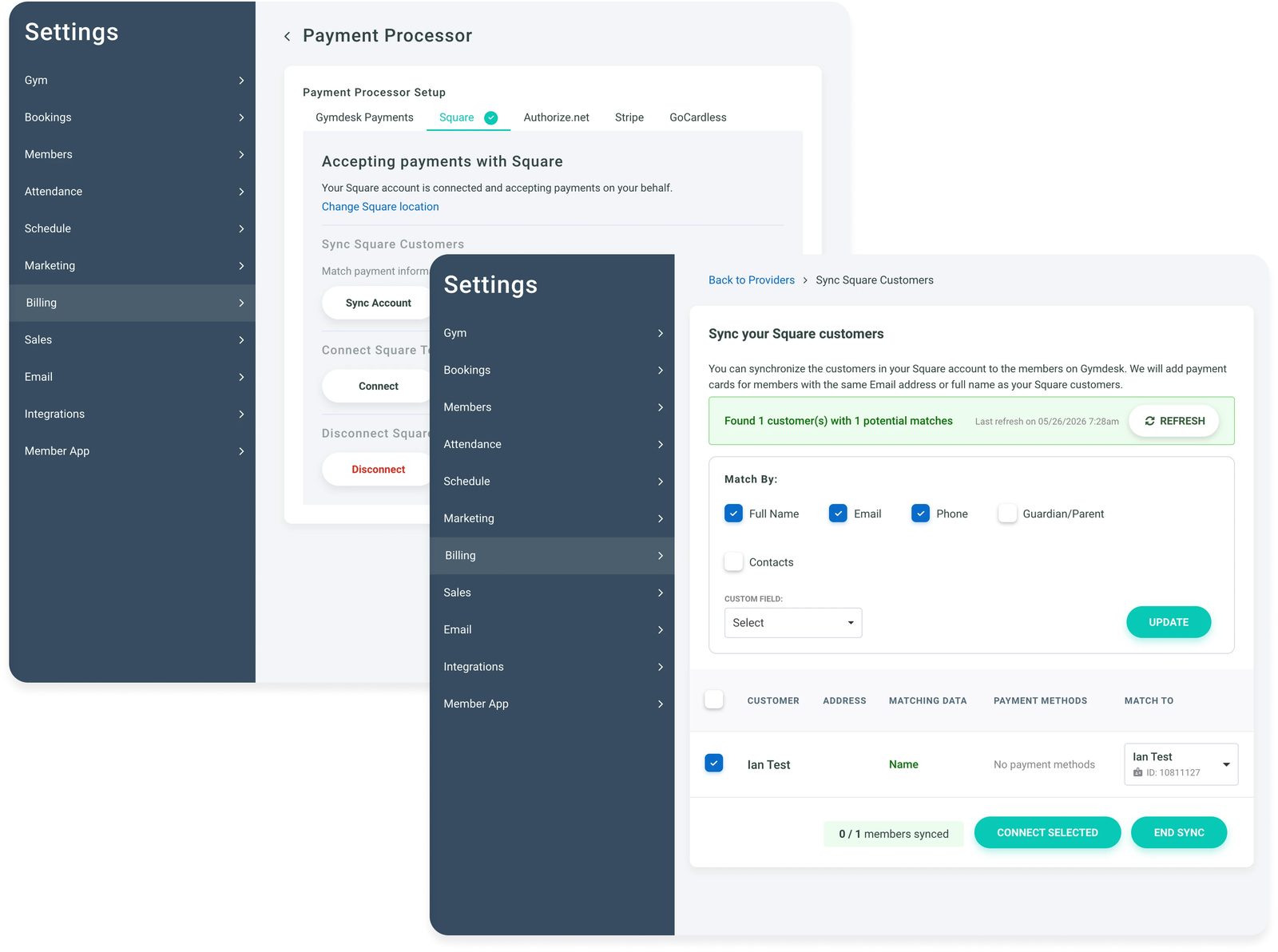
- Switching fear. Payment Method Sync matches cards from a supported processor to your members, so they don't re-enter anything and billing keeps running. You can keep a supported processor you already use, like Stripe or Square, or move to Gymdesk Payments.
Sarah's take at G.I.R.L.S. Gym, after moving to Gymdesk:
"I haven't missed another payment since then."
That's the case for us. Test it against your own list of signs, the same way you'd test anyone else.
For gym owners weighing a switch
Gymdesk retries failed payments automatically, includes every feature at every paid plan, and syncs cards from a supported processor so members don't re-enter anything.
Switch for a Reason You Can Name
Here's the rule I'd use.
If you can name the sign, you've asked for the fix, and staying costs more than moving, it's time.
If you can't name it, fix the setup first and see how you feel in a month.
When you're ready, start with choosing gym management software, and compare Gymdesk plans as one of the options on your list.
Gym management software that frees up your time and helps you grow.
Simplified billing, enrollment, student management, and marketing features that help you grow your gym or martial arts school.


FAQ
Signs You Need New Gym Management Software FAQs

Sean has spent the last decade creating content that helps businesses—small and not so small—grow smarter to allow operators to do more of what they love. You know, the fun stuff.
From shipping and international logistics to web development and marketing, he's done the work (not just the words) to scale retail and service businesses efficiently.
You can find his work at Sendle, Shogun, The Retail Exec, Gymdesk, and more.