
What Competition Management Software Does for Your Gym

A lot of gyms run their competition team on three things: a poster by the front desk, a group chat, and the coach's memory.
Two of those can't be searched. The third is busy teaching the 6pm class.
So a kid signs up for a tournament nobody from the gym is going to, and nobody notices until he's standing on the mat with no coach in his corner.
Two people who said yes never enter. And at the event, one member isn't on the list, because they registered but never paid.
Competition management software, for a martial arts gym, is the part of your gym software that handles your members' tournaments. That means finding events worth entering, getting members registered under the right academy, tracking who's in and who has paid, and bringing results back onto each member's record.
It's a different tool from the tournament software organizers use to run brackets, mats, and scoring. It's also separate from the contest-management tools used to judge awards and pitch competitions.
Gymdesk and Smoothcomp are now one company. But whichever tool you end up using, your gym needs the same few things from it.
What Competition Management Software Is (and Isn't)
Search for "competition management software" and most of what comes back is for judging awards and pitch contests. Much of the rest is league software for youth soccer, or bracket tools built for tournament organizers.
None of it is going to get your blue belt to Nashville.
The two that get mixed up are tournament software and gym-side competition management. A martial arts gym needs the second one.
Tool type | Who uses it | What it handles | Does your gym need it? |
|---|---|---|---|
Tournament software (organizer side) | Tournament organizers | Brackets, mats, scheduling, scoring, weigh-ins | Only if you host your own event |
Gym-side competition management | Gym owners and coaches | Finding events, registering members, tracking who's in and paid, results on the member record | Yes, if your members compete |
The two can be the same platform, seen from opposite sides of the event. The system an organizer builds brackets in is usually the one your members register through.
If you want to run your own event, that's a different job with its own guide to in-house tournaments.
This post is about sending your members to someone else's event.
Both sides of a tournament start months out. The organizer books the venue and builds the brackets while you prepare your athletes.
When the gym side is a mess, the organizer feels it too. Registrations show up with the wrong age, weight, or rank, and there's no easy way to reach the coach to fix it.
The admin around all of it belongs in your gym management software, next to the member records it already keeps.
We'll keep you in the loop with fresh content, podcasts, how-to guides, tool reviews, and product exclusives.
The Competition Admin Your Gym Already Does by Hand
Competing is opt-in, and at most gyms only some members do it.
They still matter.
Jorge Britto, who runs Etobicoke BJJ in Toronto, was asked if competing helps retention:
“100%. Yeah. 100%. If your student is not engaged in the martial arts, you're going to have a way lower percentage of people that are going to be interested.”
The benefits of competing go well past retention, and there's a whole separate case for building a competition team in the first place.
Key takeaway
Because it's a small group, your competition admin has to be light, or it doesn't get done.
This year, Gymdesk's product team ran more than 20 research calls with gym owners and coaches in the US, Canada, and Spain about how they handle competition today.
The quotes below come from those calls. Names are left off because they were private research sessions.
Here's where the coaches said it breaks. It probably breaks in the same places at your gym.
Finding events worth the trip
You probably comb through several websites every season. For one BJJ gym, that's the IBJJF pages, the ADCC pages, and Smoothcomp, the registration platform a lot of BJJ and grappling events run on.
Then the list goes up on the whiteboard, and your members pick from it. One coach described choosing events as "throwing a dart at the board."
Darts, at least, has a governing body.
Picking matters, because a bad first tournament can make a member stop competing. One coach steers every first-timer to an event the rest of the team is going to, so there are teammates and a coach there.
The trip also has to add up for you. One coach put it plainly:
"it doesn't really pay off to take your weekend and go coach one kid at a tournament."
Getting people registered right
Your members sign up for the wrong tournament. Or they pick the right one and register under the wrong academy, or in a division that doesn't fit them.
Divisions depend on weight and rank, so one small mistake on the form puts your athlete in the wrong bracket.
The guides to BJJ weight divisions and IBJJF belt requirements cover the rules.
Most registration platforms let you fix a division up to a cutoff date. After that, it's the organizer's call, and nobody enjoys that conversation ten minutes before the division starts.
Knowing who's actually in
Some of your members sign up on their own and tell you a week out. Every week you didn't know about is a week of preparation you didn't get.
Others say yes and never register.
Coaches in those calls said some of those members "always flake." And some coaches find out at the event that a member registered but never paid.
Waiting costs your athlete money, too.
In fall 2026, standard entry for the IBJJF Nashville Fall International Open was $138 until September 25, then $167 until October 16.
Standard entry, fall 2026
A member who waits pays about $29 more, and you spend those three weeks reminding them.
Remembering what happened
After a tournament, your kids come back with questions about their matches. With 20 athletes on the mats, you can't hold every match in your head.
Several coaches in those calls said the same thing:
"I don't remember that match."
What Competition Management Software Should Do Before, During, and After a Tournament
Go back to the member who registered but never paid. A good tool shows you that days before the event.
You can judge any tool with the criteria below. They follow the three moments of a tournament, in order.
Moment | The job | What good looks like | Red flag |
|---|---|---|---|
Before | Find and pick events | Events filtered by sport, distance, and date, with deadlines visible | The coach re-checks the same sites by hand every week |
Before | Get members registered | Registration pre-filled from the member record, with the academy fixed | Members retype their details and pick their own academy |
Before | Know who's in | Interested, registered, and paid shown separately | "Registered" and "paid" are the same checkbox |
The day of | Every athlete has a corner | A named coach for each athlete, and notes captured while the match is fresh | Notes on a phone, or nowhere |
After | Results come home | Results on each member's record, event by event | Results sit on the organizer's site, many clicks away |
After | Coach with the record | See who has gone quiet and who is ready for a first event | It lives in the coach's memory |
What to leave out
Brackets, mats, and scoring are the organizer's job, and organizer software already does them.
A gym tool should link you to the organizer's system and bring the results back.
Leave the win rate out of your gym software, too. Walkovers, disqualifications, and three-person brackets make it misleading, and a white belt with one tough loss doesn't need a 0% on her record.
How Gymdesk and Smoothcomp Handle It
If you run a martial arts gym on Gymdesk, you already have a Competitions tab. It's part of Smoothcomp Connect, the link between the two platforms, and it's included in every Gymdesk plan at the same per-member price, with no add-on or tier.
It's on by default, and you can switch it off in Settings.
Setup is one step: whoever owns your academy on Smoothcomp signs in once and links it to Gymdesk.
From then on, your academy stats and each member's activity fill with your competition history, including the years before you connected. Somebody's 2019 bronze finally has a place to live.
If a member's name or email doesn't match their Smoothcomp record, you'll see them as not linked until they link their own free Smoothcomp account.
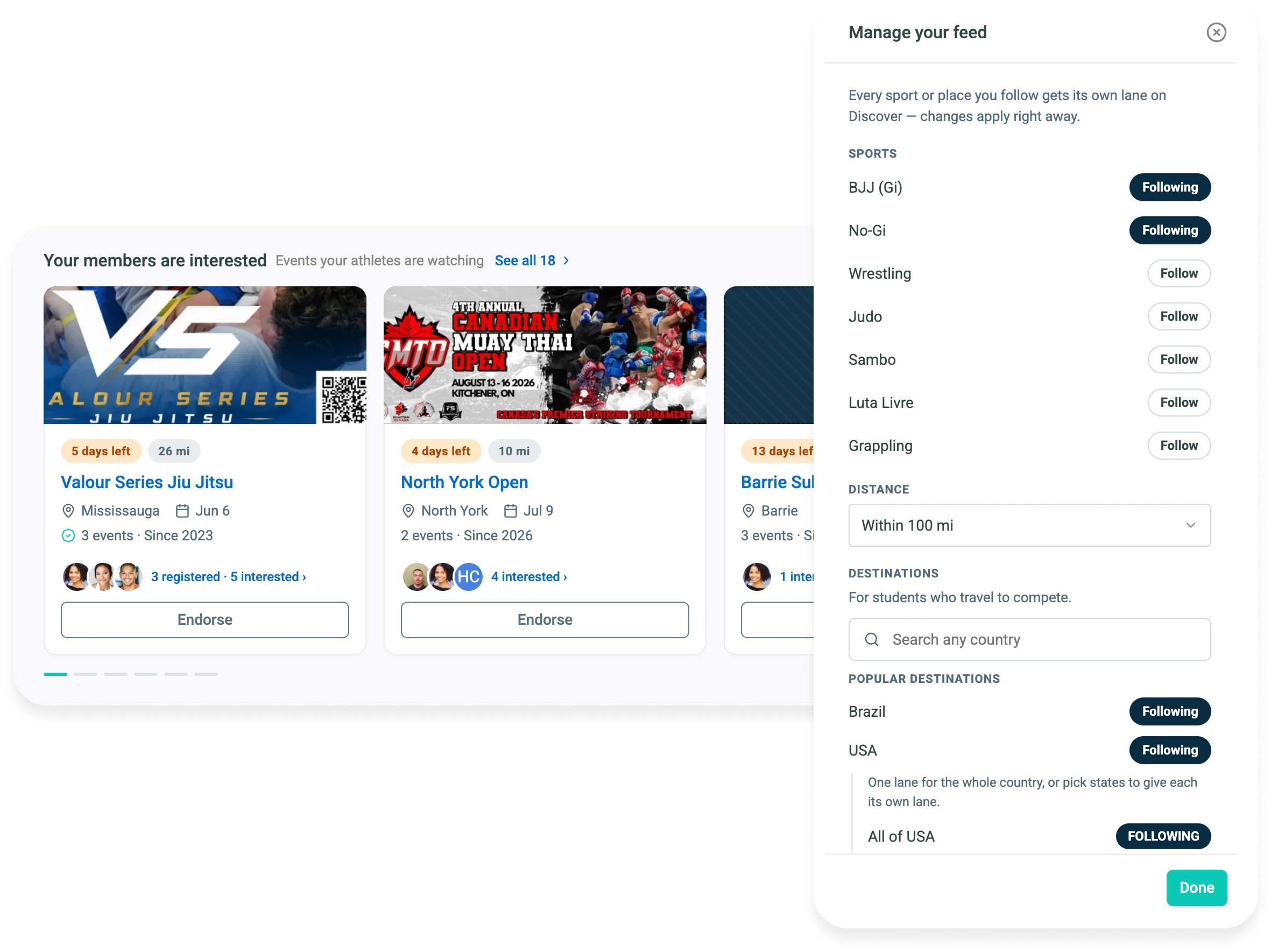
Before the tournament
Discover, the event search inside the Competitions tab, lets you filter Smoothcomp events by sport, distance, and date.
Each event page shows you the entry options and the price tiers with their deadlines. Discover covers Smoothcomp events only, so IBJJF deadlines like Nashville's are still a check you make by hand.
When you pick an event, you endorse it with a note to the team.
Your members see it marked Academy Approved in their own Competitions view, on the web and in the member app. From there, your members tap Interested or Decline and can see which teammates are going.
Registration starts from your member's Gymdesk record, with the academy fixed. You can invite members to register, or register a member yourself. Gymdesk belts map to Smoothcomp skill levels, so belt-gated divisions work, and the belts come from the same record your belt tracking already keeps.
Your roster then shows you who is Invited, Interested, Registered, and Paid, as four separate states.
The member who said yes and never registered sits in Interested, where you can see them. (Interested is a generous word for it.)
When someone stalls, you press Remind to register, Remind to pay, or Resend invite on the same tab.
Your roster, four separate states
Joe Guarino, co-founder of Unlimited Jiu Jitsu, put the before-the-tournament part this way:
“Our members are always asking, 'When is the next competition?' … There's no central place for competition information. Now, it lives within Gymdesk, which they already use. When a coach can send a student a direct invite to register, it's so much easier. It also gives them a confidence boost that makes them want to keep training.”
Pro tip
Chase the unpaid entries on Tuesday, while there's still time before Saturday.
On the day
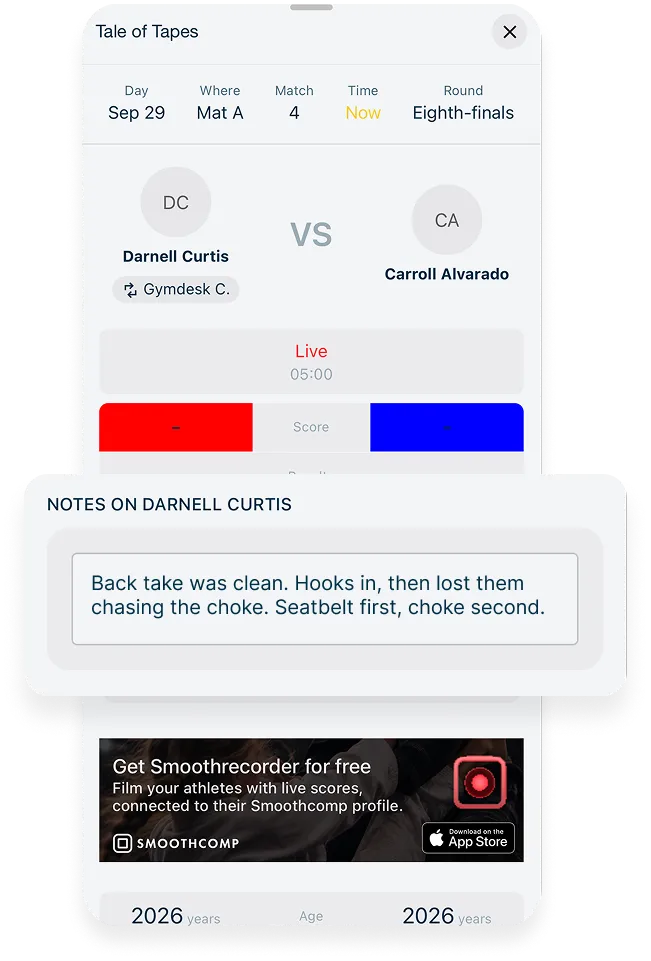
On the day, you and your coaches use the Coach Companion app, free on iPhone and Android for any coach with a Smoothcomp account.
It puts the day's matches in run order, and you give each athlete a coach and see who's coaching when.
The app pings you when two of your matches land at the same time, or when a match has nobody in the corner. You have one body, and it fits in one corner at a time.
Once your academy is connected, any note you write on a match lands on that member's record in Gymdesk.
The tournament-day workflow covers the rest of the day for your team.
After the tournament
Results come back to Gymdesk event by event on a regular sync, so they don't appear the instant a match ends.
You get each member's matches with the score or submission, plus placements and podiums. Open each member's record and you see when they last competed, which events they entered, and how they placed.
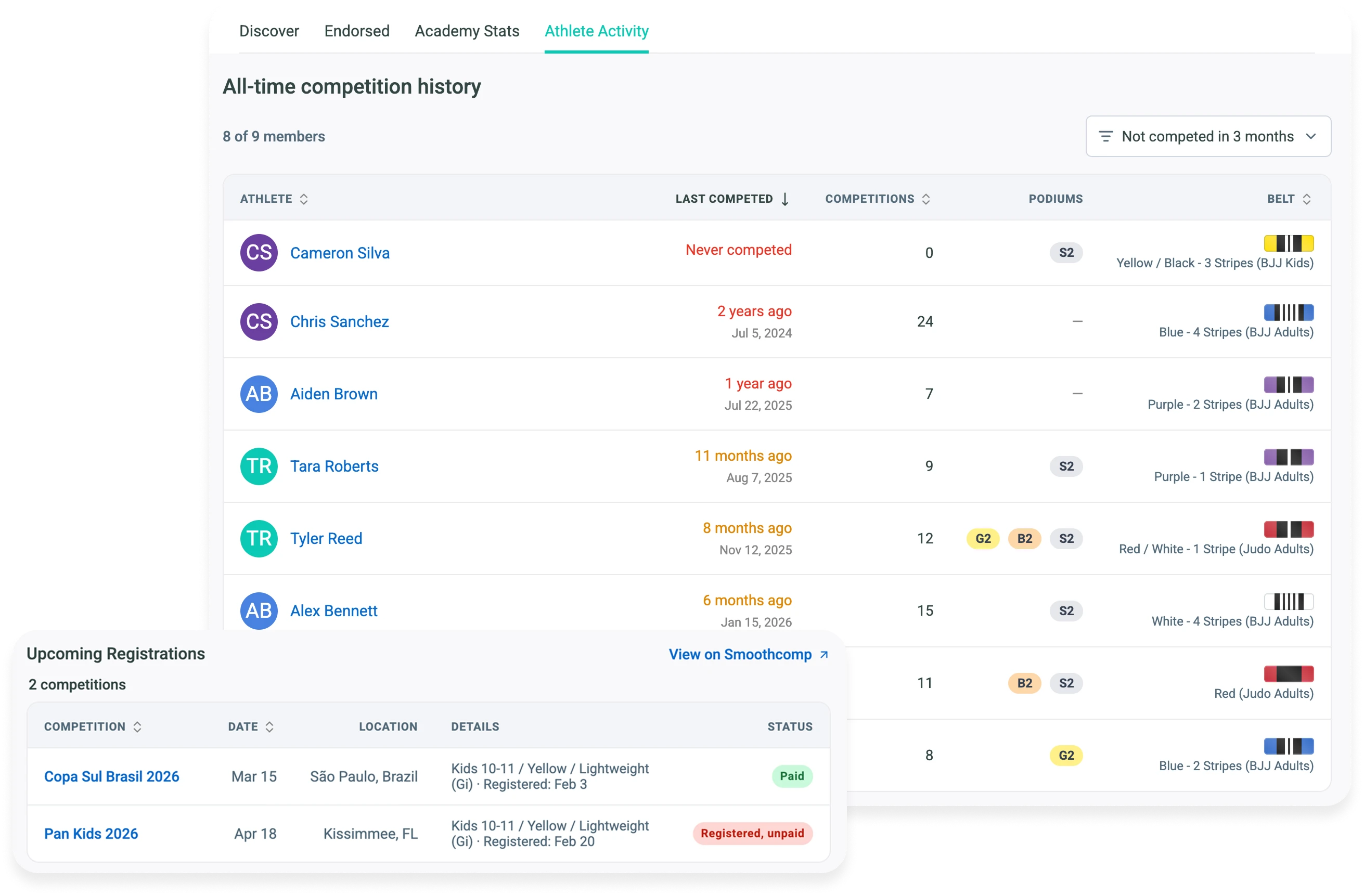
You can see at a glance who hasn't competed in a while and who's never entered an event, right next to the attendance tracking that shows who's still training.
Where the lines are
Smoothcomp and Gymdesk each spent about a decade building software for their own side of this. It doesn't make sense to rebuild every Smoothcomp tool inside Gymdesk, or the other way around.
Each side keeps doing its own job, and registrations, paid status, results, and match notes sync between them.
Where you train
- Member record
- Belts
- Attendance
- Roster
Where you compete
- Events
- Checkout
- Brackets
- Scoring
- Rankings
A few limits to know before your first event:
- Smoothcomp events only. Discover doesn't pull IBJJF or any other tournament source, and your own in-house showcases won't show up either.
- The athlete pays. Entry fees are paid at Smoothcomp checkout, and you see paid status on the roster.
- Brackets, scheduling, and scoring stay on Smoothcomp. So do changes and cancellations to a registration, and Gymdesk links straight to them.
- Coaching notes sync one way. Notes from Coach Companion show up on your member's Gymdesk record, but notes you write in Gymdesk don't go to the app.
- No win rates, for the reasons above. Rankings and points stay on Smoothcomp.
Two smaller limits. Registration happens one member at a time, with no team or family registration in one step. And every reminder is a button you press, with no automatic deadline alerts.
Some events, like USA Judo-sanctioned ones, need a federation membership (here, a USA Judo membership). Those registrations finish on Smoothcomp.
Endorsing, inviting, and results still work for those events.
Where You Train and Where You Compete, on One Record
You stop finding out about unpaid entries at the check-in table.
The poster by the front desk can retire. It had a good run.
If your members compete, see how it fits together on the Smoothcomp Connect page.
Smoothcomp Connect
Gymdesk is where you develop them. Smoothcomp is where the world competes. Together, training and competition are one continuous record.
Gym management software that frees up your time and helps you grow.
Simplified billing, enrollment, student management, and marketing features that help you grow your gym or martial arts school.


FAQ
Competition Management Software FAQs
Quick answers for gym owners.

Sean has spent the last decade creating content that helps businesses—small and not so small—grow smarter to allow operators to do more of what they love. You know, the fun stuff.
From shipping and international logistics to web development and marketing, he's done the work (not just the words) to scale retail and service businesses efficiently.
You can find his work at Sendle, Shogun, The Retail Exec, Gymdesk, and more.