
Attendance Tracking Methods for Martial Arts & Gym Businesses

Attendance is the most useful number in your school that you're probably not really using.
It tells you which classes are packed and which are dying on the vine. It feeds the reward systems that get students in the door: points, patches, student-of-the-month. And it's one of the few honest signals of who's about to quit, before they actually do.
Most important of all, minimum attendance is one of the standard checks on whether a student is ready to test for the next belt.
The uses are almost endless. But none of them work if the tracking itself is a mess. So let's get that part right.
Here are the four systems most schools actually run:
- Attendance cards
- After-class group pictures
- Personal attendance notes
- Electronic sign-in
Those four cover getting attendance recorded. The rest of this post is about what the number does next, because martial arts attendance tracking only pays off when the count reaches your belt tests and the parents who pay for them.
Common Methods of Tracking Attendance
Talk to enough instructors and the same handful of systems come up.
Most are clever: they lean on student habits so the instructor can stay focused on teaching a good class instead of taking roll. But every one of them has a failure mode.
Four methods cover almost every school. Here's how they stack up before we get into each one.
Method |
How it works |
Best for |
Where it breaks down |
|---|---|---|---|
Attendance cards |
Each student pulls their own card from a wall panel before class; the instructor collects them at the end. |
Putting the responsibility on the student instead of the instructor. |
Cards go missing, and tallying classes for a belt test is manual math. |
After-class group photo |
Photograph the class at the end of each session and record attendance from the picture later. |
Doubling as daily social content. |
Students who leave early are missing from the shot, and the data entry is deferred rather than removed. |
Personal attendance notes |
The instructor writes down who showed up, then enters it into a system afterward. |
Full control, with no reliance on anyone else remembering. |
Late arrivals get missed, and one forgotten night leaves a hole you cannot reconstruct. |
Electronic sign-in |
A tablet stays open at the front desk and students check themselves in with a short code or by name. |
The least instructor effort per class, and records that are ready to use immediately. |
You need a working device at the desk every session, and students have to be trained on it from day one. |
Attendance cards
Here's how it usually works.
On a student's first day, someone writes their name on a card with a long grid of squares for dates. That card lives in a holding panel on the back wall of the school.
Before every class, the student pulls their own card and lines up. The instructor collects the cards at the end, and someone marks attendance from the stack later.
The beauty of the card system is that it puts the work on the student, not on you.
Marking attendance becomes almost automatic, and it's easy to hand off to a front-desk person. It's a popular method for a reason.
The catch shows up on a busy night. A student comes in late, you're mid-class, and nobody reminds her to grab her card. Now there's a hole in the record.
And if you also keep a digital system, you're doing the job twice: marking the card and typing it in, card by card. Sixty students means sixty cards, every single night.
Taking after-class group pictures
Some instructors snap a photo of the whole class at the end of each session.
It does double duty: a daily post for social, and a record to mark attendance from afterward. Easier than wrangling cards or scribbling notes.
But early leavers vanish from the shot, so the record has gaps. And the data entry isn't gone. It's just pushed to after class, name by name into a ledger or a system.
You've moved the busywork, not removed it.
We'll keep you in the loop with fresh content, podcasts, how-to guides, tool reviews, and product exclusives.
Personal attendance notes
Plenty of instructors just keep the roster themselves.
They write down who showed up and enter it into a system later, if they enter it at all. Some hand the clipboard to a program manager instead.
The upside is control.
You're not relying on anyone else's attention, and there's no panel of cards to maintain.
The downside is that it lives or dies on memory. Late students get missed, and one forgotten night leaves a hole you can't rebuild.
And if you're also keeping a digital record, you're right back to doing everything twice.
Electronic sign-in
This is the least instructor-intensive method, and the most modern.
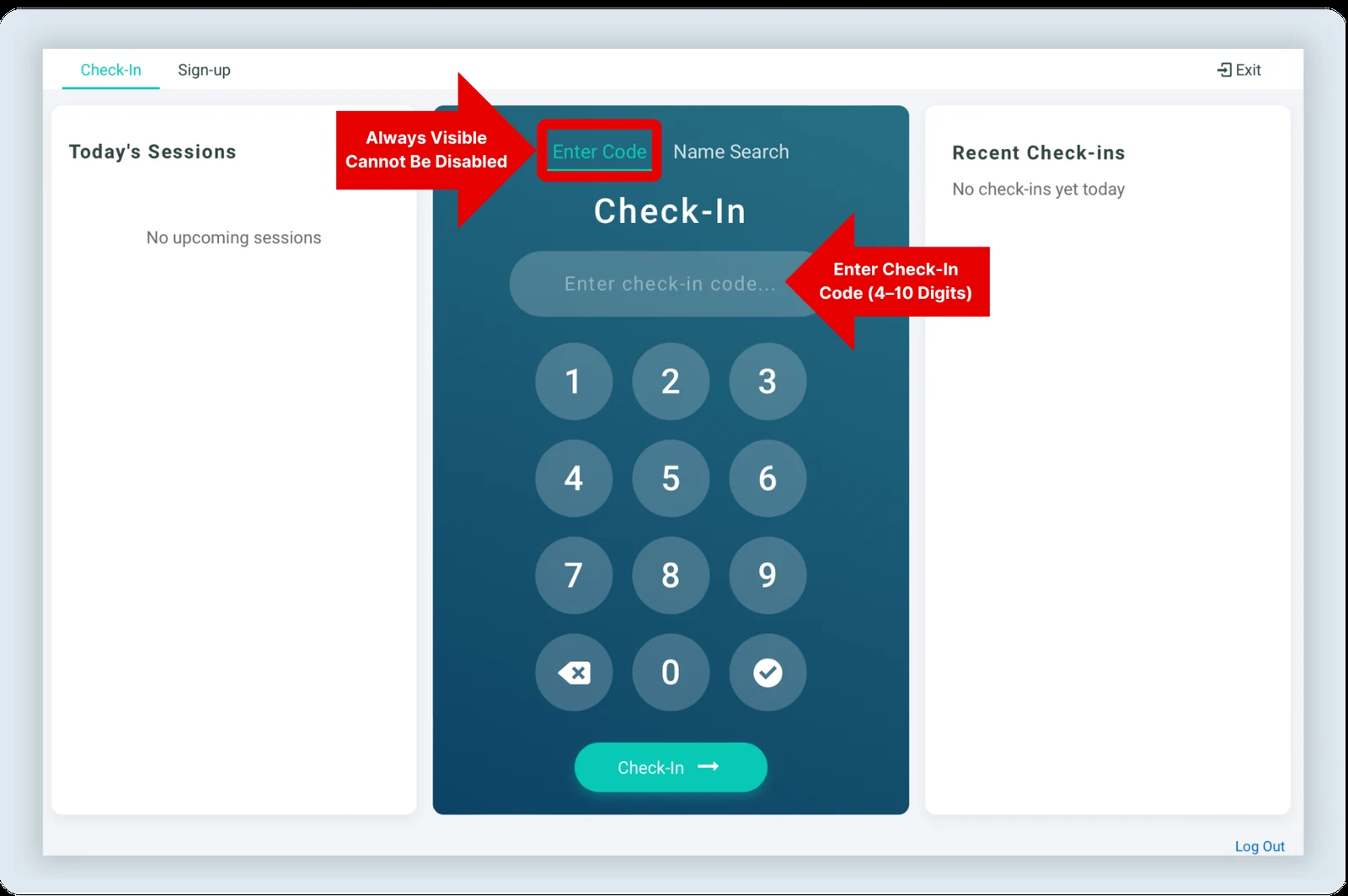
Keep a tablet open at the front desk so students sign themselves in before class with a short numerical code. Like the card system, it takes some training up front, and it means having a working device at the desk every single session.
The payoff is real.
The record is finished before class even starts—no clipboard, no line at the desk.
In Gymdesk, members check in with a short number code, or search their name if they blank on it. Put your manager account into "Front Desk Mode" on any tablet and it handles most of the tracking for you.
Pro tip
Verbal check-ins still miss the latecomers. Remind students to sign in before class, then snap an after-class photo once everyone has arrived—now you can reconcile the system against the picture instead of trusting your memory during teaching time.
Mass check-in: keep the ritual, drop the data entry
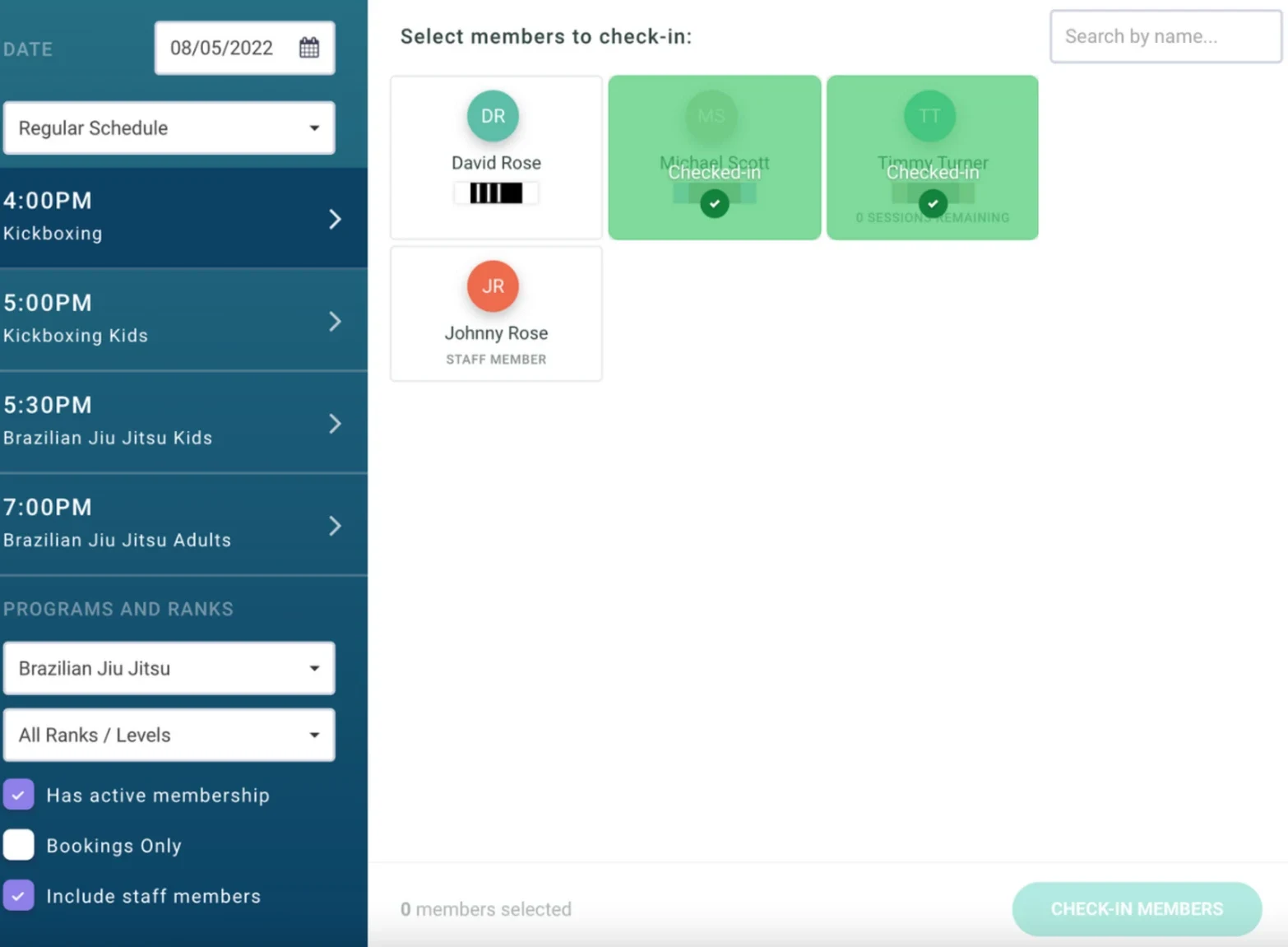
Our martial arts school management software has a power feature for exactly this: mass sign-in after class.
If you run the personal notes, after-class picture, or attendance card systems, this is how you kill the data-entry tax without giving up the ritual you already have.
By default, it only pulls up the members who should be checking into that class, filtered by their membership and rank.
You tap the ones who actually showed and hit confirm. That's the whole job.
Choosing a Digital Check-In System for Your School
Once you move off paper, the question changes.
On paper, a check-in just marks who showed up. A good system takes that same record and puts it to work: feeding belt tests, billing, and reminders instead of leaving it in a drawer.
Here is what to look for when you compare options:
- Self check-in the student runs. A tablet at the door in front-desk mode lets members sign in with a short code or by searching their name. You keep coaching. The roster fills itself.
- A record that attaches to the student and their rank. Every check-in lands on that member's profile, so a belt test is a lookup, not a night of counting cards.
- Runs on the gear you already have. A phone or an old tablet is enough. You shouldn't have to buy hardware to take attendance.
- Connects to the rest of your operation. Attendance that feeds promotions, billing, and automated reminders is worth far more than a number sitting in a spreadsheet. Gym management apps built for the job tend to bundle these together.
If you're choosing software rather than a standalone kiosk, attendance tracking is where the manual methods above stop costing you time.
The check-in is the easy part. What you do with the record is where paper schools fall behind.
Why a Member Shows "No Sessions Left" on an Active Membership
Usually, nothing is broken.
Your software is answering a question nobody asked you at setup: does a session come off when a student books, or when they actually show up?
Of all the check-in questions owners send our support team, this one comes up most. One of your students on a two-classes-a-week plan books Tuesday and Thursday, then skips both.
On Friday, the system says she has no sessions left.
Her membership is active. She's paid. She's annoyed, and now so are you.
Here's when a session can come off:
- Deduct on booking. The session comes off the moment your student reserves a spot. Cancel the booking, and it goes back. Skip class without canceling, and it's spent.
- Deduct on check-in. The balance only moves when your student walks in and checks in. A booking holds a spot and costs nothing until they show.
Setting | Deduct on booking | Deduct on check-in |
|---|---|---|
When the session comes off | The moment the student books | The moment the student checks in |
A no-show | Spends the session | Spends nothing, unless you add a no-show rule |
A canceled booking | Session goes back on the balance | Nothing to give back |
Best for | Capped classes and waitlists | Open classes nobody books ahead |
Run capped classes with a waitlist? Deduct on booking. A no-show who held one of 12 spots on the mat cost somebody else a class, and the balance should show it.
For open classes where nobody books ahead, deduct on check-in. A booking there doesn't block anyone, so only showing up should cost a session.
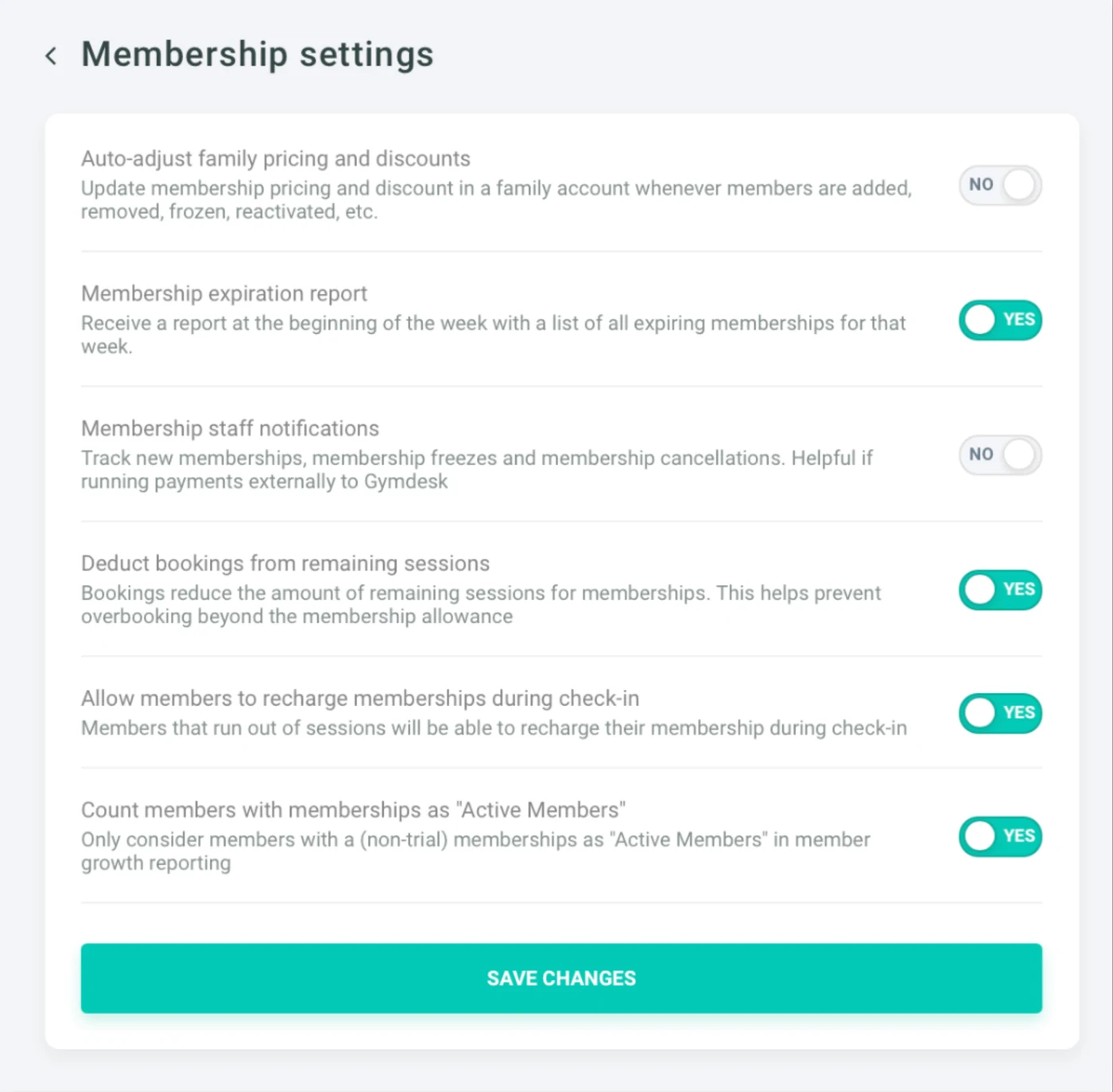
If the setting looks right and a balance still hits zero, check two things before you change anything.
Start with the billing date.
In Gymdesk, when sessions and payments run on the same schedule, the count starts from the last payment date. A student who pays on the 14th resets on the 14th, which surprises anyone who assumed the 1st.
Then look at how many memberships the student has.
Gymdesk takes the session from the oldest active membership first, so adding a second plan can run the first one down to zero and send a "no sessions left" email. Other software varies, so check how yours handles it.
Renew the plan they already have, and you skip that conversation entirely.
When the Attendance Count and the Belt Requirement Disagree
"Forty classes at this belt, at least four months, and you can show these five techniques."
That's a promotion requirement. Write yours the way you'd say it to a student, then build exactly that in your software.
Test week is when the gap shows up.
Your attendance report says a student has 42 classes, and the promotion report says he isn't eligible. Usually they're both right, because they count different things.
Stripes reset the count. Promotion requirements usually count attendance at the current rank, and if your school gives stripes, the count restarts at every stripe. So the number that matters is classes since the last stripe.
A student with 42 classes since he joined might have 11 since his last one. It's worth knowing how your belt tracking software counts well before test week.
Same student, two reports
Why 42 classes can still mean “not eligible”
Both are right.They count different things. The belt goes by the second and third rows.
Check which program each class is filed under, too.
If open mat or the Thursday no-gi class lives under its own program, a BJJ student's rounds there may never reach his BJJ belt count.
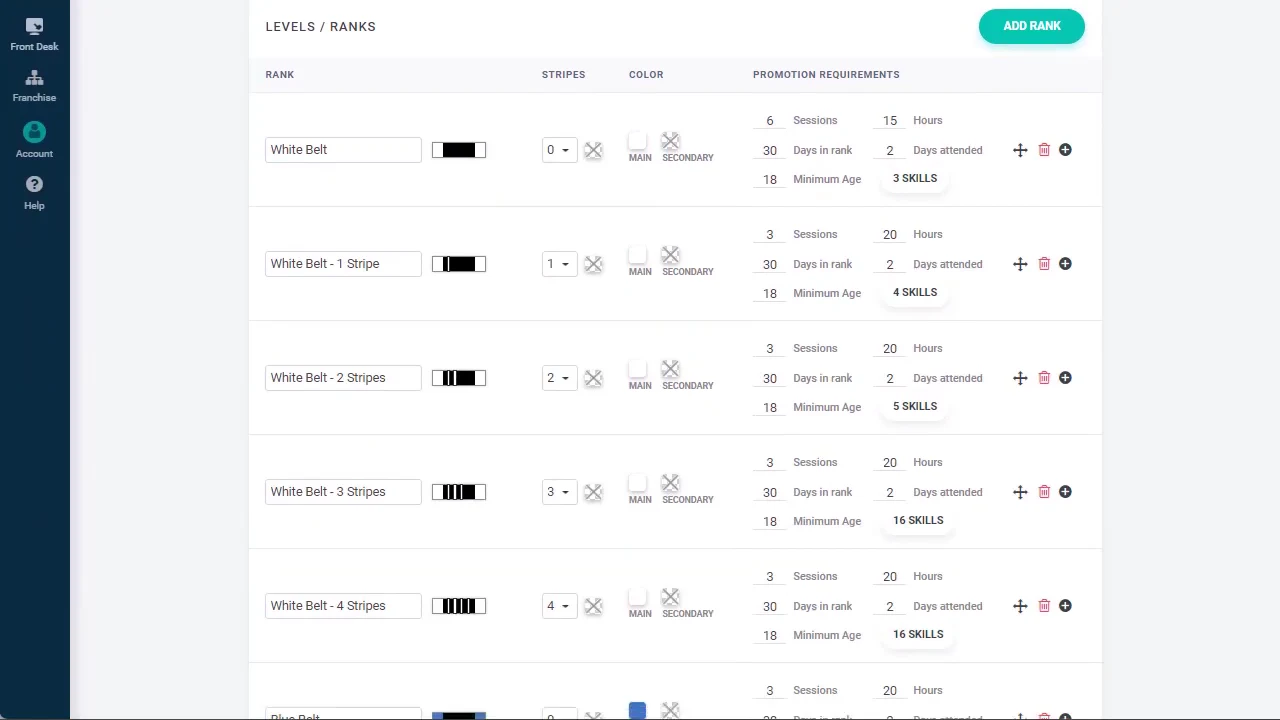
Class count is rarely the only requirement, either. Time in rank, hours on the mat, distinct days trained, specific skills, and a minimum age can all sit on the same belt. A student can hit 40 classes and still be four weeks short on time in rank.
(Explaining that to a nine-year-old is its own belt test.)
If the sentence on your wall and the setting in your software say different things, the software wins every argument. The student loses.
Turning Attendance Into a Retention Signal
Key takeaway
Attendance data is worth more than a headcount. It's your earliest warning that a member is about to quit.
That's not just a hunch. In a peer-reviewed study of 5,000 gym members, non-attendance days were the single strongest predictor of which members would cancel.
Most students don't cancel out of nowhere. They taper off first: three times a week becomes once, and once becomes a missed month.
By the time the payment lapses, they checked out weeks ago. You just found out late.
It's the most common way members go: 23% of former members who quit a health club said they left simply because they stopped using it.
Track attendance and you catch that drift while the member is still reachable.
Flag anyone who hasn't shown up in two weeks, the window where members are most at risk of quitting: gone more than a week but back within the last two.
Then reach out.
A quick "we miss you on the mat" and an invite to a class you know they like. Gymdesk fires those from automation rules you set up once, so nobody has to babysit a dashboard to catch it.
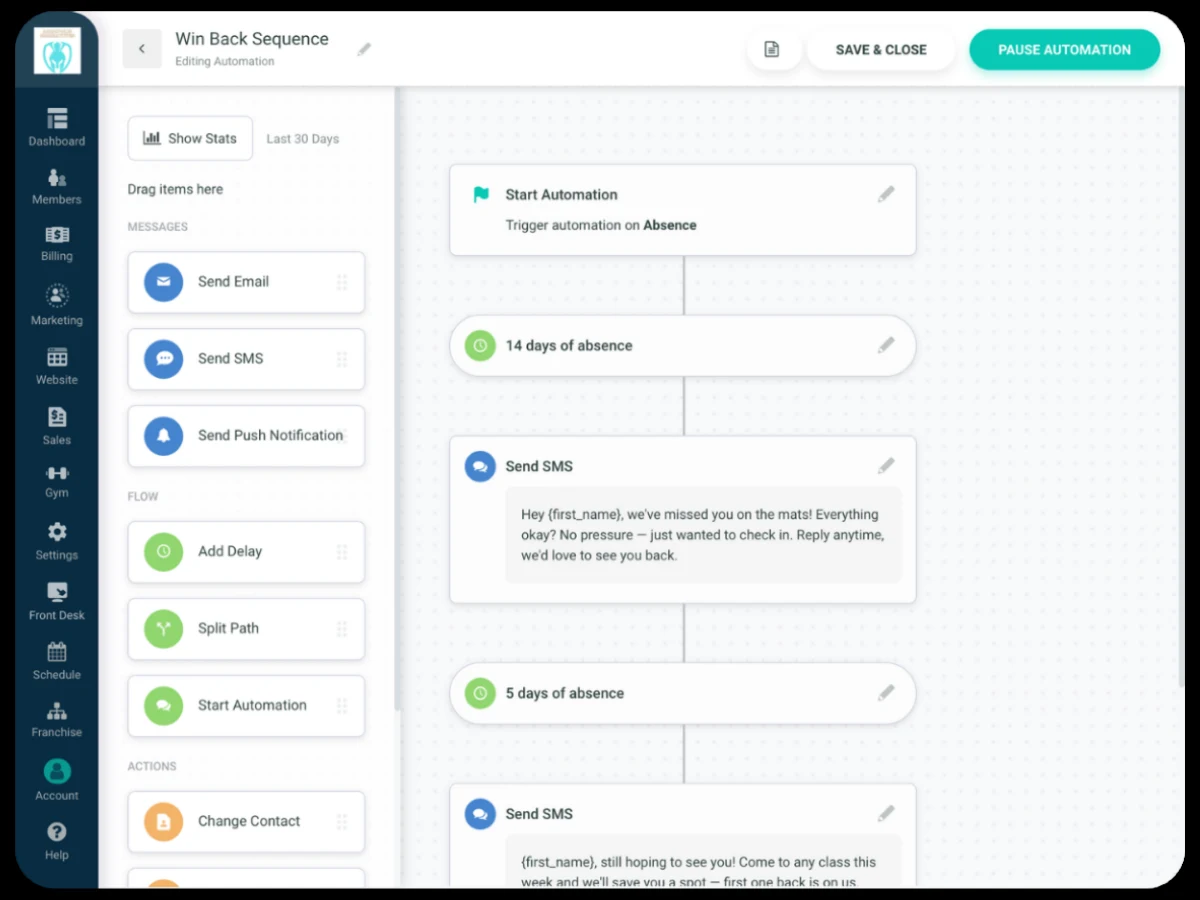
This is the cheapest retention work you'll ever do. Winning back a wavering member costs a text. Replacing one who already walked costs a whole new sign-up.
The math isn't close.
Gyms lose about a third of their members a year: 33.6% annually, the inverse of the industry's 66.4% average retention in 2025.
Catch even a few of those a month, and you've paid for the software, and you've started to reduce your churn.
It matters most early.
A white belt who goes quiet in their first hundred days is much less likely to come back on their own, and feeling unnoticed is one of the top reasons members leave in the first place.
A "haven't seen you in a while" text is a small thing that says the opposite.
Kids Programs: Show Parents the Attendance They're Paying For
In a kids program, the parent pays. The kid just shows up, sometimes with the gi on inside out.
Parents mostly see the car ride and your bill. They don't watch class, so attendance and belt progress are the closest thing to a report card they get.
That's most schools.
Most of the 4,594 active gyms in our gym benchmark report are martial arts and combat-sports schools, and 78% of them run a kids program. Those gyms average roughly 237 members against 107 for adults-only gyms, which is a lot of parents waiting to see what they're paying for.
A parent who sees that their daughter made nine of 10 classes this month and is six classes from her yellow belt renews without asking you anything.
Without that, the question of whether it's worth it comes up at renewal, which is the worst possible time to have it.
Make the progress visible without turning it into homework for you:
- Put the count toward the next belt or stripe somewhere the parent can see it, like your member portal.
- Send a note when a kid becomes eligible to test. Families plan around belt tests.
- Bring the attendance record to the progress check you already do. "She's been here 31 times since her last stripe" tells a parent more than "she's doing great."
The report card only works if the kid actually gets checked in, and a seven-year-old and a PIN pad aren't always friends. You can give kids a QR code card to scan, or have the instructor run a mass check-in from the roster after class.
Setting It Up So One Check-In Does Every Job
Most school software has some version of these settings. Set them once, in this order.
Here's how it goes in Gymdesk:
- Decide what a no-show costs. Out of the box, booking and check-in both take a session, and canceling a booking gives it back. If only attendance should count, turn off Deduct bookings from remaining sessions under Settings → Members → Membership Settings. Schools that switch to check-in but still want no-shows to cost a session can turn on the automatic no-show deduction in booking settings.
- File every class under the right program. A membership only grants access to the programs you select, and the promotion report tracks progress program by program. A class filed under the wrong program can leave a student's belt count short.
- Set promotion requirements for each rank and stripe. Mix sessions, hours, days in rank, days trained, skills, and minimum age to match your curriculum. The promotion report flags who's ready and lets you promote a group or schedule a testing event from the same screen.
- Show progress in the member portal. Turn on promotion progress and students see how far they are from the next belt. A parent who heads a family account manages each child's account from the same login.
- Turn on an absence automation. Use the rule from the retention section above, so an at-risk student gets a text whether or not anyone remembered to check a report.

After that, the attendance reporting mostly runs itself. One check-in updates the session balance and the belt count, and your two reports stop arguing with each other.
Pick the System You'll Actually Keep Up With
The best system is the one you'll still be using in six months. A paper card you actually mark beats a slick app you never open.
But a card can't tell a parent their kid is six classes from a yellow belt, and it can't take a session off a balance. As your numbers grow, the manual methods start costing you real hours and real accuracy, and that's when digital tracking starts paying for itself.
We make gym management software, so of course we think digital tracking wins.
But we're not talking about a big spend: next to the cost of opening a martial arts school, the software behind your attendance is a rounding error.
Here's how our attendance tracking handles it.
FOR MARTIAL ARTS SCHOOLS
Attendance that feeds belt tests, billing, and retention alerts on its own—so class time stays about teaching, not paperwork.
Gym Management Software That Gets You Back On The Mats
Run your gym smarter with the right software. Automate your attendance tracking, lead management, belt tracking, and more.


Martial Arts Attendance Tracking FAQs
How do martial arts schools track attendance?
Four methods cover almost every school: attendance cards pulled from a wall panel, a group photo taken after each class, handwritten notes kept by the instructor, and electronic sign-in on a tablet at the front desk. The first three are manual and defer the data entry; the fourth records it as it happens.
What's the best check-in system for a martial arts school?
The best system records the class and does something with it. It feeds belt promotions and flags students who stop showing up, without adding work for the instructor. Look for self check-in on a tablet, a record that ties to each student's rank and history, and automatic reminders for missing members. Software built for martial arts schools handles all three in one place.
Is there an app to track martial arts attendance?
Yes. A martial arts attendance app or tracker lets students check themselves in on a tablet or phone and stores every session against their profile, so you can pull attendance for a belt test or a retention check without counting cards. Whether you run a BJJ academy, a taekwondo dojang, or a mixed program, Gymdesk does this as a core feature, including a mass check-in for classes you tracked on paper.
Should sessions be deducted when a student books or when they check in?
Deduct on booking if you run capped classes or waitlists, so a no-show who held a spot spends the session. Deduct on check-in if classes are open and nobody books ahead, so only attendance costs a session. Many "no sessions left on an active membership" problems come from this setting, or from a session count that resets with the billing cycle.
How many classes does a student need for a belt promotion?
There's no universal number. Each school sets its own per belt, usually a class count plus a minimum time at the current rank. The count usually restarts at each new belt or stripe, which is why a student's total attendance can look high while their count toward the next belt is low.

Sean has spent the last decade creating content that helps businesses—small and not so small—grow smarter to allow operators to do more of what they love. You know, the fun stuff.
From shipping and international logistics to web development and marketing, he's done the work (not just the words) to scale retail and service businesses efficiently.
You can find his work at Sendle, Shogun, The Retail Exec, Gymdesk, and more.