
Spark Membership vs Gymdesk for Martial Arts Schools

Spark Membership has a page on its site called "The Martial Arts Software Built to Replace Gymdesk." Its first line says Gymdesk is built for gyms.

That's worth checking. It's also very much not true, but we'll get more into that later.
This post puts Spark Membership vs Gymdesk side by side for a martial arts school, starting with that claim.
Quick disclosure: I work at Gymdesk. I have a dog in this fight, and it's wearing a Gymdesk rash guard on Zoom calls occasionally.
Here's how I'll keep it honest.
Every Spark fact below comes from Spark's own pages and help center, read on November 6, 2026. Every Gymdesk fact comes from our pricing page or product docs.
After a quick table, I check four of Spark's claims about Gymdesk. Then Spark gets its wins, and they're real, before I make the case for Gymdesk.
Spark Membership vs Gymdesk at a Glance
If you only have a minute, the table below is the short version.
Both are martial arts software, and both say no long contracts. Both also let you try before you pay: Spark for eight weeks, Gymdesk for 30 days with no card.
Area | Spark Membership | Gymdesk | Edge |
|---|---|---|---|
Who it's for | Martial arts schools | Martial arts schools first, plus other gyms | Both fit a martial arts school |
Price, up to 150 students | $199 a month | $75 to $150 with Gymdesk Payments, $100 to $175 on your own processor | Gymdesk, by $24 to $124 a month |
Price, 151–250 students | $199 a month | $200 with Gymdesk Payments, $240 on your own processor | Spark, by $1 to $41 a month |
Price, 251+ students | $199 a month, no student cap stated | Contact us | Spark, likely, if there's no cap |
Payment processor | Spark's merchant in the US and Canada, Stripe elsewhere | Gymdesk Payments, or your own Stripe, Square, Authorize.net, GoCardless or Ezypay account | Gymdesk, if you want to pick or keep your processor |
Website | Through Ignite, a $199-a-month add-on Spark builds for you | Website builder in every plan | Gymdesk on cost; Spark if you want it built for you |
Belt and rank tracking | Belt history, mass promotions, stripes report | Ranks per program, six combinable promotion rules, auto-promotion | Gymdesk, if promotion depends on age or skills |
Setup | An account rep configures it for you | Self-guided, with a person a call away | Spark, if you want it done for you |
Payment plans per membership | Several payment options on one membership | One payment structure per membership option | Spark, if you sell many plans per program |
Competition | Not mentioned on Spark's pricing or features pages | Smoothcomp Connect in every plan | Gymdesk, if your students compete |
If you're comparing more than these two, the breakdown of martial arts management software covers nine vendors.
What Spark Says About Gymdesk, and What's True
Spark's compare page rates Gymdesk on ten rows. Every Gymdesk cell says "Limited," "Basic," "Not a core strength," "Not a core fit," or "Varies."
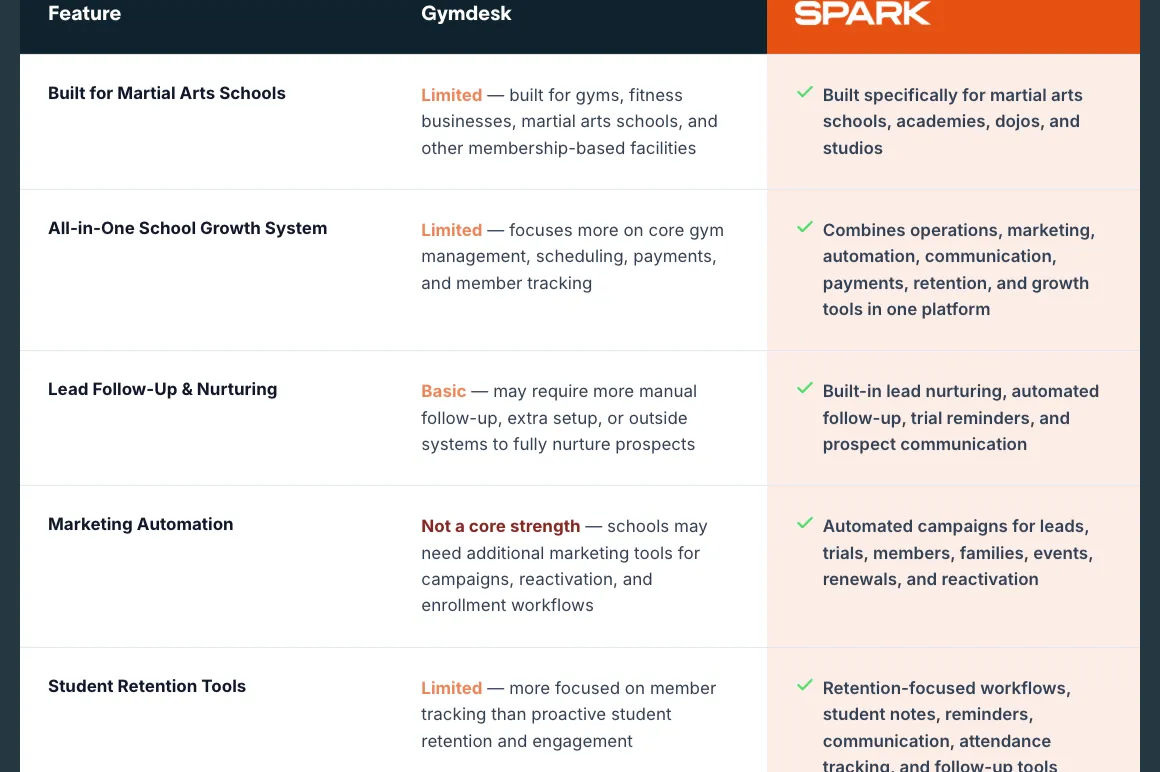
Four of those claims matter most to a martial arts owner. Two are wrong, one is misleading, and one is partly fair.
Spark’s claim
“Built for gyms”
Misleading
Gymdesk does serve fitness gyms. But martial arts schools are most of our customers, and the product was started by a Brazilian Jiu-Jitsu black belt. Spark’s own Gymdesk column lists “martial arts schools” too.
Spark’s claim
“Not a core fit” for belt and rank
Not true
Gymdesk tracks ranks per program, with BJJ, judo, karate, and aikido belt styles and stripes, and promotions that can depend on skills and age.
Spark’s claim
“Basic” lead follow-up and “not a core strength” for marketing
Not true
Leads move through a pipeline with stages you can add to, and automations start from 19 triggers. A flow can branch, wait for a number of classes, and stop on its own when the lead books or the member renews.
Spark’s claim
“Varies” for data migration and setup
Partly fair
Gymdesk’s onboarding does come in levels. Every school gets the same floor: self-serve import for members, memberships, attendance, payments, products, and leads, plus Payment Method Sync for saved cards.
Claims from Spark’s Gymdesk compare page, read November 6, 2026.
"Built for gyms"
Misleading. Gymdesk does serve fitness gyms, and I'm not going to pretend it doesn't. Why would I?
But martial arts schools are most of our customers, and the product was started by a Brazilian Jiu-Jitsu black belt.
Spark's own Gymdesk column admits it, too.
It says Gymdesk is built for "gyms, fitness businesses, martial arts schools, and other membership-based facilities."
Misho Ceko, founder of Chicago MMA, put it this way:
"I think Gymdesk is also built for martial arts schools versus some of the other ones where it's kind of a nice add-on."
"Not a core fit" for belt and rank
Not true. Gymdesk tracks ranks per program, with BJJ, judo, karate, and aikido belt styles and stripes, and promotions that can depend on skills and age.
The rank section below has the details.
Lakea Vargas, owner of Combat Sports Academy, on what she sees:
"It's easy to see the numbers. It's easy to see the ranks. I love the whole ranking thing with the colored belts and all."
"Basic" lead follow-up and "not a core strength" for marketing
Not true. Leads move through a pipeline with stages you can add to. Automations start from 19 triggers, including a new lead, an abandoned booking form, an absence, and a cancellation request.
A flow can branch, wait for a number of classes, and stop on its own when the lead books or the member renews. Texts go both ways, and replies land on the lead's record.
You can also target messages by program, membership, or rank, so only your blue belts hear about the blue belt seminar.
Ready-made trial-conversion and absence sequences are in the template library.
So a new lead gets a follow-up even when nobody at the front desk remembers to send one.
One honest gap: Gymdesk's lead conversations live in the web app, and there's no dedicated manager app.
"Varies" for data migration and setup
Partly fair. Gymdesk's onboarding does come in levels.
Every school gets the same floor, though: self-serve import for members, memberships, attendance, payments, products, and leads, plus Payment Method Sync for saved cards.
For saved cards, your old processor sends an encrypted card file to your new processor, and Payment Method Sync then pulls those cards into each member's profile. Pick Gymdesk Payments, and its team runs that transfer with you.
Some processors charge for that export or won't release cards at all. Then families re-enter their cards, and Gymdesk sends them the instructions and reminders.
Spark advertises free student data migration on every account. That's a point for Spark, and it's in Spark's wins below. Good for them!
Where Spark Wins
Spark wins on four things. Anyone who's used Spark will check this section first.
Setup done for you
Spark's pricing page says "Your dedicated account rep handles the entire setup," with automations, payments, and attendance configured for you.
For an owner who never wants to build an automation, that's a strong pitch. Gymdesk's default is free, self-guided setup: in-app setup steps, a weekly live webinar, and support by phone, email, or chat.
A dedicated onboarding specialist who walks you through setup is a paid option.
Free student data migration
Spark's pricing page lists free student data migration on every account.
On Gymdesk, you export your files from Spark and import them yourself, with a Spark export guide in the help center and support to answer questions.
Having Gymdesk's team run the import for you is a paid option. If you'd rather hand over your student list and get it back loaded, Spark's offer is the simpler one.
One membership, several ways to pay
Spark lets one membership carry several payment options, set up once and offered at checkout.
In Gymdesk, each payment structure is its own membership option. If you sell pay-in-full, six-month, and twelve-month versions of the same program, that's more setup in Gymdesk.
One flat price
Spark lists one plan at $199 a month after an eight-week free trial. The pricing page doesn't mention a student cap.
If there isn't one, a school past 250 students likely pays less on Spark, since Gymdesk prices 251+ students as a custom quote.
Spark also edges out Gymdesk from 151 to 250 students. The pricing section below has the numbers.
Where Gymdesk Wins for a Martial Arts School
Now the other side, starting with the biggest difference. Each of these is a specific feature, so you can check it in a trial.
You choose the payment processor
This is the biggest practical difference between the two, and Spark's own help center lays out why.
From Spark’s help center
What Spark’s help center says about processors
- US and Canada schools get an application for Spark’s merchant processor.
- Schools in any other country use Stripe.
- A school that keeps its own merchant has to log each payment in Spark by hand, and auto-charge, checkout pages, and point-of-sale payments don’t work.
Source: Spark Help Center, “Merchant and Merchant Fees Information” (article dated January 29, 2026).
The same article adds that Spark "cannot connect with any other merchant processor at this moment."
On Gymdesk, you choose your payment processor.
A US school can use Gymdesk Payments, Stripe, Square, or Authorize.net, and GoCardless and Ezypay cover other regions.
If you're already on Stripe, Square, or Authorize.net, bring it. Your saved cards stay in an account you own.
Whichever processor you pick, the billing tools work the same. Gymdesk retries failed payments, emails members about expiring cards, and can add a late fee after a grace period.
The guide to martial arts billing software covers how that works for family plans.
Rank and promotion depth
Ranks live inside each program, so one student can hold a BJJ belt and a judo belt separately, with dated history for both.
Promotions can require any combination of six rules: sessions at rank, hours, days in rank, days attended, skills, and a minimum age.
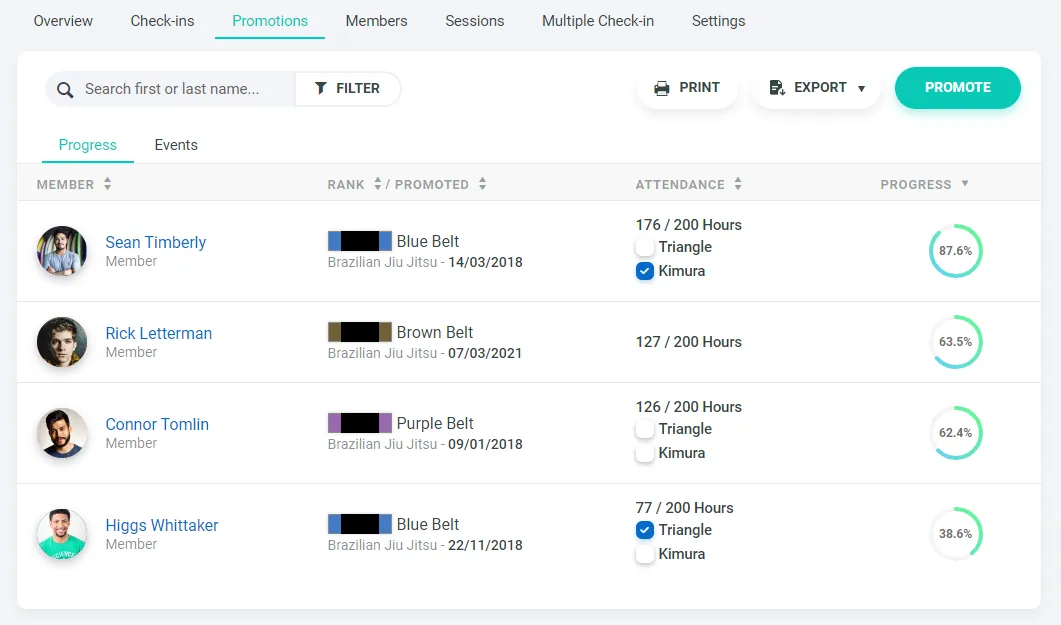
Skills assigned to a class get logged when students check in. Turn on auto-promotion, and Gymdesk promotes for stripes only or for every rank. A promotion fee can go straight to the card on file.
So when a junior student needs 40 classes at green, a passed kata, and a 10th birthday, Gymdesk tracks all three.
The belt and rank tracking guide goes deeper.
Pricing that starts lower for most schools
Gymdesk prices by active members, so frozen and canceled members don't count.
Up to 150 students, every tier costs less than Spark's $199, on any processor. The pricing section below has the full table.
Your website is part of the plan
Every Gymdesk plan includes a gym website builder that pulls in your schedule and pricing.
Removing the "Powered by Gymdesk" footer is $100 a month extra.
Spark's website comes with Ignite, its website and marketing package. Spark's Ignite page calls it "the ultimate add-on for Spark" and lists it at $199 a month, with a $1 setup offer.
So Spark plus Ignite is $398 a month before processing.
To be clear, Ignite also brings ad campaigns, email and text campaigns, and a team that builds the site for you.
On Gymdesk, you build the site yourself, and it's already in the plan.
Competition tools built in
If your students compete, you probably know the routine: tournament sign-ups tracked in a group chat, and results that never reach the student's file.
Smoothcomp Connect is built for that, and it comes with every Gymdesk plan at no extra cost. Gymdesk and Smoothcomp are now one company, so this is built-in for martial arts gyms.
Students can find and register for Smoothcomp tournaments, and their match results land on the member record next to belt and attendance. Results are matched automatically, and complete once the student links their Smoothcomp account.
Spark's pricing and features pages don't mention tournament tools.
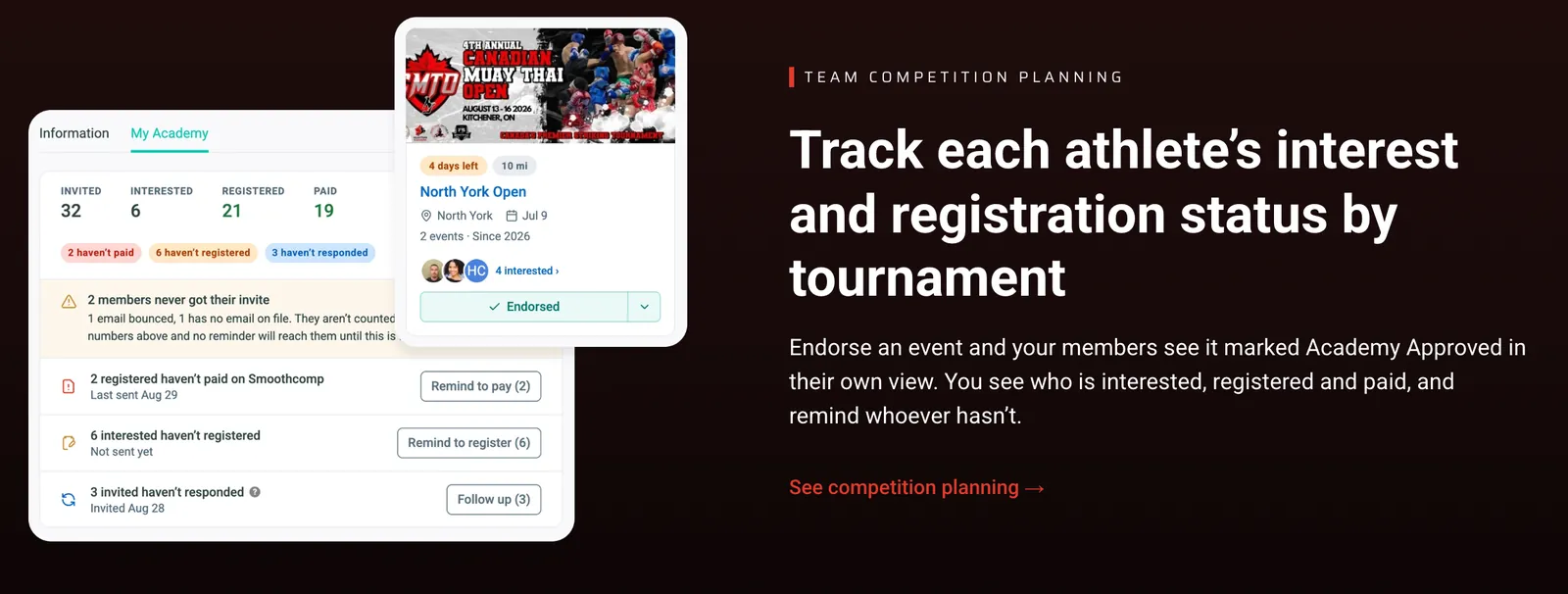
One limit: Connect works with Smoothcomp events. If your school creates its in-house tournament on Smoothcomp as a public event, it comes through, but private events don't yet.
Spark Membership Pricing vs Gymdesk Pricing
Bottom line first: up to 150 students, Gymdesk costs less on any processor. From 151 to 250, Spark is a little cheaper, and past 250, Spark's flat price likely wins.
What matters is what you'd pay for your student count, plus whatever each vendor leaves off the page.
Students | Gymdesk with Gymdesk Payments | Gymdesk, own processor | Spark Membership |
|---|---|---|---|
Up to 50 | $75 | $100 | $199 |
51–100 | $100 | $125 | $199 |
101–150 | $150 | $175 | $199 |
151–250 | $200 | $240 | $199 |
251+ | Contact us | Contact us | $199, no cap stated |
Monthly plan prices from Spark's pricing page and Gymdesk pricing, November 6, 2026. Outside the US and Canada, processing through an approved Gymdesk partner can qualify for the lower price, subject to approval. Processing isn't included on either side: Spark doesn't publish its processing fees, and Gymdesk Payments adds a $5 monthly account fee plus per-transaction fees.
Read the two exceptions before you decide.
From 151 to 250 students, Spark costs $1 a month less than Gymdesk on Gymdesk Payments, and $41 less than Gymdesk on your own processor. Past 250, Gymdesk is custom pricing, so Spark's flat price is likely lower if it holds.
Then the add-ons.
On Spark, the website and marketing package, Ignite, is $199 a month. Spark's pricing page doesn't list a setup fee, a processing rate, or a price for extra locations.
On Gymdesk, the branded member app is $100 a month, and each extra location is $50 a month with Gymdesk Payments or $100 without.
Door access is in beta at $100 a month for up to three doors and $29 per extra door, plus a one-time hardware and install cost.
Text messages are billed by usage, and US numbers carry a one-time carrier registration fee. Gymdesk has no setup fee, contract, or exit fee.
One more thing. Spark's compare page says the trial is "8 Weeks For Just $1." Its pricing page says the eight weeks are free.
Go with free. It's cheaper.
Want your own number? Plug your student count into the software cost calculator.
Who Should Pick Spark Membership
Spark is the better pick if:
- You want someone else to build your automations, payments, and website
- You sell several payment plans for the same program
- You're past 150 students and Spark's flat price beats your Gymdesk tier
Who Should Pick Gymdesk
Gymdesk is the better pick if:
- You want to choose your payment processor, or keep the one you have
- You're under 150 students and want to pay for your size
- Your promotions depend on skills, age, or more than one program
- You want the website in the plan
- Your students compete, and you want results next to their belt
- You want to change your own automations without calling a rep
Patrick Teruel, founder and head coach of NEO Martial Arts, on what he needs from the software:
"I know what's coming in, what's coming out. And I know how to rank people. And I know how to make notes on their file. And I know how to convert leads into members. I'm good. Everything else is gravy."
An owner who tried both
Artur Gasanov, CEO of Fit & Fight Gym, tried Spark first. Here's how he describes it:
"It's too much option. Not simple. … I tried to move there, and then I canceled the membership, like, after two months. And then, I went to Gymdesk. I'm very happy with Gymdesk."
Already on Spark and weighing a move? Gymdesk's page on switching from Spark covers the product side, and the guide on when to change software helps you time it.
What About the Other Martial Arts Software Options?
Start with the nine-vendor comparison linked above, then the head-to-heads: PushPress vs Gymdesk, Gymdesk vs Zen Planner, and Gymdesk vs Kicksite.
For Spark specifically, the roundup of Spark Membership reviews covers what users say, and the list of Spark Membership alternatives covers the rest of the field.
Test Both on Your Own School Before You Decide
Both trials are long enough to do this properly. Spark gives you eight weeks. Gymdesk gives you 30 days, no card.
Set up your actual programs, promote a test student, and put one family with two kids through billing.
Then ask each one the question that matters most to you. For Spark, it might be what happens to your billing if you keep your own merchant. For Gymdesk, it might be how your saved cards come over.
Whichever one makes testing night feel boring, pick that one.
FOR MARTIAL ARTS SCHOOLS
Gym management software that frees up your time and helps you grow.
Simplified billing, enrollment, student management, and marketing features that help you grow your gym or martial arts school.


FAQ
Spark Membership vs Gymdesk FAQs
Short answers for owners comparing the two.

Sean has spent the last decade creating content that helps businesses—small and not so small—grow smarter to allow operators to do more of what they love. You know, the fun stuff.
From shipping and international logistics to web development and marketing, he's done the work (not just the words) to scale retail and service businesses efficiently.
You can find his work at Sendle, Shogun, The Retail Exec, Gymdesk, and more.