
What is Gym Management Software? Why is it Important?

It's 9pm. The last class cleared out an hour ago.
You're still at the front desk, reconciling three failed credit card charges, texting a member who swears she paid, and copying next week's schedule into a spreadsheet so your staff knows who's teaching what.
None of this is coaching. None of it grows your gym. It's the manual tax, and it eats the evenings of good gym owners everywhere.
The manual tax
One evening, itemized
- Reconcile three failed credit card chargesBilling
- Text the member who swears she paidBilling
- Copy next week's schedule into a spreadsheetScheduling
- CoachingNone
TotalYour evening
An example, built from the scene above.
Gym management software exists to hand that night back to you.
I work at Gymdesk, which means I look at this software—ours and everyone else's—all day, and I've listened to a lot of the owners who use it.
The short version of what follows: what this software is, what it does, what it costs, and how to pick one (or switch) without a headache.
What Is Gym Management Software?
Gym management software is an all-in-one platform that automates the daily administrative work of running a fitness business (member management, billing, class scheduling, reporting) from a single dashboard.
It replaces the patchwork of spreadsheets, paper waivers, and separate payment tools that most gyms start with, so owners and staff can spend that paperwork time with members.
It's the operating system for your gym.
Member records, recurring payments, class bookings, and reports all live in one connected place, which beats a dozen apps that have never once spoken to each other.
You'll also see it called a gym management system, fitness studio software, or member management software.
It's the same idea under every name: one tool that runs the business side of a gym so the humans can run the training side.
And there's real money in this market.
Strategic Market Research valued the gym management software market at about $2.1 billion in 2024 and expects it to reach $3.8 billion by 2030, growing 8.5% a year.
A second firm, 360iResearch, is more bullish and forecasts growth of about 10% a year through 2032.
The two firms define the category differently, so the dollar figures don't line up neatly. Both point the same way, though: up.
For you, a growing market mostly means more choice, and more vendors who all claim to do everything. The rest of this guide is about telling the options apart.
What Software Do Gyms Actually Use?
Before you buy a platform, you're already running the gym on something.
Most gyms run on one of four setups, and only one is gym management software. You can probably point to yours right now:
- No software: A paper sign-in sheet, punch cards, and a cash box. It works while you know every member by name. The trouble is that you can't trust the numbers, because there aren't really any.
- Spreadsheets: A shared Excel or Google Sheet for members, renewals, and attendance. It's free and familiar. Then someone overwrites a column, and you spend Sunday working out which version is the real one.
- The patchwork: A booking app here, a card reader there, an email tool, a waiver service, and a spreadsheet tying it all together. Each piece is fine. The gaps between them are where payments go missing and members fall through, and when one tool changes, the workarounds holding the rest together come loose.
- An all-in-one platform: Software built for gyms that handles members, billing, scheduling, attendance, and reporting in one system, and connects to the outside tools you still need (door access, payment processors).
Plenty of good gyms run on the first three for years.
Every new member adds a little more manual work, though. Say the spreadsheet takes 10 minutes a week at 40 members. At 200, it can eat your whole Sunday.
The four setups side by side:
No software | Spreadsheets | The patchwork | All-in-one platform | |
|---|---|---|---|---|
What it costs | Almost nothing: a paper sign-in sheet, punch cards, and a cash box | Free and familiar: a shared Excel or Google Sheet | Several tools, each with its own bill, plus the spreadsheet tying them together | One system for members, billing, scheduling, attendance, and reporting |
What breaks first | The numbers. You can't trust them, because there aren't really any | The file. Someone overwrites a column, and you spend Sunday working out which version is the real one | The gaps between tools, where payments go missing and members fall through | Your first few weeks. Setup and staff training take time before the hours come back |
Who it fits | A gym where you know every member by name | A gym small enough that the sheet takes minutes a week | A gym that has stacked a booking app, card reader, email tool, and waiver service | A gym where every new member adds a little more manual work |
Once the spreadsheet starts eating Sundays, most owners start looking at the fourth setup. Here's what it does.
Gym Management Software Features
At its core, gym software takes the repetitive jobs that used to live in your head, or in a spreadsheet held together with hope, and runs them for you.
The features split into two groups.
Core features keep the lights on from day one. Growth features matter more as the member count climbs.
Core features
These are the ones you'll use every day, whatever kind of gym you run:
- Member management: Store member profiles, track membership status and renewals, and build custom plans (monthly, class-pack, family, drop-in) without a spreadsheet.
- Billing and payments: Set up recurring billing once, then let it run. Charge cards automatically, retry failed payments, and stop chasing people for money in person.
- Class and appointment scheduling: Publish the class timetable, let members book and cancel from a phone, and cap class sizes so you never oversell a session.
- Attendance and check-in: Log who's showing up, flag members whose attendance is slipping, and catch a cancellation before it happens.
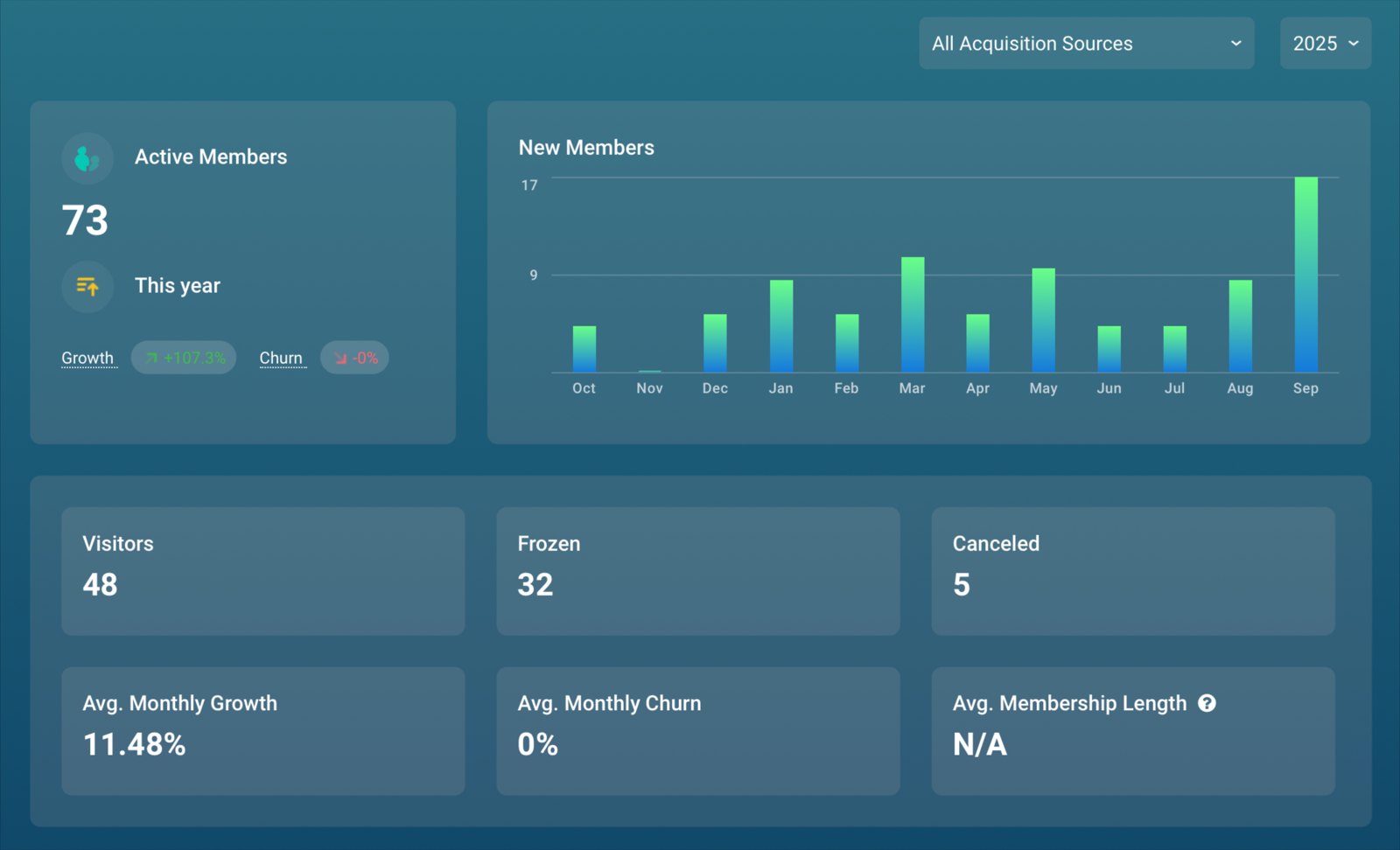
- Reporting and analytics: See revenue, membership growth, and class attendance at a glance in built-in reports, so your pricing and scheduling calls start from real numbers.
- A member-facing app or portal: Give members one place to book classes, update payment details, and manage the account without calling you.
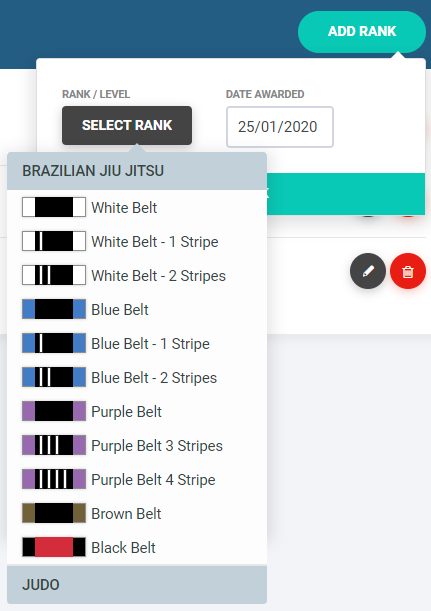
- Discipline-specific tools (for the gyms that need them): A martial arts school needs belt and rank tracking and attendance-based promotions from day one. A class-pack studio needs waitlists and pack expiry. Generic software often can't do these.

Reporting deserves a closer look, because it's the feature owners undersell when shopping. A good platform should show you these numbers without a single export:
- Active members and new signups
- Cancellations and churn
- Recurring revenue and revenue per member
- Class attendance and visit frequency
- Leads and how many convert to members
If you can only get those by copying data into another spreadsheet, the software isn't doing its job.
Growth features
You'll lean on these more as you add members, staff, and programs:
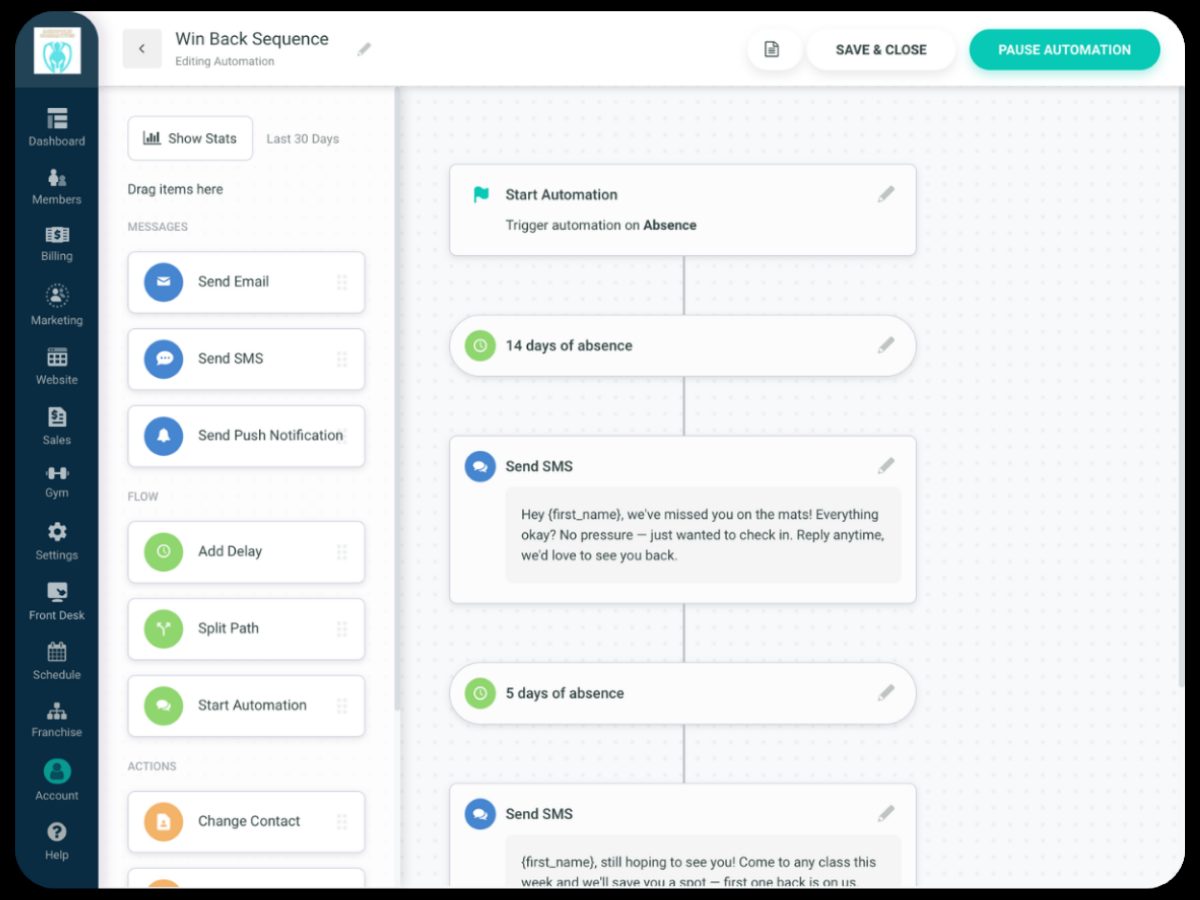
- Marketing and lead tracking:Capture leads from your website forms, follow up automatically, and see which campaigns bring people in.
- Self-serve membership changes: Members upgrade, downgrade, or pause a plan without asking the front desk. Every change a member makes is one you don't.
- Staff and payroll tracking: Assign instructors to classes, log hours and sessions taught, and pull a payroll report your accountant or payroll provider can run from.
- Integrations: No platform does everything, so check it connects to the tools you already rely on, like door access hardware and your payment processor.
So here's the test for any feature: if a front desk person or owner would otherwise do it by hand, good software does it for you or makes it much faster.
(For how specific tools stack up on these features, see the roundup of the best gym management software.)
Seven features
Keep the lights on from day one.
- Member management: Store member profiles, track membership status and renewals, and build custom plans (monthly, class-pack, family, drop-in) without a spreadsheet.
- Billing and payments: Set up recurring billing once, then let it run. Charge cards automatically, retry failed payments, and stop chasing people for money in person.
- Class and appointment scheduling: Publish the class timetable, let members book and cancel from a phone, and cap class sizes so you never oversell a session.
- Attendance and check-in: Log who's showing up, flag members whose attendance is slipping, and catch a cancellation before it happens.
- Reporting and analytics: See revenue, membership growth, and class attendance at a glance in built-in reports, so your pricing and scheduling calls start from real numbers.
- A member-facing app or portal: Give members one place to book classes, update payment details, and manage the account without calling you.
- Discipline-specific tools (for the gyms that need them): A martial arts school needs belt and rank tracking and attendance-based promotions from day one. A class-pack studio needs waitlists and pack expiry. Generic software often can't do these.
Four features
Matter more as the member count climbs.
- Marketing and lead tracking:Capture leads from your website forms, follow up automatically, and see which campaigns bring people in.
- Self-serve membership changes: Members upgrade, downgrade, or pause a plan without asking the front desk. Every change a member makes is one you don't.
- Staff and payroll tracking: Assign instructors to classes, log hours and sessions taught, and pull a payroll report your accountant or payroll provider can run from.
- Integrations: No platform does everything, so check it connects to the tools you already rely on, like door access hardware and your payment processor.
How Does Gym Management Software Work?
Most modern gym software is cloud-based, which means it runs online, and the aging computer at your front desk becomes just one more way to log in.
You log in from a browser or an app, and everything syncs in real time. A member books a class on a phone at midnight, and it's on your schedule before you wake up.
Walk through a normal signup.
A prospect fills out a form on your website, and that becomes a lead. When someone joins, the plan, the signed waiver, and the card details all land in one record.
From then on, billing runs on schedule, bookings update your timetable, and attendance feeds your retention reports.
Because everything connects, one action moves through the whole system without anyone retyping a thing. A calendar app and a card reader in a trench coat, pretending to be software, can't do that.
Cloud delivery also means you can run the place from anywhere.
Approve a refund, check last night's attendance, or pull a revenue report from your couch, a tournament three states away, or an actual vacation. For an owner who used to be chained to the front desk, that's a big deal.
- Website formA prospect fills out a form on your website.
- LeadA prospect fills out a form on your website, and that becomes a lead.
- Member recordWhen someone joins, the plan, the signed waiver, and the card details all land in one record.
- Recurring billingBilling runs on schedule.
- BookingsBookings update your timetable.
- AttendanceAttendance feeds your retention reports.
- Retention reportOne action has moved through the whole system without anyone retyping a thing.
Cloud-based vs on-premise software
Cloud-based gym management software runs on the provider's servers. You reach it through a browser or app and pay a monthly fee.
On-premise software is installed on a computer at your gym. It usually costs more upfront, and the backups and updates are your job.
Most gym software sold today is cloud-based. There's no server to look after, and updates happen automatically.
On-premise mostly hangs on in older or very large operations with strict rules about where data is stored. For an independent gym or studio, you'll almost certainly want cloud-based.
What most gyms pick
Cloud-based
- Where it runs
- The provider's servers
- How you reach it
- A browser or app, from anywhere
- How you pay
- A monthly fee
- Updates and backups
- Happen automatically
Older or very large operations
On-premise
- Where it runs
- A computer at your gym
- How you reach it
- That computer
- How you pay
- Usually more upfront
- Updates and backups
- Your job
Who Uses Gym Management Software?
Gyms of nearly every size and discipline run on this software:
- Independent gyms and fitness studios: A big share of users. Owners lean on software to run the whole operation (memberships, billing, scheduling, staff hours and payroll tracking), often as a one- or two-person team.
- Boutique and specialty studios: Yoga, pilates, spin, and dance studios use it for class-pack pricing, waitlists, and recurring bookings.
- CrossFit and functional-fitness boxes: Programming-heavy gyms use it for scheduling, drop-in management, and community engagement. (See the guide to CrossFit gym management software.)
- Martial arts schools: Dojos and academies need something most generic tools skip: belt and rank tracking, family billing for the parent with three kids enrolled, attendance-based promotions. Software built for a yoga studio rarely knows what to do with a jiu-jitsu belt curriculum. (More in our martial arts management software guide.)
- Personal trainers: Independent trainers use lighter versions for client bookings, programming, and payments.
Inside each business, the software serves different people.
Owners use it to run the operation and watch the numbers, and coaches use it for schedules and rosters. At the front desk, it handles check-ins and sign-ups, which leaves staff free to help the person in front of them.

Benefits of Gym Management Software for Gym Owners
Let's be honest: the advantages of a gym management system come down to two things. You get your time back, and you get a clear view of where your money is going.
Run a gym without it and the admin compounds.
Manual billing means late-night reconciling and awkward "did your payment go through?" conversations. With paper records, you don't see a retention problem until the member is already gone. And without reports, every pricing or scheduling call is a guess, even the ones that move real money.
Here's what changes when software takes over:
- Revenue you'd otherwise lose: Automated billing retries failed payments on its own, so you recover money a manual system never notices is missing. Automatic renewals mean fewer memberships lapse because nobody followed up.
- Early warning on cancellations: Attendance tracking flags the member who's gone quiet, so you can reach out while there's still time to keep them. (More on that in our guide to how gym software can improve member retention.)
- Room to grow: The habits that hold at 40 members (memory, spreadsheets, a sticky note on the monitor) fall apart at 200. Software handles 200 members the same way it handles 40.
- One source of truth: When billing, bookings, and attendance live in one system, nobody argues over which spreadsheet is right. Your staff all work from the same member records, and reporting shows which classes fill and which sit empty, so you can schedule what people show up for.
- The manual tax, mostly gone: Recurring billing, failed-payment retries, bookings, and renewals all run automatically.
Steve Camara at Academia BJJ described the before and after like this:
“At the end of every month, I was handwriting invoices and handing them to people. And then enter Gymdesk. And it's just like, whoa, I don't have to do anything. I just got to teach and clean the mats.”
Admin is only one of the challenges gym owners face, but it's the one software takes off your plate most directly.
Put a number on your manual tax
The gym admin time calculator adds up the hours a typical week loses to billing, late-payment follow-up, attendance, bookings, and lead follow-up, then shows what that comes to over a year.
Count your hoursWe'll keep you in the loop with fresh content, podcasts, how-to guides, tool reviews, and product exclusives.
How Much Does Gym Management Software Cost?
For a small to mid-size gym with a single location, most gym software runs somewhere between $75 and $300+ per month, depending on the tool, your gym's size, and what you need it to do.
The pricing model matters as much as the number, because it decides what your bill looks like once you grow.
Three common pricing models:
- Flat, all-inclusive: One monthly price, usually scaling with your active member count, every feature included. Easy to budget, no surprises.
- Tiered with add-ons: A low headline price, but the website, the automations, and the extra staff logins all cost more. The real bill is the sum of the parts.
- Quote-only: No public price at all. You book a demo to find out. When a company won't tell you the price until you've sat through a sales call, that's usually the price talking.
This is where a flat, all-inclusive model is worth it, and yes, this is the part where Gymdesk shows up.
Gymdesk prices by active member count, and every plan includes every feature.
On Gymdesk Payments, plans start at $75 a month for up to 50 members, then $100 up to 100, $150 up to 150, $200 up to 250, and $275 up to 400. Bigger tiers run all the way to 3,000 members, and past that the price is custom.
So your plan price changes only when your member count crosses into the next tier, and every feature is already in it.
If you bring your own payment processor, each plan costs more: $25 a month more on the smaller plans, and up to $75 more on the largest.
There are no per-staff fees (staff users are unlimited) and no long-term contracts, and a member-facing website comes free with every account. What costs extra sits outside the software itself: additional locations, door access, and a custom-branded app.
Gymdesk plans on Gymdesk Payments, as of November 2026:
Active members | Per month on Gymdesk Payments |
|---|---|
Up to 50 | $75 |
51–100 | $100 |
101–150 | $150 |
151–250 | $200 |
251–400 | $275 |
401–3,000 | Larger tiers, up to 3,000 members |
Over 3,000 | Custom |
Every plan includes every feature. Processing elsewhere adds $25–$75 a month depending on tier. Prices as of November 2026 at gymdesk.com/pricing.
For competitor prices side by side and what a gym your size should budget, our guide to gym management software cost has the full breakdown.
Price your own gym
The gym software cost calculator takes your member count, monthly payment volume, and the features you need, then shows the all-in monthly cost across 11 platforms, processing and add-ons included.
Run your numberWhat to Watch Out For
Software solves real problems. It still won't fold the towels, though, so go in clear-eyed about the trade-offs:
- There's a learning curve. Any new system takes setup time and staff training. Simple tools with responsive onboarding shorten it; feature-bloated ones can stretch it into weeks.
- The vendor holds your data. You're handing a provider member and payment information, so confirm the provider stores it securely and meets payment standards.
- Support quality swings hard. When billing breaks on a Saturday, a fast reply from a real person can be the difference between a hiccup and a lost day.
How to Choose the Right Gym Management Software
The best tool is the one that fits the way your gym runs.
Work through this:
- Start with what you need. How many members, what do you teach, and which manual tasks eat your week? Fit for your type of gym matters more than anything else on this list. Buy for the gym you have.
- Sort features into must-haves and nice-to-haves. Look for what you'll use daily. Anything that misses a must-have is out, however good the demo was.
- Add up the true price. Base plan plus every add-on you'd genuinely need: website, app, automations, and payment processing. Compare the totals.
- Test it like you'll use it. In the demo or free trial, have the person who'll run the front desk sign up a member, book a class, and fix a failed payment. Could they do it the first time without help, and would they want to do it every day? If your staff won't use it, it doesn't matter what it can do.
- Weigh the support. When something breaks, you want a fast answer from a real person. Ask how support works and how quickly they reply.
- Confirm the migration path. If you're switching, ask exactly how your member data and stored cards move over.
Run this in any free trial
Three everyday jobs
Hand the keyboard to whoever will run your front desk.
- Sign up a new member
- Book a class
- Fix a failed payment
Then ask
- Could they do it the first time without help?
- Would they want to do it every day?
Any tool handles the basics. It's the discipline-specific stuff (belt tracking, class packs, family billing) that separates the software that just works from the one you fight with every Monday.
For the full step-by-step, including what to ask in a demo and how to read the contract, see our guide on how to choose gym management software.
Can You Switch Gym Management Software Without Losing Your Data?
Yes. Fear of a messy migration is one of the most common reasons owners stay on software they've already outgrown. The move is usually more manageable than you'd expect.
Two worries do the most stalling: member data and stored payment info.
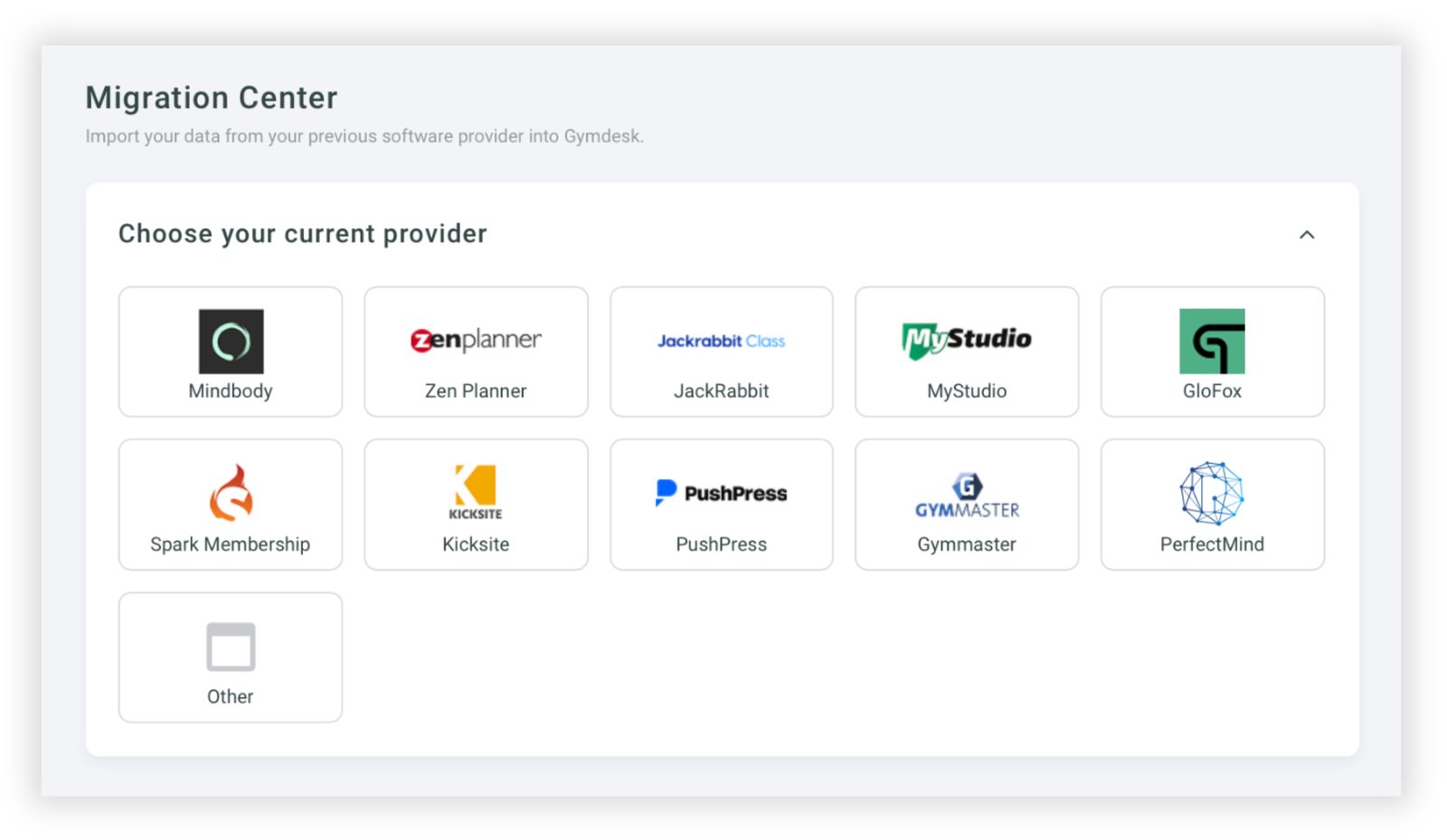
On the data side, any reputable provider imports your existing records, plans, and history. The good ones do the import with you as part of a guided setup.
Stored cards are the scarier one.
Nobody wants to ask every member to re-enter payment details.
The fix is card tokenization: your members' saved card tokens move directly from the old processor to the new one, so nobody re-enters a card and billing keeps running. It works when your current processor allows token export and the new software supports the import, so ask about both up front.
Done right, your members won't even notice you moved.
So don't let migration anxiety keep you on a tool that's costing you time and money. Ask any provider you're weighing to walk you through exactly how the data import and payment migration work.
A confident, specific answer is a good sign. Vagueness is the red flag.
At Gymdesk, Payment Method Sync brings stored cards over from Stripe, Square, Authorize.net, GoCardless, or Ezypay as part of setup.
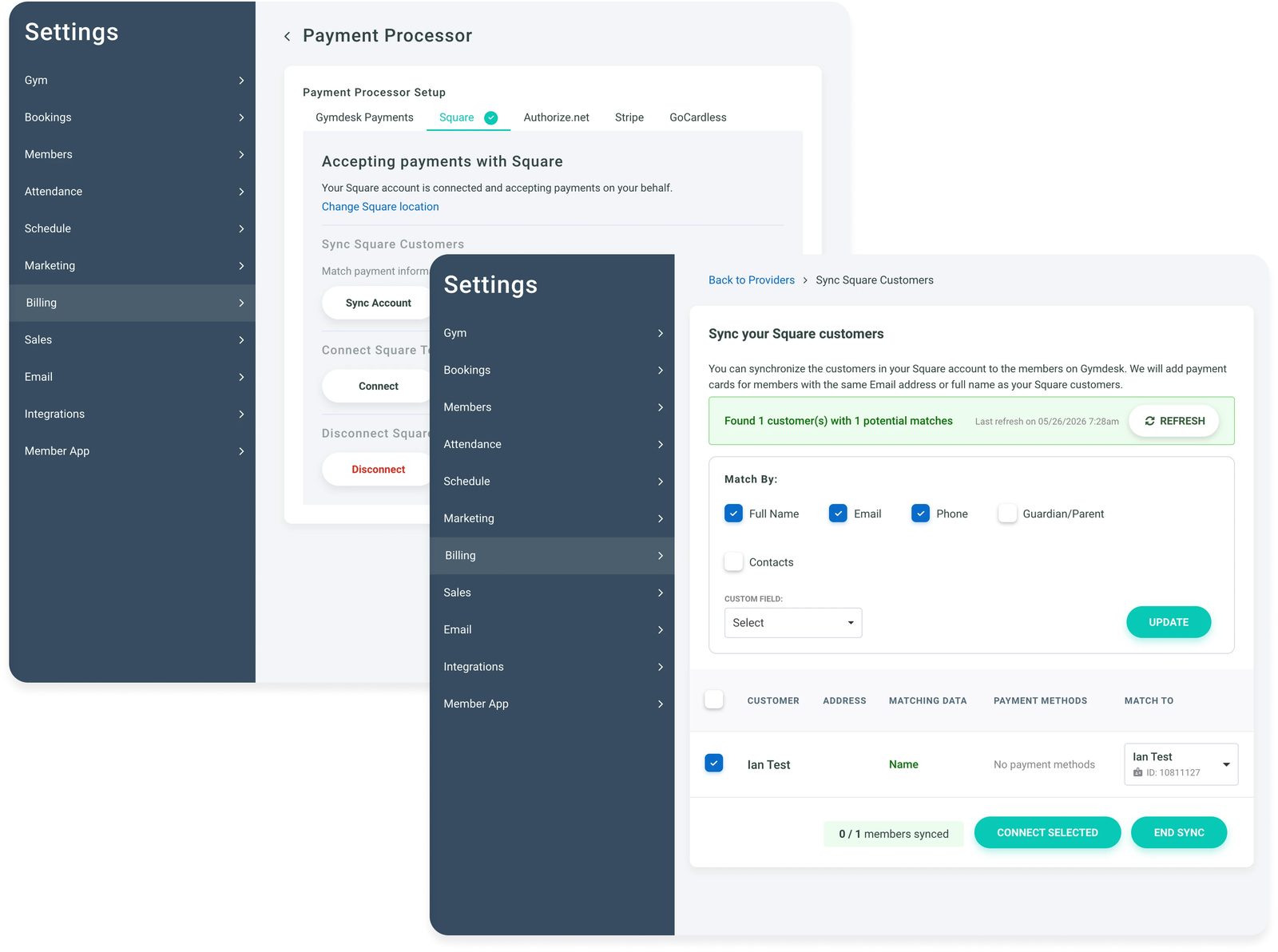
The guide on how to switch gym software walks through the move week by week.
Get Your Evenings Back From the Front Desk
Gym management software is the operating system for a modern fitness business.
It takes the admin that keeps owners at the front desk long after the last class (billing, scheduling, member tracking, reporting) and runs it from one connected platform.
You can open a gym without it. Once the member list grows, it's what keeps the manual tax from eating your evenings.
So pick the one built for your size and your discipline.
The front desk will still be there at 9pm. You just won't be.
Founded in 2016, Gymdesk now helps more than 4,000 gym owners across 34 countries spend less time on admin and more time coaching.
If you run a martial arts school, a boutique studio, or an independent gym, Gymdesk gives you every feature at a price set by your member count, with support that answers like a human. See how Gymdesk works, or see Gymdesk pricing for your member count. Less admin, more members, zero guesswork.
Gym Management Software That Gets You Back On The Mats
Run your gym smarter with the right software. Automate your attendance tracking, lead management, belt tracking, and more.


FAQ
Gym Management Software FAQs
Quick answers to the questions owners ask most about gym management software.

Sean has spent the last decade creating content that helps businesses—small and not so small—grow smarter to allow operators to do more of what they love. You know, the fun stuff.
From shipping and international logistics to web development and marketing, he's done the work (not just the words) to scale retail and service businesses efficiently.
You can find his work at Sendle, Shogun, The Retail Exec, Gymdesk, and more.