
Gymdesk vs Mat Track: An Honest Comparison for Martial Arts Gyms

I work at Gymdesk, and Gymdesk is one of the two products on this page.
So read this the way you'd read a restaurant review written by the chef. Carefully, with the other place's menu open in another tab. I implore you.
Every Mat Track figure below comes from Mat Track's own pricing page and its Gymdesk comparison page, both read on October 29, 2026.
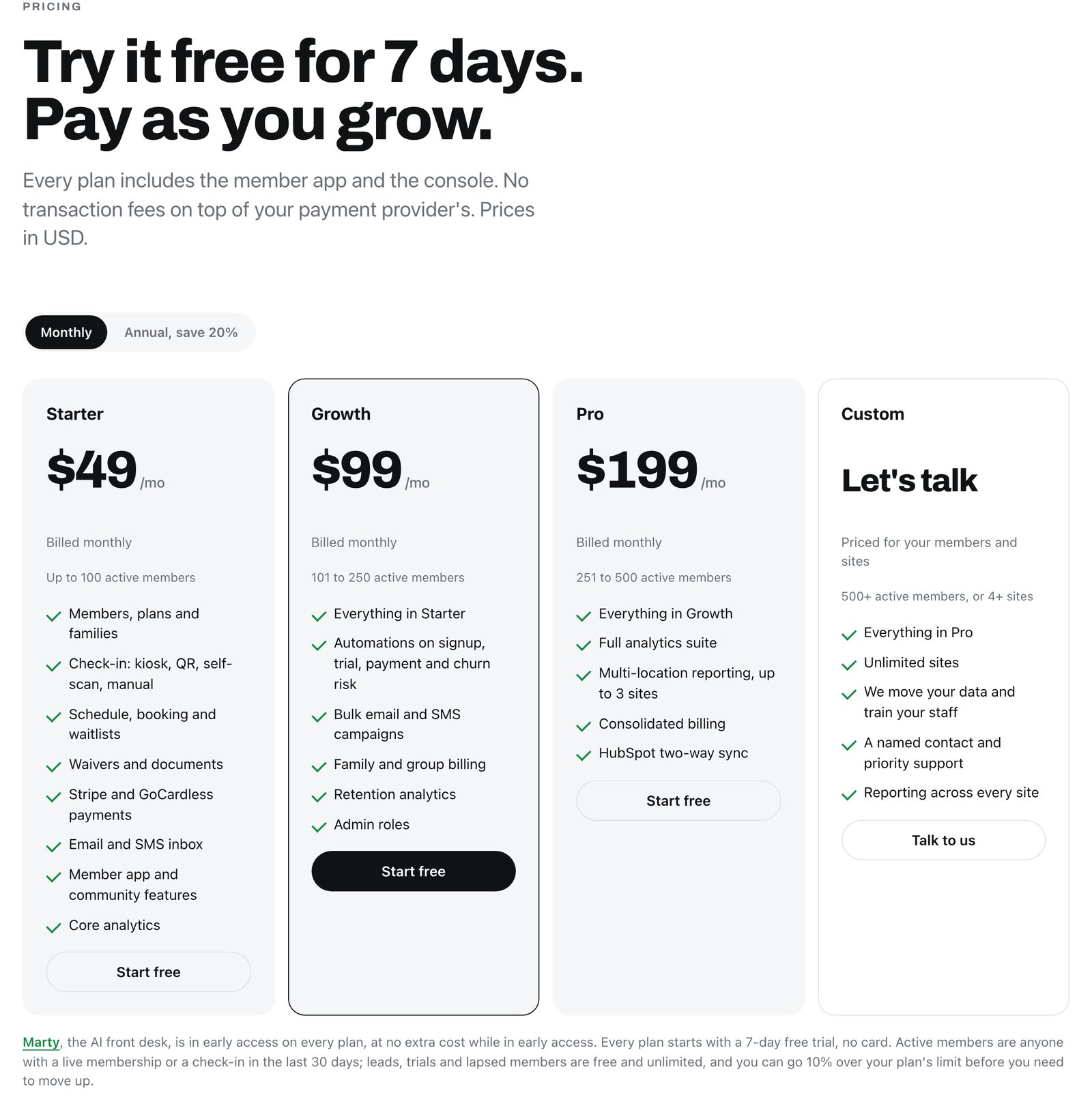
If you're weighing Gymdesk as a Mat Track alternative, start with what Mat Track does better. It's cheaper at every band both companies publish, and its member app is built to be opened every day.
Gymdesk includes automations, per-program ranks, a website, and your choice of processor on every plan.
And a few things Mat Track's comparison page says about Gymdesk are out of date or wrong.
IN THREE LINES
- Price: Mat Track wins at every band both companies publish. Starter is $49 a month up to 100 active members.
- Plan contents: Mat Track's follow-up automations start on its $99 Growth plan (101–250 members). Every Gymdesk plan has all of them.
- The record: Gymdesk includes a member app on every plan, sends per-member absence emails, and tracks ranks per program. Mat Track's page says otherwise.
Gymdesk vs Mat Track at a Glance
If you only read one thing, read this table. It shows list prices at three gym sizes, with no totals and no math done for you, plus what each plan includes.
Gymdesk | Mat Track | |
50 active members | $75/mo with Gymdesk Payments or an approved partner; $100 on your own processor | $49/mo (Starter) |
100 active members | $100/mo with Gymdesk Payments or an approved partner; $125 on your own processor | $49/mo (Starter) |
250 active members | $200/mo with Gymdesk Payments or an approved partner; $240 on your own processor | $99/mo (Growth) |
Free trial | 30 days, no card | 7 days, no card |
Contract | Month to month | Month to month, or annual at 20% off |
Payment processors | Six, including Stripe and GoCardless | Stripe and GoCardless |
Follow-up automations | Every plan | Growth ($99) and up |
Member app | Included on every plan | Included on every plan |
Website builder | Included | Not offered |
Rank tracking | A rank per program, promotion criteria, grading events | Belts and stripes across arts, promotion criteria |
Mat Track (also written Mattrack) is a UK company founded in 2025, and its app doubles as a training log for practitioners.
Where Mat Track Wins
Credit where it's due, starting with the monthly bill.
Price at every band both companies publish
Up to 100 active members, Mat Track Starter is $49 a month. Gymdesk is $75 to $100 with Gymdesk Payments or an approved partner, or $100 to $125 on your own processor.
From 101 to 250 members, Mat Track Growth is $99. Gymdesk is $150 to $200 with Gymdesk Payments or an approved partner, or $175 to $240 on your own processor.
Mat Track also offers 20% off for annual billing, which brings Growth to about $79 a month. Gymdesk is month to month only.
A member app built for daily use
The app is built around coming back.
Members get weekly streaks, badges, leaderboards, and five ready-made challenge formats, plus guest passes, phone check-in, booking, and waivers.
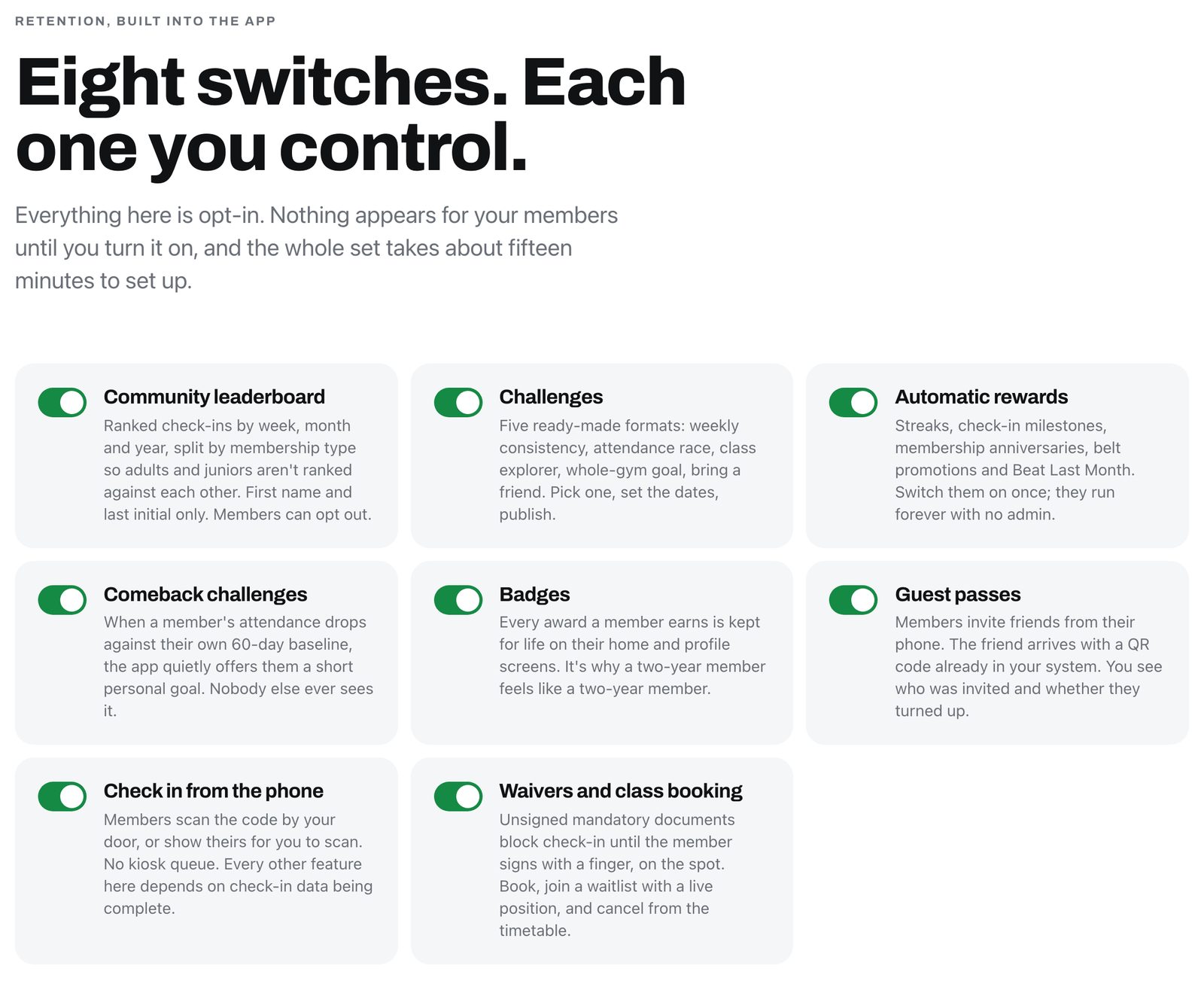
Gymdesk's app shows members their attendance and promotion progress. Challenges, badges, and a community leaderboard are Mat Track's territory, and if that's what you want your members doing between classes, Mat Track does it well.
Retention alerts against each member's own pattern
On Growth ($99) and up, every member is scored against their own 60-day baseline.
A regular who drops from three sessions a week to one lands on a watchlist, and can get an email, a text, or a private "comeback challenge" in the app.
Measuring against the member's own normal is a smart idea. A twice-a-week hobbyist and a six-day competitor shouldn't trip the same alarm.
An AI front desk in early access
There's also Marty, which Mat Track calls an AI front desk.
Marty drafts replies to members and answers owner questions from the gym's own records. It also checks Stripe for double charges and sets up refunds for an admin to approve.
It's in early access and free on every plan for now.
What Each Plan Includes
Mat Track sells its plans strictly by member count.
Its headline features start on Growth, which covers 101 to 250 active members. That list includes signup, trial, payment, and churn-risk automations, plus bulk email and SMS, family billing, retention analytics, and admin roles.
So at 100 members or fewer, a Mat Track gym is on Starter, and Starter has no automated follow-ups.
At 100 active members or fewer
Mat Track Starter
$49/mo
No automated follow-ups on this plan
These start on Growth ($99, 101–250 members):
- Signup, trial, payment, and churn-risk automations
- Bulk email and SMS
- Family billing
- Retention analytics
- Admin roles
Gymdesk
$75–$100/mo
With Gymdesk Payments or an approved partner ($100–$125 on your own processor)
On every plan:
- Every automation Gymdesk has
- Every feature
- A responsive website
A Gymdesk gym that size pays $75 to $100 a month with Gymdesk Payments or an approved partner ($100 to $125 on your own processor).
It gets every automation Gymdesk has.
Every feature is on every plan, and so is a responsive website.
From 101 to 250 members, the like-for-like is $99 at Mat Track against $150 to $200 at Gymdesk with Gymdesk Payments or an approved partner ($175 to $240 on your own processor).
That gap is real, and I'm not going to pretend otherwise. You've got both tabs open.
Open a third tab
The gym software cost calculator takes your member count and payment volume and gives you Gymdesk's all-in monthly cost, so you're comparing your number, not a range.
Run your numberWHAT COSTS EXTRA ON GYMDESK
A few things on Gymdesk cost extra, and you should know them before you sign:
- An additional location is $50 a month with Gymdesk Payments or an approved partner, or $100 on your own processor.
- A branded member app (your gym's own App Store and Google Play listing) is $100 a month, first month free.
- Door access (in beta) is $100 a month for up to three doors, then $29 per extra door.
Gymdesk Payments runs in the US and Canada. If your gym is somewhere else, the UK included, processing through an approved partner gets you the same lower plan price, subject to approval. The live pricing page has a calculator for your exact setup.

Mat Track advertises no transaction fees. Gymdesk doesn't add a per-transaction fee on your own processor either. Bringing your own processor raises the plan price instead, which is the own-processor figure in each range above.
What Mat Track Gets Wrong About Gymdesk
The comparison page Mat Track wrote about Gymdesk is fair about a lot.
It says Gymdesk is good software (fact), it gets the entry price right, and it credits the website builder.
Three of its claims about Gymdesk are wrong (flat out, you could say), one leaves out the member app every plan includes, and one price band is out of date.

Here's each one next to the fact and the Gymdesk page you can check it against.
Mat Track says | The fact | Where to check |
"Branded app +$100/mo; member portal included" | The Gymdesk Members App (iOS and Android) is included on every plan. The $100 a month is the optional branded app. | |
Retention alerts: "Reporting, no per-member alerts" | Absence automations enroll each member a set number of days after their last visit and stop when they come back, and the dashboard lists absent members. | |
Comeback flows: "Manual" | Automations can start on an absence, a cancellation request, or an expired membership, with ready-made absence and cancellation-recovery templates. | |
Belt and rank tracking: "Basic ranks" | Each member holds a separate rank in each program, with combinable promotion requirements, auto-promotion on check-in, and grading events. | |
Top published price: "$200/mo (201 to 400 members)" | $200 covers 151–250 members with Gymdesk Payments or an approved partner ($240 on your own processor). Above 250 is a quote. |
The member app
Every Gymdesk plan includes the Gymdesk Members App on iOS and Android. The $100 add-on is for gyms that want their own name on the app store listing.

The worked example on Mat Track's page prices a 150-member Gymdesk gym with the optional branded app added. Without it, that gym pays $150 a month with Gymdesk Payments or an approved partner, or $175 on its own processor.
Absence alerts and comeback flows
Gymdesk's absence automations watch each member's last visit.
When someone hits the number of days you set, they're enrolled in a follow-up, and it stops on its own when they come back.
Gymdesk absence automation
What happens when a member stops showing up
- Last visit Gymdesk watches each member's last check-in.
- Days pass You set the number of days.
- Follow-up starts The member is enrolled and gets the email you wrote.
- They come back The follow-up stops on its own.
Included on every plan. The same system runs cancellation-request and expired-membership flows.
Martin Herrick runs Adayama Jiu-Jitsu while holding down a full-time job. He leaves the defaults on.
Herrick describes it like this:
Sometimes his members write back to say they were sick. The automations, he says, make "it look like you are much more omnipresent than you actually are."
The same system runs cancellation-request and expired-membership flows. None of that is manual.

Ranks and gradings
A student who trains jiu-jitsu and Muay Thai holds a separate rank in each program.
You set the promotion requirements per program (sessions, hours, days, attendance, skills, age), turn on auto-promotion if you want it, and run grading events with invitations and evaluations.
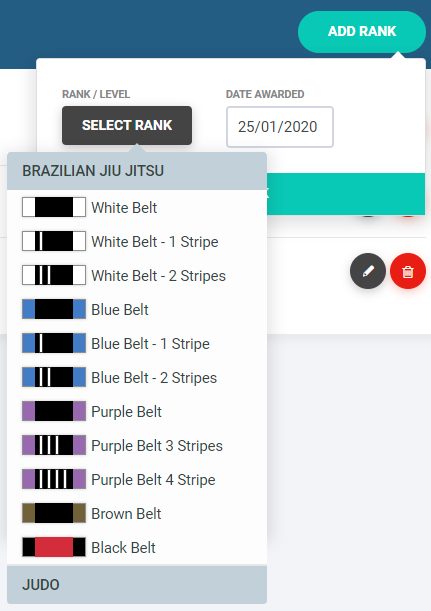
That covers the multi-art gym Mat Track's page says needs "workarounds."
Where Gymdesk Wins
Every point below is on a live page you can check.
- Belts across programs: each student holds a rank per program, and the guide to belt tracking software shows how schools set it up.
- Processor choice: Gymdesk connects to six processors (Gymdesk Payments, Stripe, Square, Authorize.net, GoCardless, and Ezypay), so you can bring your own processor, GoCardless included, and keep the account your members already pay through. Payment Method Sync moves stored payment methods across on supported processors.
- One account for the front of house: a website, point of sale, a shop, and door access (in beta) all run from the same login as your members and billing, so there's one bill and one place to look.
- A longer trial: 30 days with no card, against Mat Track's seven. That's long enough to see a real absence email go out.
Smoothcomp Connect
Gymdesk and Smoothcomp are now one company.
For martial arts gyms, Smoothcomp Connect adds a Competitions tab inside Gymdesk on every plan.
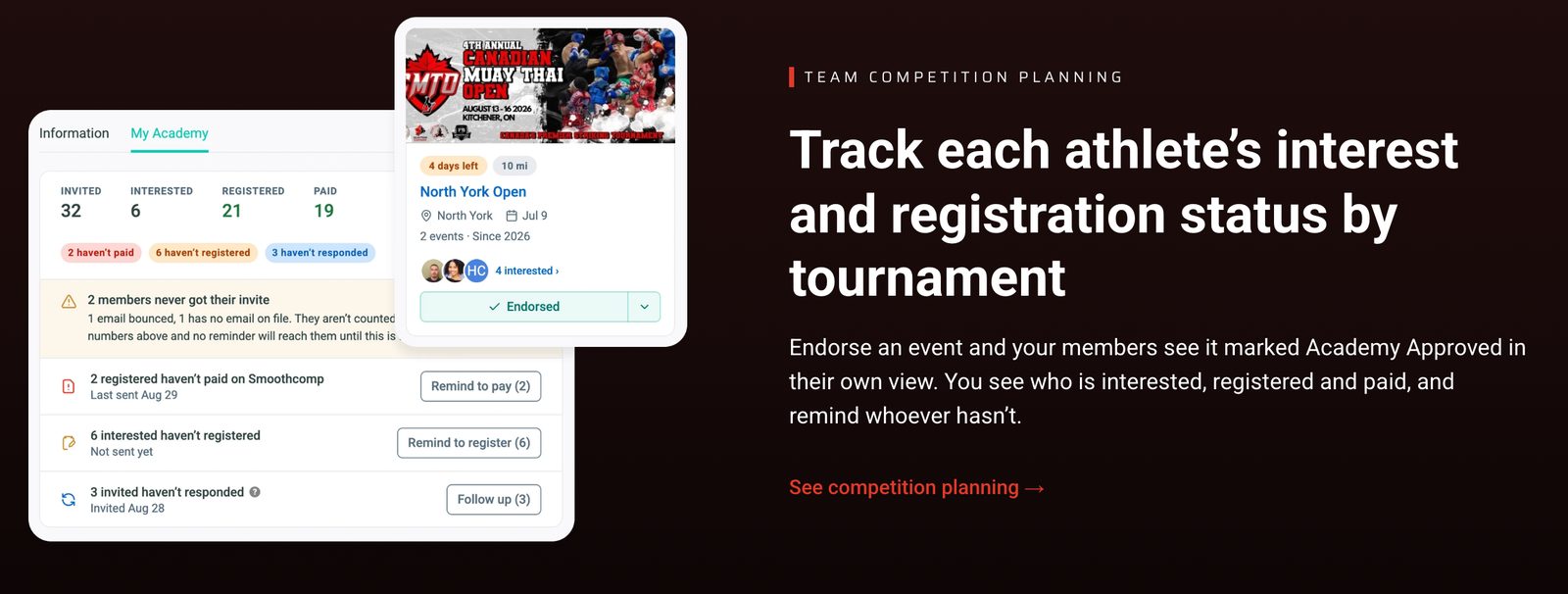
You can find Smoothcomp events, endorse one with a coach's note, and register members from a pre-filled form. You see who's interested, registered, and paid, and results land back on each member's record.
Smoothcomp Connect, inside Gymdesk
From event listing to results on the member's record
- Find Browse Smoothcomp events from the Competitions tab.
- Endorse Add a coach's note to the events you back.
- Register Members sign up from a pre-filled form.
- Track See who's interested, registered, and paid.
- Results Results land back on each member's record.
On every Gymdesk plan, for martial arts gyms.
Mat Track doesn't connect to Smoothcomp.
What About Growing?
Mat Track publishes a price up to 500 members and three sites. Gymdesk publishes up to 250 members and quotes above that.
So if you want a number on a page for a 400-member gym, Mat Track has one and Gymdesk doesn't.
Gymdesk does run big schools. OCTA Jiu-Jitsu runs seven locations in Ontario on Gymdesk. Raion Dojo in Switzerland runs 201 to 400 members on it.
Switching Between Them
The credit cards on file are the part that keeps owners up at night, so start there.
Mat Track bills through Stripe and GoCardless only. If your gym uses its own Stripe account on Mat Track, you can connect that same account to Gymdesk, and Payment Method Sync matches the stored cards to your members.
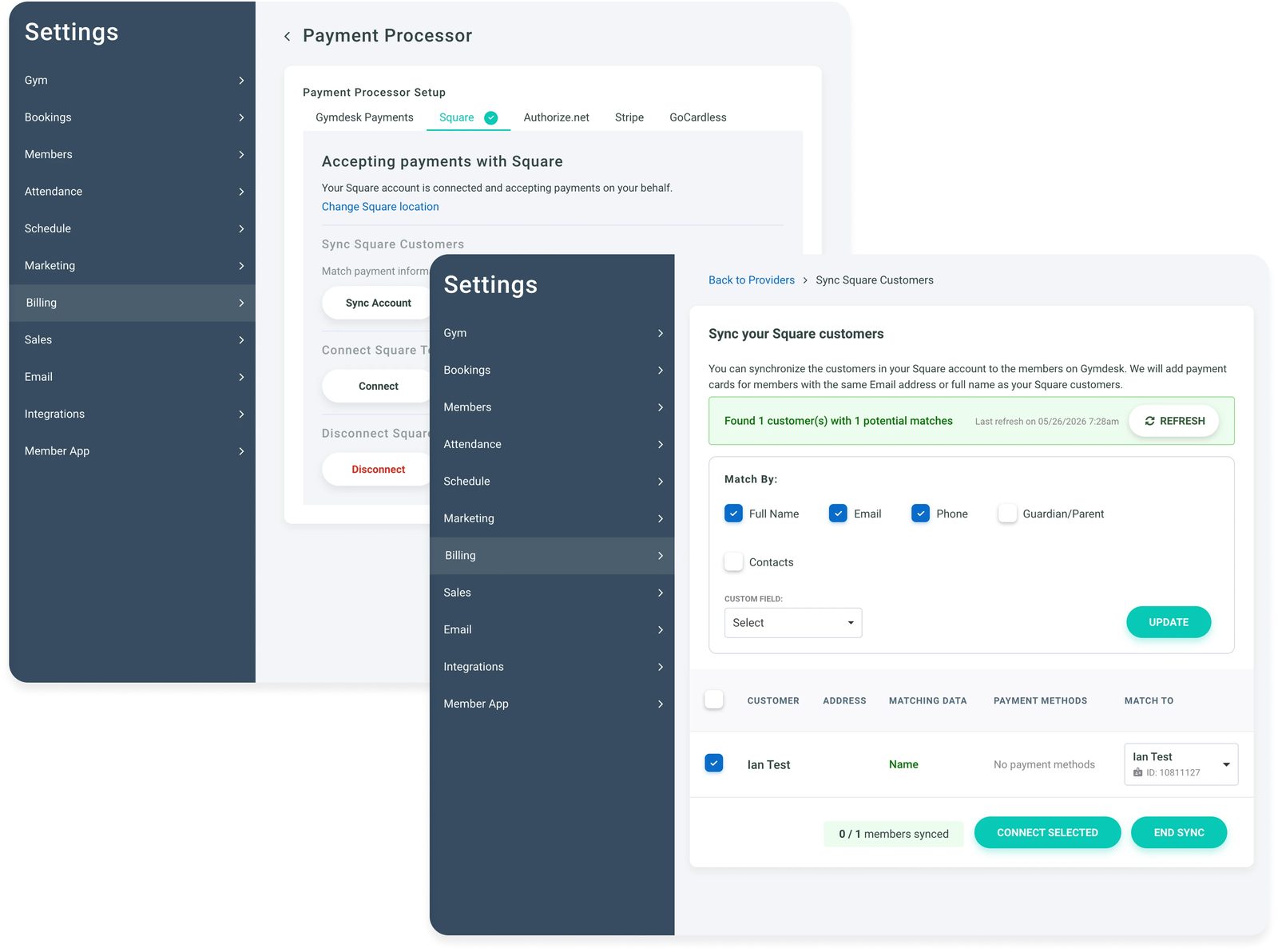
They don't re-enter anything.
Direct-debit mandates depend on the processor and the country, so confirm with Gymdesk before you set a switch date.
Moving from Mat Track to Gymdesk
Cards on Stripe
They come with you
Connect the same Stripe account to Gymdesk, and Payment Method Sync matches the stored cards to your members. They don't re-enter anything.
Direct-debit mandates
Confirm first
It depends on the processor and the country, so confirm with Gymdesk before you set a switch date.
Members, plans, attendance
CSV export and import
The same on both sides.
Going the other way, Mat Track's own pages disagree with each other.
Its pricing FAQ says matched Stripe and GoCardless customers mean "billing carries over." Its Gymdesk comparison page says cards and direct debits "need fresh member consent."
Ask Mat Track which applies to you.
One caution either way: if you're moving between processors, some won't release stored cards, and transfers can take weeks. Ask before you announce anything to members.
The rest of the move (members, plans, attendance) is a CSV export and import on both sides. The guide on how to switch gym software walks through the order of operations.
Who Should Pick Which
Most gyms can tell from member count and what they want automated.
CHOOSE MAT TRACK IF
- You run a gym under 100 members and the lowest monthly price matters most.
- You want a social member app with streaks, challenges, and leaderboards.
- You're happy on Stripe or GoCardless and don't need a website from your gym software.
CHOOSE GYMDESK IF
- You want automated absence and cancellation follow-ups at any size, including under 100 members.
- You want promotion criteria, auto-promotion on check-in, and grading events with invitations and evaluations.
- You want a website, point of sale, and door access (in beta) in the same account, or more than two processor options.
- Your students compete in Smoothcomp events.
Weighing more than these two? The roundup of martial arts management software covers the wider field.
The Honest Answer
Mat Track wins on price. Gymdesk wins on what the plan includes, most of all at 100 members or fewer, where Mat Track's plan has no automated follow-ups.
Put your own member count into both pricing pages and see which side of 100 you land on. Then start a free trial of whichever one you're leaning toward.
The chef has a favorite. You knew that going in.
Gym management software that frees up your time and helps you grow.
Simplified billing, enrollment, student management, and marketing features that help you grow your gym or martial arts school.


FAQ
Gymdesk vs Mat Track FAQs
A few questions that come up when owners compare the two.

Sean has spent the last decade creating content that helps businesses—small and not so small—grow smarter to allow operators to do more of what they love. You know, the fun stuff.
From shipping and international logistics to web development and marketing, he's done the work (not just the words) to scale retail and service businesses efficiently.
You can find his work at Sendle, Shogun, The Retail Exec, Gymdesk, and more.