
Gym Management
Management content for gym and studio owners—staff, scheduling, billing, operations, and the systems that get you off the computer.
It's the first week of the month, and you've got three tabs open.
Your software says you took in $18,400 in October. Your processor's payout report says $17,690. Your bank statement says $17,120.
Same month, three numbers
That's a $1,280 gap, and nobody stole it.
Cash Flow Kung Fu (a made-up school), October
That's three different numbers for the same month, and one very tired owner with a calculator trying to make them agree.
That gap is a big part of why martial arts accounting feels harder than it should. Nobody stole $1,280 from you.
Each of those numbers counts something slightly different, on a slightly different calendar, and none of them labels the difference.
This guide walks one made-up school from the first number to the last, dollar by dollar, then does the same for the two member counts that won't agree either.
Gymdesk makes the software behind that first number, so I'm not exactly neutral here. I'll show you where our reports save you time and where you're still on your own.
I also don't do taxes, and you shouldn't take tax advice from a guy who writes blog posts. Every tax question in here ends with "ask your accountant."
Key Takeaways
Key takeaways
Your software, your processor, and your bank each report a different revenue number, and all three can be right at once.
Processing fees, payout timing, refunds, disputes, and cash explain almost every gap.
Book income at the gross amount your students paid, then record fees and refunds as their own lines.
In the US, your processor's Form 1099-K reports card and payment-app payments at the gross amount, not adjusted for fees or refunds. ACH bank payments and cash aren't on it, so it won't line up neatly with your deposits.
Paying members and active members are different counts, and family plans are where they split the most.
Keep testing fees, pro-shop gear, seminars, and family plans in their own categories so year-end sorting goes faster.
The Revenue a Martial Arts School Actually Has to Track
A general gym sells memberships and the occasional protein bar.
A martial arts school runs about five small businesses under one roof, and they don't behave the same way on paper.
To make this concrete, I'll use Cash Flow Kung Fu, a made-up school with about 140 students, two-thirds of them kids (any resemblance to your own bookkeeping is a coincidence).
In a normal month, Cash Flow Kung Fu's money comes from five places:
Five revenue streams
Monthly memberships on autopay. This is the steady part.
Lumpy by design. Cash Flow Kung Fu tests every eight weeks, so two months out of three look slow and the third looks great.
Uniforms, sparring gear, belts. This is the line that may carry sales tax, depending on your state, so ask your accountant how it applies to you.
A visiting black belt, a tournament entry, a summer camp. One-offs that can swing a month by thousands.
Three siblings on one payment. One charge, three students, which matters more than you'd think (we'll get there).
Cash Flow Kung Fu (a made-up school)
And then the calendar does its thing. At Cash Flow Kung Fu, kids' enrollment jumps in September and dips in summer.
Testing months spike, and a seminar in March makes March look like the best month ever, right before April makes you wonder what happened.
Why Your Three Revenue Numbers Don't Agree
Each number comes out of a different system, and each system counts its own way. Pin this table somewhere you'll see it next month.
Number | Where it lives | What it counts | Trust it for |
|---|---|---|---|
Software revenue | Your gym software's billing reports | Everything marked paid, including cash and checks you logged by hand | What your students paid you |
Processor payouts | Your payment processor's dashboard | Card and bank payments, minus fees, refunds, and disputes | What the processor sent you |
Bank deposits | Your bank statement | Payouts by the day they landed, plus any cash you deposited | What's actually in the account |
All three are correct. They're just answering different questions.
Run Cash Flow Kung Fu's October through those three columns, and $18,400 turns into $17,120 in three steps.
Gap one: Cash and checks
Cash Flow Kung Fu collected $300 in cash at a testing day and logged it in its software.
That cash is still in the office cash box, waiting for the next bank run, so neither the processor nor October's bank statement knows it exists.
That leaves $18,100 in card and bank payments through the processor.
Gap two: Processing fees
The processor kept $410 in fees on that $18,100, which leaves $17,690. How that shows up depends on your setup.
If fees come out of each payout, October's payouts add up to $17,690. If they're debited separately, you'll see $18,100 in payouts and a $410 withdrawal from your bank account.
Gap two: processing fees
Fees taken out of each payout
Fees debited separately
Either way, the processor kept $410. What changes is where it shows up.
Cash Flow Kung Fu (a made-up school), October
Gymdesk Payments, for example, needs debits enabled on your bank account so it can pull processing fees.
There's more on what those fees cover in our guide to gym payment processing fees.
Gap three: Timing
Processors don't pay you the moment a student pays.
On Gymdesk Payments, card payments land two business days after the transaction, and bank (ACH) payments land four business days after.
Other processors run their own schedules, so check yours.
That means $870 of autopay from October 30 and 31 shows up in November's bank statement. Meanwhile, a different $300, from September 29 and 30, showed up in October's.
Gap three: timing
Gymdesk Payments: card
Lands two business days after
Gymdesk Payments: bank (ACH)
Lands four business days after
$300
Autopay from Sept 29 and 30
Shows up in October's bank statement
$870
Autopay from Oct 30 and 31
Shows up in November's bank statement
Other processors run their own schedules, so check yours.
Cash Flow Kung Fu (a made-up school), October
Take $17,690, subtract $870, add $300, and you get $17,120. That's the bank number.
The whole October, from software to bank:
Step | Change | Running total |
|---|---|---|
Software revenue | $18,400 | |
Cash still in the cash box | −$300 | $18,100 |
Processing fees | −$410 | $17,690 (payout total) |
Oct 30–31 autopay lands in November | −$870 | $16,820 |
Sept 29–30 autopay lands in October | +$300 | $17,120 (bank number) |
Cash Flow Kung Fu (a made-up school), October
Every dollar is accounted for. It just took a table and a nap.
Gap four: Refunds and disputes
Cash Flow Kung Fu didn't have any refunds or disputes in October. Most months, you will.
When you refund a student, the full amount goes back to them, and the original processing fee usually stays gone. On Gymdesk Payments, the gym absorbs the original fee and pays a $0.30 transaction fee on the refund itself.
A dispute (a chargeback) is when a student asks their bank to reverse a charge.
You can lose the money while the bank decides, and the card network typically takes 30 to 60 days to resolve it.
That's a month or two where your software says "paid" and your bank disagrees.
Your 1099-K won't match your deposits either
Once a year, a fourth number shows up. In the US, your card processor sends you a Form 1099-K every year, whatever your volume.
The gross amount on that form isn't adjusted for fees, credits, or refunds. ACH bank payments and cash aren't on it at all, so your total deposits can come out higher or lower than the form.
Form 1099-K (US)
On your 1099-K
- Card payments
- Payment-app payments
At the gross amount, not adjusted for fees, credits, or refunds.
Not on it
- ACH bank payments
- Cash
So your total deposits can come out higher or lower than the form.
Source: IRS, What to do with Form 1099-K
Your books should show the fees, refunds, and non-card income that explain the difference, and your accountant will take it from there.
How to Reconcile Your Software, Processor, and Bank
Set aside an hour on the same day each month. Cash Flow Kung Fu does it on the 5th, after the last of the prior month's payouts have landed.
If you only take on one martial arts accounting chore yourself, make it this one.
Open these three before you start:
- Your software's payment export for last month
- Your processor's payout report for the same dates
- Your bank statement
Step 1: Match the date ranges
Pull the software export and the processor report for the same calendar month.
Then pull the bank statement for that month plus the first week of the next one, so you catch the late payouts.
Step 2: Separate cash from card
Filter out cash, checks, and anything else you logged by hand. Those match up against the cash deposits you made, not the processor.
What's left should be roughly what the processor saw.
(Cash Flow Kung Fu's $300 is still sitting in the cash box. Be better than Cash Flow Kung Fu.)
Step 3: Subtract fees, refunds, and disputes
Take the processor's fee total for the month and its refund and dispute lines. Subtract them from the card total.
You should be within a few dollars of the payout total.
Step 4: Line up payouts against deposits
Each payout should match one deposit on your bank statement, a couple of business days later.
Tick them off one by one. The ones that don't match are your timing gap.
Step 5: Chase whatever's left
If you're still off after all that, it's usually one of three things:
- A refund issued in the processor's portal instead of your gym software, so one system knows about it and the other doesn't
- A payment marked "paid" by hand that never actually went through
- A dispute you haven't seen yet
On the first one, Gymdesk Payments asks you to always refund inside Gymdesk, because refunding in the processor's portal knocks the two systems out of sync.
Whatever software you use, pick one place to issue refunds and always use it.
Gym owner tip: Write down the reason for every gap you find, even the boring ones. By month three, you'll know your school's normal gap ("about $400 in fees and a couple hundred in timing") and you'll spot a weird month in seconds.
Sample gap log
Cash Flow Kung Fu (a made-up school), October
Where Gymdesk Helps (and Where It Doesn't)
Gymdesk's reports cover the starting numbers. The matching after that is still yours.
The Accounting screen pulls member payments and point-of-sale sales into one list. Pick a date range, hit Export to CSV, and you get a spreadsheet file any accounting app can open.
That handles the software side of step one.
The Billing Growth report splits collected revenue into memberships and point-of-sale, and it shows pending payments separately.
Pending means scheduled or upcoming payments that haven't been processed yet, so keep them out of your income numbers until they're actually paid.
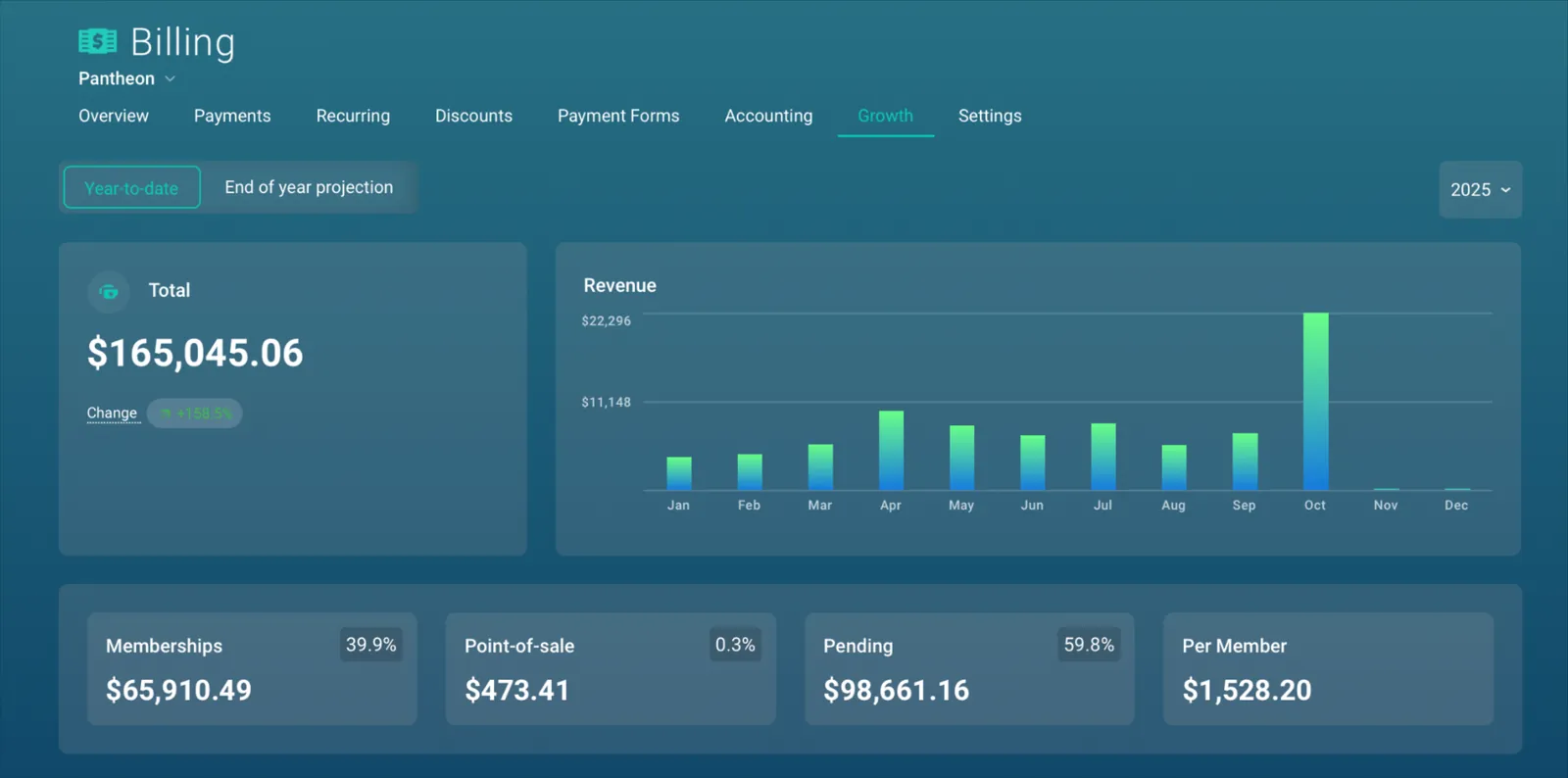
You can read more about sales and shop reporting on the blog, or see the full reporting features.
What it won't do: match your payouts to your bank deposits for you. Steps two through five still happen in a spreadsheet, by you or by a bookkeeper.
Where Gymdesk helps
What Gymdesk does
- The Accounting screen exports member payments and point-of-sale sales to CSV for any date range you pick
- The Billing Growth report splits collected revenue into memberships and point-of-sale, and shows pending payments separately
What it doesn't do
- Match your payouts to your bank deposits
- Steps two through five: those still happen in a spreadsheet, by you or by a bookkeeper
(I'd vote bookkeeper if this post has already made you tired. I'm a little sleepy myself.)
If you're still picking tools, we've compared gym accounting software and martial arts billing software in their own guides.
Member Counts: Why Two Reports Show Different Numbers
Open the Billing Growth report and the Member Growth report for the same month, and the member counts may not match.
Each one counts a different group of people. Cash Flow Kung Fu's three siblings on one family plan show the difference:
Report | What it counts | Family of three | Use it for |
|---|---|---|---|
Billing Growth | Paying members: the people actually being charged | One | Revenue-per-member math |
Member Growth | Active members: every student whose status is active | Three | Class sizes, staffing, how many belts to order |
Cash Flow Kung Fu (a made-up school)
The one-payer rule comes from our post on the monthly revenue report. Multiply it across a kids-heavy school and the gap gets big fast.
One catch: the Billing Growth report's Per Member tile divides revenue by active members, so on a family-heavy school it reads lower than revenue per paying member.
Two more groups move the count:
- Frozen students drop off your active member list, but the Member Growth report still treats them as active when it calculates growth. Only cancellations count toward the cancellation rate.
- Trial students on trial memberships aren't on a regular plan yet. Decide whether your monthly numbers include them, and count them the same way every month.
With your revenue per paying member in hand, see how it stacks up in our gym benchmark report, built from 4,594 active martial arts and combat-sports schools on Gymdesk.
How to Categorize Martial Arts Revenue and Expenses
Your accountant will build the actual chart of accounts (the list of categories your books sort money into).
Day-to-day martial arts school bookkeeping is mostly sorting the money into the right buckets as it comes in, and doing that well makes their job, and your bill, a lot smaller.
Income categories worth keeping separate:
Category | What goes in it | Why separate it |
|---|---|---|
Tuition | Monthly and annual memberships | Your core recurring income |
Sign-up fees | One-time enrollment fees | Tells you what new students are worth up front |
Testing and belt fees | Promotion tests, belt and stripe fees | Lumpy, so it skews tuition trends if mixed in |
Pro shop | Uniforms, gear, belts, apparel | May carry sales tax, and has inventory cost |
Seminars and events | Guest instructors, camps, tournaments | One-offs that distort month-to-month comparisons |
Private lessons | One-on-one or small-group sessions | Often split with the instructor |
If you're on Gymdesk, belt-test fees can be set as promotion fees on each rank, with tax applied if you need it, and seminars can run through their own payment form. That keeps both out of the tuition line before they ever reach your spreadsheet.
Expense lines that people forget:
- Processing fees. Book them as an expense of their own. This line explains most of the gap between your 1099-K and your card deposits.
- Refunds. Their own line, so you can see if one program refunds more than the others.
- Chargebacks. Their own line too, so you notice if they start creeping up.
- Pro-shop inventory. Gear you bought to resell. Ask your accountant how to track it, because it isn't the same as an ordinary expense.
The pro-shop line is the easiest one for a dojo to get wrong.
A $60 gi brings in $60 minus whatever you paid for it, minus any sales tax you owe the state. (Your accountant will have a lot to say about that last part.)
Pro-shop math
$60
The price
What you paid for it
Any sales tax you owe the state
What the gi brings in
For the chart-of-accounts basics that apply to every kind of gym, start with our guide to accounting for gyms.
What to Hand Your Accountant at Year End
Your accountant will have their own list. Showing up with these covers most of it, and saves you a few back-and-forth emails in February.
Year-end packet
- Your software's full-year payment export, with membership and point-of-sale sales split out
- Twelve months of processor payout reports
- Twelve months of business bank statements
- Every Form 1099-K you received
- Your monthly reconciliation notes (the gap reasons you wrote down)
- A list of refunds and chargebacks for the year
- Pro-shop inventory: what you bought, what's left on the shelf
- Payments to instructors, so your accountant can sort out what forms they need
Twelve monthly reconciliations make this a one-hour job. Zero makes it a weekend.
Pick a Day, Close the Gap
Put an hour on your calendar for the same day every month, run the five steps, and write down the reason for whatever's left.
That hour is most of the martial arts accounting you'll ever have to do yourself.
For martial arts schools
Gymdesk exports every payment and shop sale in one file, so your monthly reconciliation starts from a clean list. Try it free for 30 days.
Want the starting number to be the easy part? Gymdesk exports every payment and shop sale in one file, and the software for martial arts schools handles billing, belts, and attendance in one place.
You can try it free for 30 days.
The spreadsheet part is still yours. Sorry. I did say I'd tell you where you're on your own.

