It's 9 PM. Your last class wrapped an hour ago.
The front desk is dark.
Someone is standing outside in the cold because their membership lapsed three weeks ago and nobody caught it.
Either you drive back to let them in, or you don't. And now it's a one-star review with your name in it.
A 24/7 gym access system has one real job: Every single time someone taps in, decide whether the person on the other side still pays you.
The lock is the easy part.
Extending your hours or going fully unstaffed is one of the cleanest ways to add capacity without adding rent or staff. More hours, same building.
What stands in the way is almost always the same thing: the door has no idea who's a paid-up member and who let their card expire in March.
Educate first. You can decide who to call after.
What a 24/7 Gym Access System Has to Do
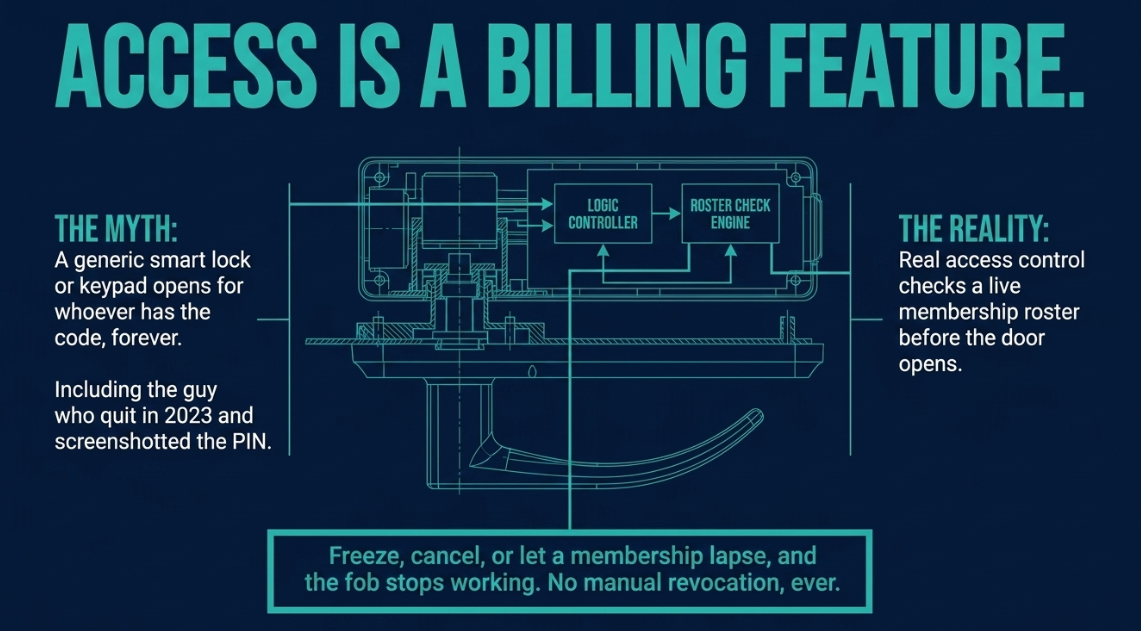
A basic gym door lock system is not access control.
A deadbolt with an app, or a keypad code, opens for whoever has it, forever, including the guy who quit in 2023 and still has the code screenshotted.
What a gym actually needs is access that reads membership status.
When someone taps to get in, the system checks whether they have an active membership before the door opens. And it does that on its own, with nobody watching a screen at 3 AM.
The behavior owners ask for most is also the hardest to fake with a generic smart lock: access follows the membership automatically.
Freeze, cancel, or let a membership lapse, and the fob stops working. No manual revocation, ever.
The trick is where the "who's allowed in" list lives.
When access runs inside the same software as your billing and memberships, you're not maintaining a second list of approved people that slowly drifts out of sync with reality.
The list is your membership roster.
Change someone's status and their door access changes with them, the same minute.
Most of the pain of unstaffed hours comes from the gap between "this person stopped paying" and "this person can no longer get in." Close that gap to zero and the door mostly runs itself.
KEY TAKEAWAY:
When access runs inside the same software as your billing, the "who's allowed in" list is your membership roster. Freeze, cancel, or let a membership lapse, and the fob stops working automatically—no manual revocation, ever.
Close the gap between "this person stopped paying" and "this person can no longer get in" to zero, and the door mostly runs itself.
The Ways Members Get In
Members don't agree on how they want to get in, and they never will.
Plan for that up front.
Some want a physical fob. Kids who don't carry phones, older members, the guy on a flip phone, and plenty of people who simply don't want to open an app at 6 AM with cold hands. Others would rather leave the fob at home and tap their phone.
The right answer is to let each member use whatever fits. Fob or phone, their choice, same door.
Two things to nail down before you buy anything:
- The fobs are standard 13.56 MHz NFC. You can bring your own for roughly $17–20 per 100, so re-keying an entire gym costs about as much as a large pizza order.
- Your old fobs probably won't work. Most existing gym fobs are 125 kHz, an older technology the newer readers can't read. If you're counting on reusing the fobs already in your members' pockets, verify the frequency first. This is the single most common surprise in the whole project, and it's a five-minute check that saves a bad afternoon.
PRO TIP:
Before you fall in love with any 24/7 gym access system, find one of your current fobs and confirm whether it's 125 kHz or 13.56 MHz. If it's the old 125 kHz kind, the newer readers can't read it—budget for new fobs from day one.
It's a five-minute check that saves a bad afternoon. It's the surprise that stings, not the cost.
Keypads and biometric readers exist too, and they have their place.
But for most gyms, the fob-or-phone combination covers the whole membership without asking anyone to memorize a PIN or scan a fingerprint they didn't sign up for.
What Happens When the Internet Drops
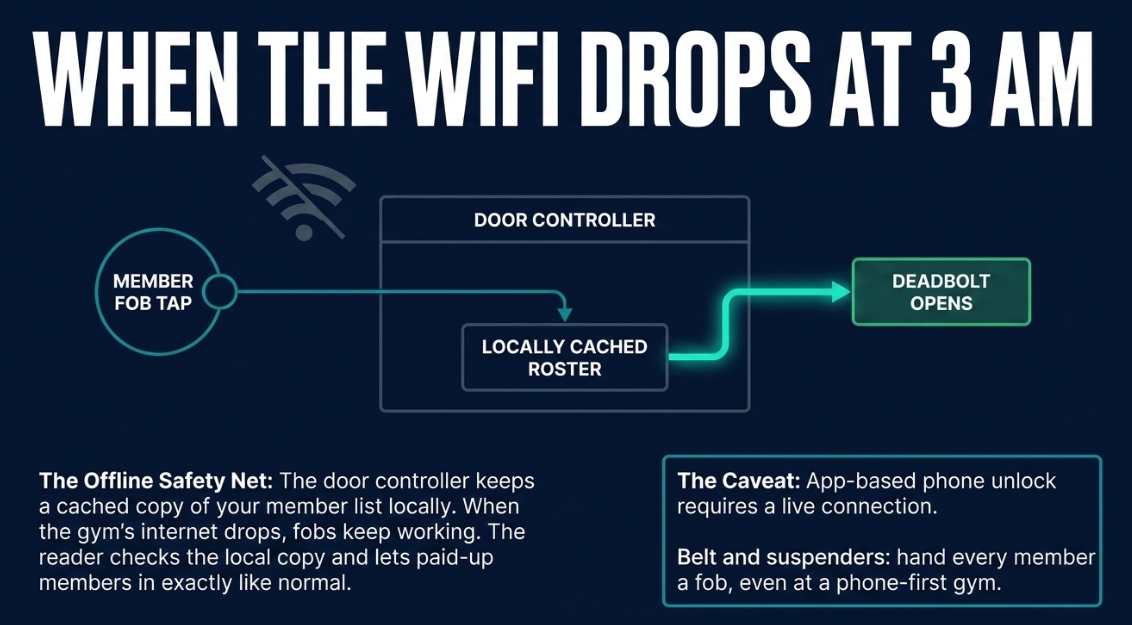
At 3 AM, "the WiFi went down" cannot mean "nobody can get into the gym they pay for."
So here's how a 24/7 gym access system behaves offline.
The door controller keeps a cached copy of your member list locally. So when the gym's internet drops, fobs keep working. The reader checks the local copy and lets your paid-up members in exactly like normal.

App-based phone unlock is the exception. It needs a live connection to talk to the system.
That's a good reason to hand every member a fob even at a phone-first gym: the fob is the one that keeps working when the router doesn't.
Belt and suspenders, and both are cheap.
We'll keep you in the loop with fresh content, podcasts, how-to guides, tool reviews, and product exclusives.
Integrated vs Standalone Access Control
There's a fork in the road here, and it's the one that actually matters for your bill and your sanity.
You can buy access control as a separate product. Kisi, Brivo, Openpath, Verkada.
They all make solid gear.
But they'll happily sell you a second platform with its own login and its own monthly charge, one that has no idea your member in bay four stopped paying.
You, or a staffer, become the sync layer between "who paid" and "who gets in."
That's a job. A boring one you'll forget on a Friday.
Capability | Integrated (Gymdesk) | Standalone (Kisi, Brivo, Openpath…) |
Access reads membership status automatically | ✓ | ✗ |
No second "approved" list to keep in sync | ✓ | ✗ |
One monthly bill, one login | ✓ | ✗ |
One support path when something breaks | ✓ | ✗ |
The integrated approach makes the door read your membership software directly.
One system runs the memberships, the billing, and the access, so there's nothing to keep in sync. It's all one list.
That's the wedge: access control belongs inside the software already running your gym. Same bill, same roster.
On the hardware side, our door access runs on Rhombus.
For an unstaffed gym, the hardware is the part that simply has to work. The door has to open at 3 AM with nobody there to reset it, so it can't be a hobbyist smart lock.
That's why the gear matters.
Rhombus is the same access hardware 24 Hour Fitness runs, and it also runs In-Shape's 60-plus clubs.
It's rated #1 in Physical Security on G2 and carries a 10-year warranty. You get equipment proven at chain scale without having to be a chain to run it.
And it's one system with one support path.
You buy the hardware and access through Gymdesk, and it's installed by a managed installer network that finds, bids, and schedules the job, so nobody at your gym touches a screwdriver.
When something needs attention, you have one number to call instead of a door that depends on three companies agreeing whose fault it is.
The way to think about it: you want the best gym software and the best door hardware, together. Platforms that try to build both in-house from scratch tend to do both about halfway.
Tailgating and Shared Fobs: What a Fob Can and Can't Fix
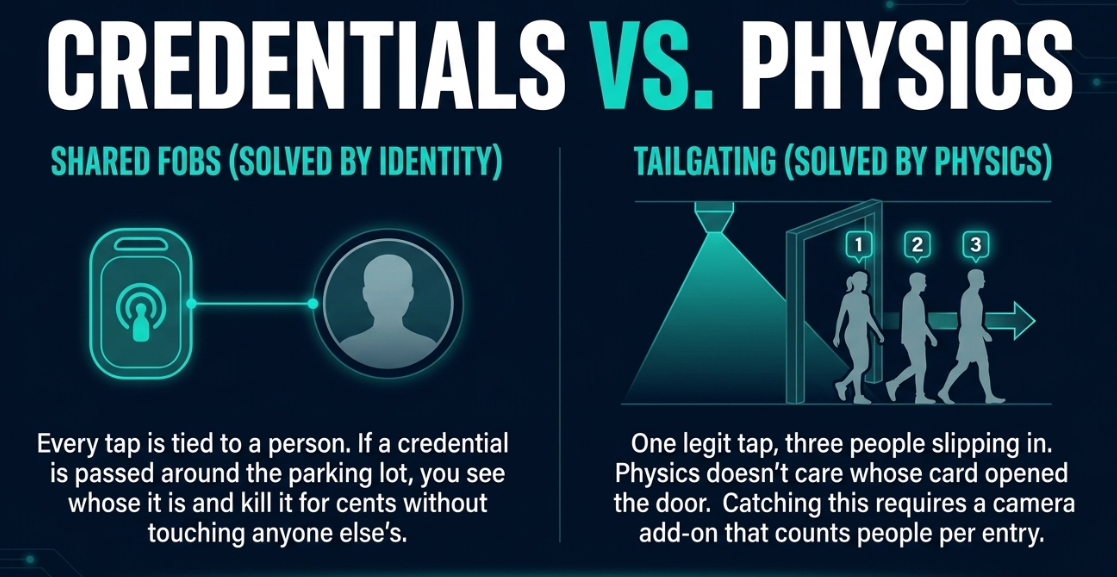
These get lumped together as "security," but they're two different problems, and a credential only solves one of them.
Shared fobs are solved by identity.
Every member gets their own fob, every tap is tied to that person, and you can kill a single lost or shared fob without touching anyone else's.
A replacement costs cents. If one credential is getting passed around the parking lot, you see whose it is and shut it off.
Tailgating—one legit tap, three people slipping in behind—is not something any fob can stop.
Physics doesn't care whose card opened the door. Catching that takes a camera.
If it's a real concern for your space, the reader is available with a built-in camera (or a separate dome camera) that counts people per entry and flags the mismatches, with the alerts living in your own security console.
So set the expectation honestly. The base kit gives you per-person accountability, which fixes shared-fob abuse cleanly.
WARNING:
The base kit gives you per-person accountability, which fixes shared-fob abuse cleanly. But tailgating—one legit tap, three people slipping in behind—is a camera problem, not a credential one.
Tailgating detection is a camera add-on, not a fob feature. Anyone who tells you a keychain fob stops tailgating is selling you something.
What a 24/7 Gym Access System Costs
Pricing has two parts, and the honest picture includes both. Nobody likes the vendor who quotes you the monthly and stays quiet about the hardware.
Monthly, on your Gymdesk bill: $100 a month covers up to three devices, then $29 a month per device after that. No separate access-platform contract stapled to the side.
One-time, for hardware and installation: a single-door setup runs roughly $3,100–3,400 all in. That's the controller and reader plus professional install. Those figures are estimates until your specific install gets quoted, so treat them as a planning number, not a promise.
The per-door cost drops fast as you add doors, because one controller runs up to four of them.
Two or three doors don't cost three times as much as one.
It's a real upfront number. Weigh it against the thing it replaces: paying a human to sit at a front desk for the hours you want the doors open.
For most gyms extending into early mornings, late nights, or full 24/7, the door pays for itself against the labor it stands in for, and then keeps paying.
If you're pricing the broader software side too, our gym management software cost breakdown covers where the monthly access fee sits in the total.
Is 24/7 Access Actually Safe?
Access control is the mechanics—who gets in and when.
Safety is a separate question, and a real one: liability, insurance, emergency coverage, and the house rules that keep an unstaffed gym from turning into a 2 AM problem.
That's its own topic, and we've covered it properly in our guide to running a 24-hour gym safely. Read that one before you flip the switch on unstaffed hours. It's the half of this decision the hardware doesn't cover.
If you're still deciding whether unstaffed hours make sense for your gym at all, the 24-hour gym pros and cons is the place to start.
How to Choose a 24/7 Gym Access System
Strip away the brochures and the buying decision comes down to a few things.
Two of them cut deepest.
Does access read membership status automatically, or does someone have to revoke people by hand? Can members choose a fob or their phone, or are you forcing one method on a mixed crowd?
The other two are quick to confirm: The fobs keep working when the internet drops, and when something breaks you call one company instead of refereeing a fight between three.
If access is already living inside the software running your gym, most of those answers take care of themselves. The door just reads the roster you're already keeping current.
You can see how membership-linked entry fits with the rest of the platform on our gym access control page, or talk to our team about what a setup would look like for your space and how many doors you'd need to cover.
If you're also sorting out how members tap in for regular staffed classes, our gym check-in system guide covers that adjacent piece. If your building is a dojo with open mat hours rather than a 24-hour floor, access control for martial arts schools runs on the same membership link.
Extend your hours. Let the door do the front desk's job after the front desk goes home. The members who want to train at 5 AM get to, the ones who stopped paying don't, and you get to sleep through all of it.
Gym management software that frees up your time and helps you grow.
Simplified billing, enrollment, student management, and marketing features that help you grow your gym or martial arts school.


FAQ
24/7 Gym Access System FAQs

Sean has spent the last decade creating content that helps businesses—small and not so small—grow smarter to allow operators to do more of what they love. You know, the fun stuff.
From shipping and international logistics to web development and marketing, he's done the work (not just the words) to scale retail and service businesses efficiently.
You can find his work at Sendle, Shogun, The Retail Exec, Gymdesk, and more.