How to Run a 24-Hour Gym Safely (Without Getting Sued)

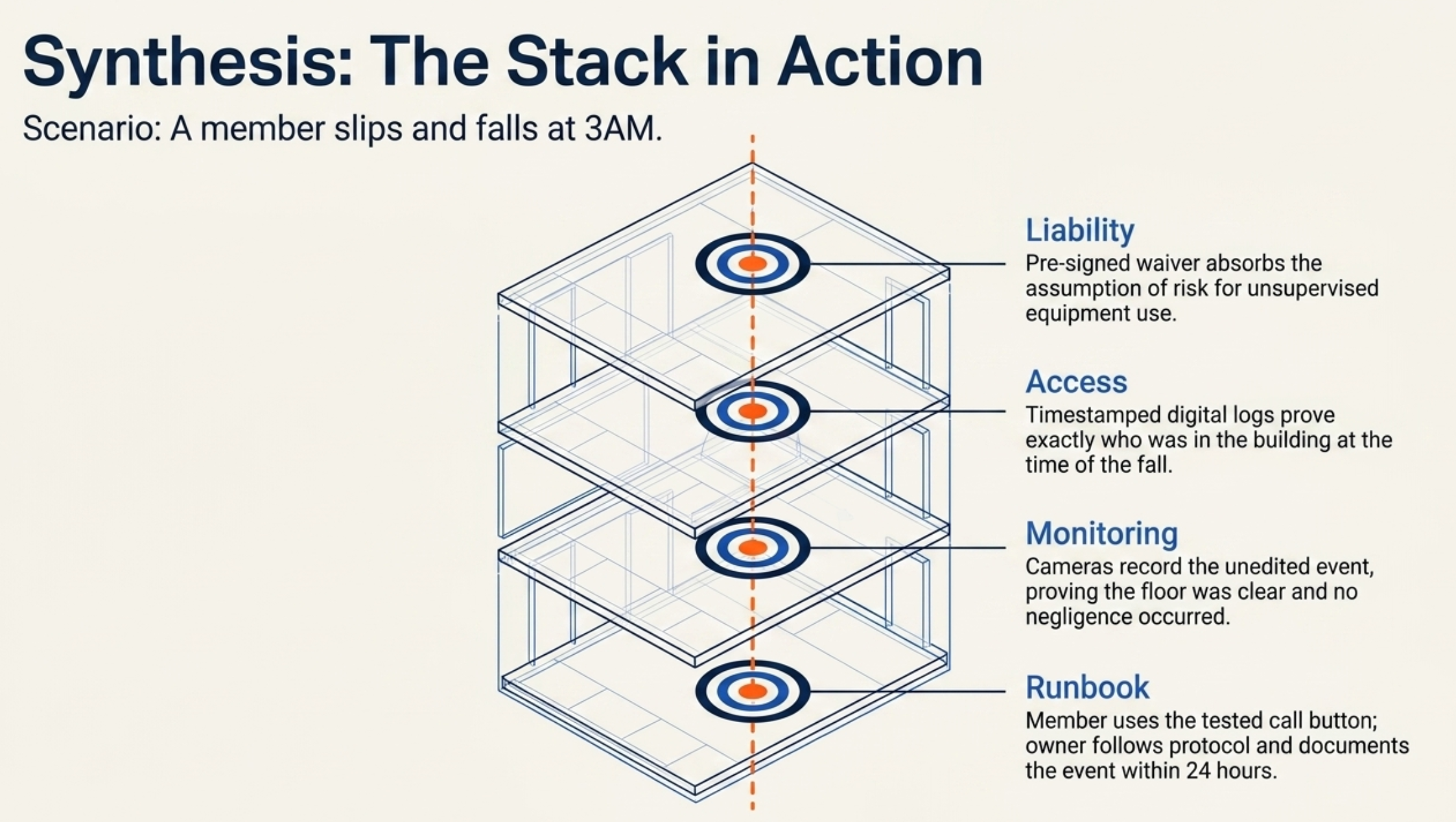
It's 3am and a member is on the floor of your gym. Nobody's at the desk. The cameras are recording. Two other members are standing over him, one is on the phone with 911, and the other is trying to figure out where the AED is.
What happens next depends almost entirely on the choices you made months ago.
Running a 24-hour gym is one of the better business decisions in fitness right now. You unlock revenue without locking in labor costs, you serve members on their schedule, and your space stops being dead at 9pm.
If you're still weighing whether to make the jump, our 24-hour gym pros and cons post is where to start.
This one is for the owner who's already decided. You're going 24/7, or you already are. The question now is how to do it without getting sued, and without something genuinely bad happening to a member while you're asleep.
KEY TAKEAWAY:
24-hour gym security comes down to a stack of four layers: liability, access, monitoring, and a written plan for the moment when none of the other three caught it in time.
Here's how to build that stack.
What 24-Hour Gym Security Actually Means When Nobody's at the Desk
Most articles about 24-hour gym safety are written for members. Wear a fob. Park under a light. Tell a friend where you are.
Useful, sure. Not your problem.
Your problem is different. As an owner running unstaffed hours, you're absorbing four categories of risk that a 6am-to-10pm gym doesn't have to think about:
- Medical incidents. Somebody gets hurt or has a cardiac event with no staff to respond.
- Security incidents. Theft, harassment, an unauthorized person tailgating behind a member.
- Equipment and facility failures. A sparking outlet, a leak, a treadmill that won't stop.
- Liability after the fact. Someone files a claim, and you have to prove you weren't negligent.
Every section below maps to one or more of these. If a security feature, an insurance line item, or a piece of paperwork doesn't reduce one of these four risks, it's not pulling its weight.
There's a baseline of gym safety best practices that applies to every gym: equipment maintenance, layout, cleanliness, member orientation.
Assume you've got that handled. The 24/7 stack is what you bolt on top.
The Liability Stack
Start here, even though it's the part nobody wants to read. The unsexy bit is the part that decides whether one bad incident closes your business.
Quick note before we go further: this is operational guidance, not legal advice. Confirm waiver language, minor-access rules, and insurance specifics with a licensed attorney and broker in your jurisdiction.
Insurance that actually covers unstaffed hours
Pull your current general liability policy and read the exclusions. I'll wait.
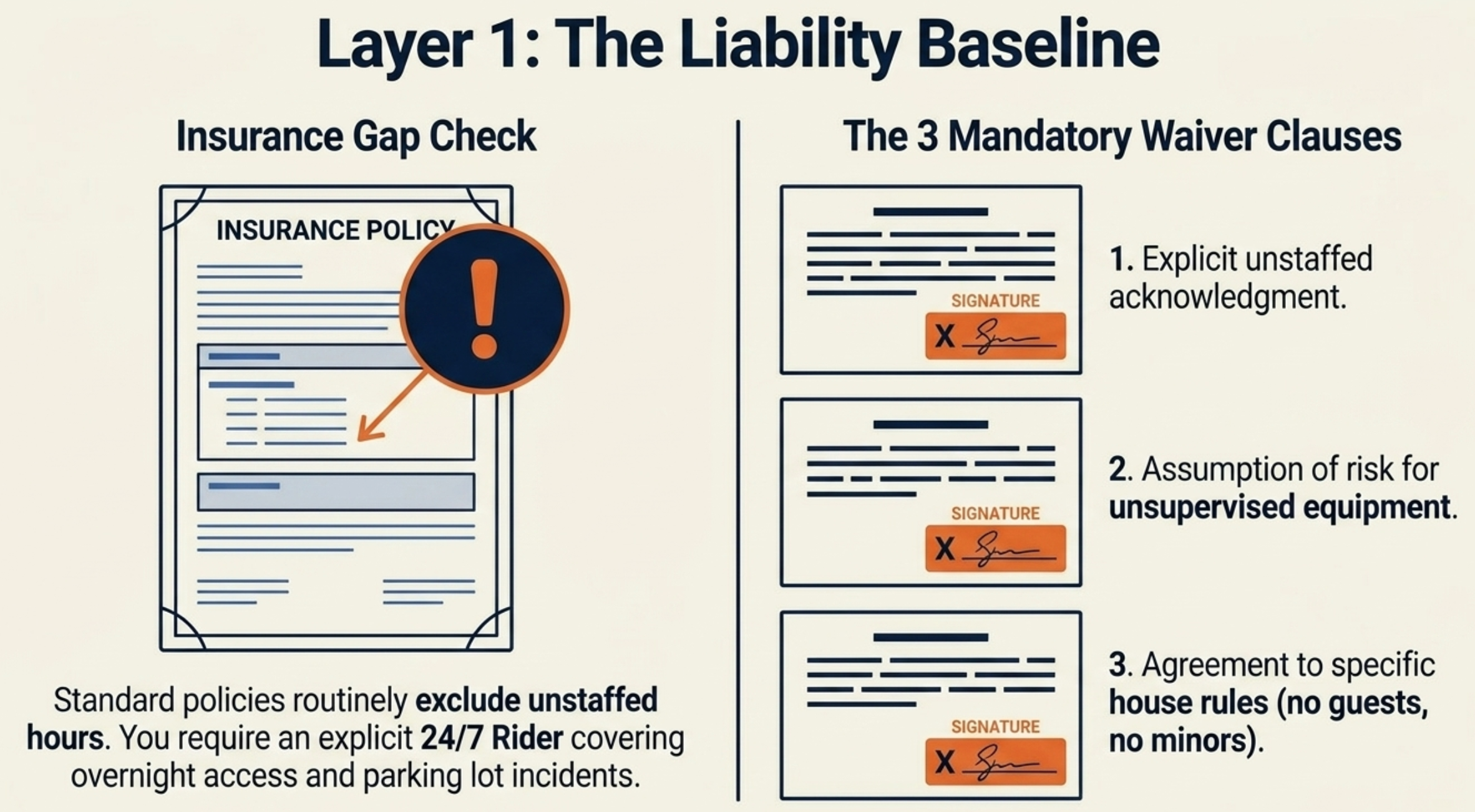
Many standard gym policies exclude or limit coverage during unstaffed hours—which is why this is the first line item to check.
Some require an attendant on premises any time members are. Some exclude overnight access entirely. Some only cover incidents that occur during posted staff hours.
IMPORTANT:
If you're running 24/7 on a policy that doesn't explicitly cover unstaffed access, you are uninsured for the part of the day you most need to be insured. Get the answer from your broker in writing before you flip the switch.
What to do:
- Call your broker and ask, in writing, whether your current policy covers unstaffed access. Get the answer in writing.
- If it doesn't, get a 24-hour rider or a new policy. Premiums will go up. That's expensive. It's the cost of running 24/7. Bake it into your pricing.
- Confirm the policy covers the specific things that actually happen at 3am: cardiac events, slip-and-falls, equipment-related injuries, and (this one gets missed) incidents in the parking lot.
If you want a primer on the categories you're shopping across, our gym insurance policy guide and types of gym insurance are both worth reading before you call your broker.
Waiver language built for 24/7
Your standard membership waiver is probably not enough. It was written for a staffed gym.
A 24/7 waiver needs to do three extra things:
- State explicitly that the member acknowledges there are hours when no staff is present.
- State that the member assumes the risk of using equipment without supervision during those hours.
- State that the member agrees to follow specific rules (no guests, no propping doors open, no unaccompanied minors) that you can point back to if something goes wrong.
A handshake addendum doesn't count. The 24/7 acknowledgment needs to be a separately initialed line, ideally captured digitally, so you have a timestamped record.
Whether a waiver is enough on its own to protect you in a lawsuit is another question entirely. Short answer: liability waivers aren't bulletproof. Waiver enforceability also varies by state—some won't enforce them for negligence claims at all—so have local counsel review the language. Treat them as one layer, not the only one.
Member vetting before the fob gets activated
This is the cheapest, highest-impact move in the entire stack.
Before a member gets 24/7 access:
- They sign the 24/7-specific waiver (separate from the standard one).
- They complete an in-person orientation covering equipment, emergency call buttons, AED location, and who to call.
- They acknowledge house rules in writing (no guests, no door-propping, no minors).
- Set a minimum age—most owners land at 18, or 16 with a parent's signature and a separate liability section. Confirm your jurisdiction's rules with counsel.
Call it bureaucracy if you want.
PRO TIP:
"The member knew the risks and the rules" is a defensible position. "The member walked in and got hurt" is a settlement. Vetting before fob activation is the cheapest, highest-impact move in the entire stack.
Documentation you'll be glad you kept
After every incident, and ideally for every camera and emergency-button check, you want a paper trail. The judge isn't going to take your word for it.
Keep, at minimum:
- Signed waivers and orientation acknowledgments per member, indefinitely.
- Camera footage for at least 30 days (60–90 if your policy or local laws require it).
- Access log records showing who was in the building when, retained for 90+ days.
- Equipment maintenance and inspection logs.
- Incident reports for anything that gets reported, no matter how small.
When something happens, the question won't be whether you were running a careful operation. It'll be whether you can prove you were.
The Access Stack
Your front door is the whole game. If the wrong person can get in, every other safeguard is downstream of a problem you already failed to solve.
What good 24/7 access control looks like:
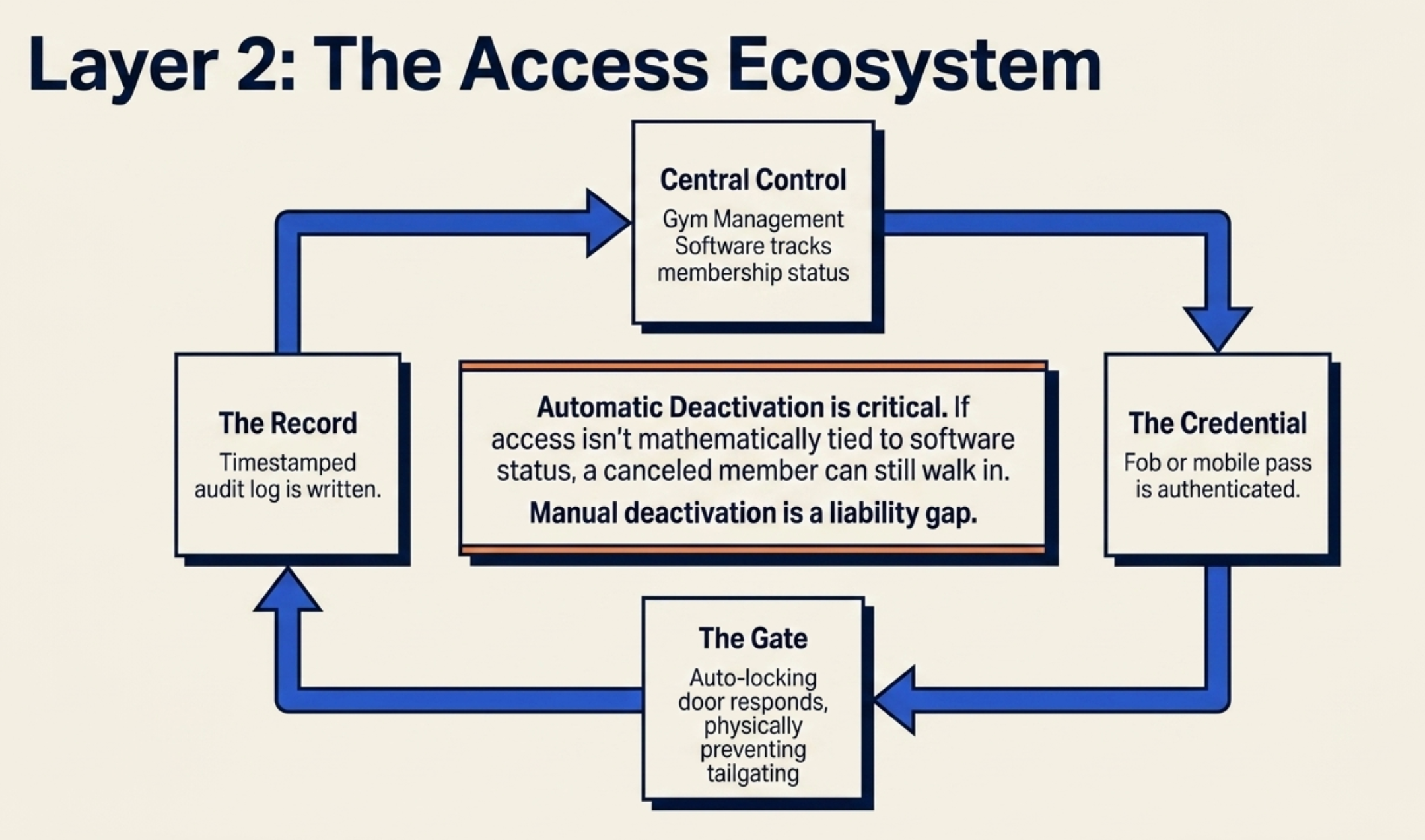
- Credentialed entry. Fobs, keycards, mobile credentials. Pick one and commit. Each member gets exactly one. The credential is tied to their membership status in your gym management software, so when somebody freezes, suspends, or cancels, the credential stops working automatically. No "I'll go deactivate that fob in the morning."
- Auto-locking doors. The door re-locks behind every entry. Members are never the last line of defense against an unauthorized entry. The door is.
- What happens when somebody holds the door for a stranger? That's tailgating, and you can't fully prevent it with a $5 piece of plastic. You can set a norm. Signs at the door reminding members not to hold the door for anyone, even people they recognize. Make it part of the orientation. Members tend to take it seriously when they understand they're protecting each other.
- Audit logs that mean something. Every entry and exit is timestamped and tied to a member identity. When an incident happens, you don't want to be reviewing two hours of grainy footage to figure out who was in the building—you want to pull a list. The log is also evidence in any legal matter that follows.
- Tied to membership status, automatically. This is the one most gyms get wrong. If you're manually deactivating fobs after a cancellation, there's a window where a former member can still walk in.
With Gymdesk, access control is bound to membership status. When a member is no longer active, the door doesn't open. There's no manual step to forget.
For a deeper dive on the hardware side and how access integrates with gym management software, see our guide on smart locks for 24/7 gyms. Martial arts schools have a narrower version of the same problem—a few open mat hours without staff on the floor rather than a door open around the clock.
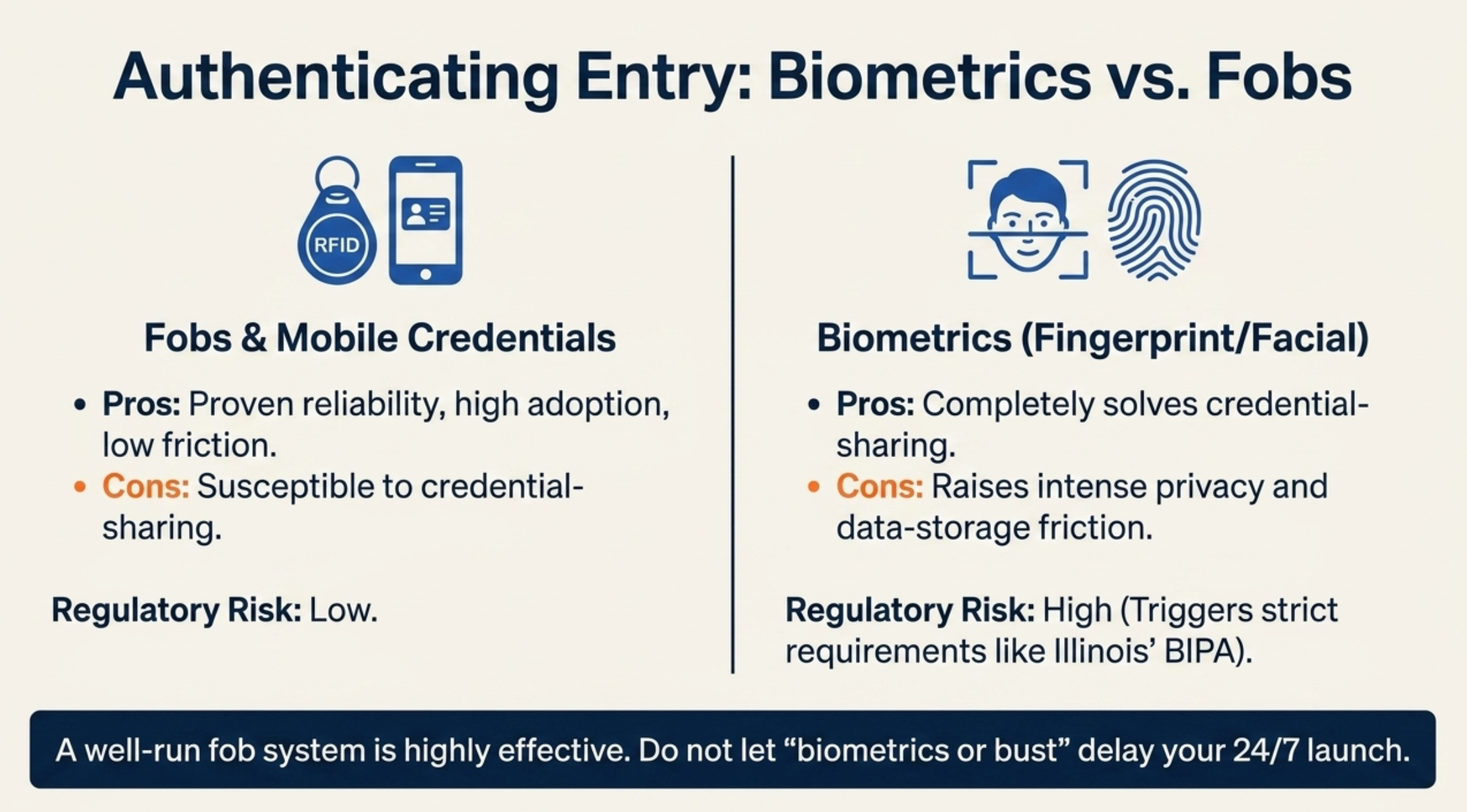
A note on biometrics: facial recognition and fingerprint readers are more common than they were two years ago, and they solve the credential-sharing problem nicely.
They also raise privacy and data-storage questions you'll need to think through carefully. In some jurisdictions (Illinois' BIPA is the headline example), they trigger regulatory requirements you may not want to take on.
A well-run fob system is fine. Don't let "biometrics or bust" be the thing that delays your launch.
The Monitoring Stack
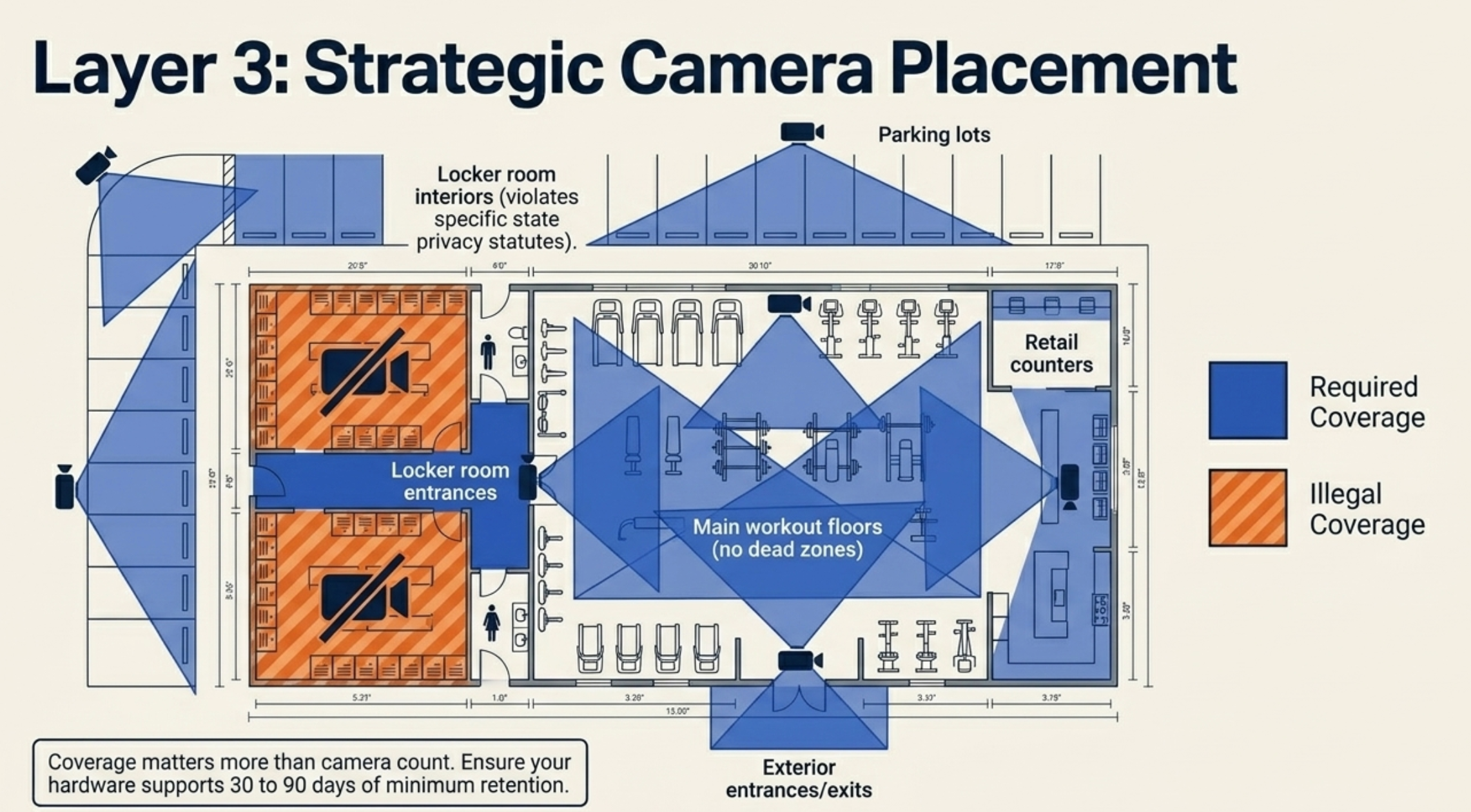
Cameras, emergency buttons, and lighting. The triad that does the watching while you're not.
Cameras with intent
Coverage matters more than camera count. The areas that earn cameras:
- Every exterior entrance and exit.
- The reception or check-in area.
- All main workout floors, with no large dead zones.
- Any retail or POS counter.
- Every parking lot and exterior walkway.
Things to get right that gyms commonly get wrong:
- Locker room entrances are camera territory. Locker room interiors are off-limits—many states have specific statutes prohibiting recording in changing areas, separate from any liability exposure.
- Common practice is 30 days minimum, with 60-90 days giving more defensibility—confirm with your carrier and counsel.
- Test the footage quality. A camera that records a blur is worse than no camera, because it gives you false confidence.
Emergency call buttons that work
Buttons or pull cords near every workout zone, locker room, and entrance. Each one needs to:
- Be visible and clearly labeled.
- Connect to a real human: your monitoring service, an on-call number, or 911.
- Get tested on a schedule (monthly is sensible, quarterly minimum).
- Be reachable from the floor, not buried at chest height behind a rack of dumbbells.
If the answer to "what happens when this button gets pressed" is anything less crisp than a one-sentence description, fix that before you fix anything else in this section.
Exterior lighting
The parking lot is where a surprising number of incidents actually happen. It's also the part of your facility you probably think about least. Funny how those two things go together.
LED lighting on every walking path. Cameras that cover the lot. Bulbs that get checked weekly. Walkways that don't run through dark blind spots between cars.
Spend the money here. It's cheap relative to its risk-reduction return.
Essential vs. nice-to-have
Security Feature |
Essential |
Nice-to-Have |
Credentialed entry (fob, card, mobile) |
✔ |
|
Auto-locking doors |
✔ |
|
Membership-tied access deactivation |
✔ |
|
24/7 video surveillance with adequate retention |
✔ |
|
Emergency call buttons in workout areas |
✔ |
|
Well-lit parking and entrances |
✔ |
|
Posted house rules and signage |
✔ |
|
On-site overnight security personnel |
✔ |
|
Biometric authentication |
✔ |
|
Panic alarms in heavy-lifting zones |
✔ |
|
Monitored alarm with response service |
✔ |
Build the essentials first. Add nice-to-haves as your budget and member volume justify them.
The 3am Runbook
Here's the part most owners haven't written down—which is the part you'll wish you had on the morning after something happens.
Sit down for an hour and put a one-page runbook on paper for each of the scenarios below. It's the cheapest insurance policy you'll ever buy.
RUNBOOK: MEDICAL EMERGENCY
Scenario: A member collapses, falls, has chest pains, or goes unresponsive.
Members on-site: call 911, activate the emergency call button, get the AED, do not move the person unless there's an immediate environmental hazard.
Owner contact tree: the runbook should specify who you want called — your number, an on-call manager, a designated staff lead.
What dispatch needs: the gym's full address, the suite number if you have one, and the nearest exterior entrance for paramedics to use.
Within 24 hours: incident report, witness names, camera footage timestamp range, paramedic response time.
RUNBOOK: SECURITY INCIDENT
Scenario: Suspicious person, harassment, theft, or an unauthorized person inside.
Members on-site: do not engage, leave the area, get to a public place, call local law enforcement first, then the gym contact.
Your follow-up: pull access logs, pull camera footage, file a police report, communicate with the affected member directly within 24 hours, review whether the access stack failed and how.
Hard rule: never confront an unauthorized person remotely or instruct a member to confront one. Get them out, get a record, get law enforcement.
RUNBOOK: EQUIPMENT OR FACILITY FAILURE
Scenario: Sparking outlet, treadmill that won't stop, water leak, smoke or fire alarm.
Members on-site: stop using equipment, evacuate if there's any sign of fire or smoke, do not re-enter on a "false alarm" assumption.
Immediate action: tag the equipment out of service.
Member comms: notify members of the closure window so the next early-morning session doesn't show up to a locked or compromised building.
The fourth scenario is the one most gyms forget about entirely.
RUNBOOK: MEMBER COMMUNICATION
The gap most gyms have: a member shouldn't have to figure out at 3am what to do, who to call, or when the gym is back online.
Your gym management software should be able to push a notification to the right members at the right time. With Gymdesk, you can broadcast an emergency message to everyone currently checked in, or to the full membership list, in a few taps.
Post-incident playbook for the next 24 hours: notify your insurance broker, file the incident report, review the camera footage and access log together, communicate with the affected member, and walk through what (if anything) needs to change in the stack so it doesn't happen again.
That matters when you have to close a section of the gym in the middle of the night.
It also matters when you need to alert members coming in for an early-morning session that the building is unavailable. The difference is members showing up to a locked door at 6am versus members getting a heads-up the moment something changes.
The post-incident playbook for the next 24 hours: notify your insurance broker, file the incident report, review the camera footage and access log together, communicate with the affected member, and walk through what (if anything) needs to change in the stack so it doesn't happen again.
What Members Need from You
Members can't be your safety strategy. They are, however, the people on-site when something happens. What they know and how they can reach you matters.
Set the floor with:
- Visible signage at every entrance covering emergency button locations, AED location, your gym's full address and a phone number, and an after-hours contact.
- A camera notice—many jurisdictions have specific requirements for placement and wording, so check your state or provincial law.
- Three sentences in large type near the door explaining what to do in a medical or security emergency.
- A communication channel members trust: your gym app, posted phone numbers, an emergency line that's actually monitored.
- An orientation that includes the 3am scenario, not just the equipment tour.
Make solo-workout etiquette part of your culture. Members who train at 3am are usually the most reliable members you have. Treat them like adults, give them the information they need, and they'll back each other up better than any policy will.
The Bottom Line
A 24-hour gym is a real business advantage. It's also a different operation than a staffed gym, and the gap between "we're open 24/7" and "we're running 24/7 safely" is wider than most owners think when they make the switch.
The stack is four layers: liability that holds up in court, access that controls who's in the building, cameras and call buttons that record what happens when nobody's watching, and the runbook for the night the first three weren't enough.
You don't need every nice-to-have. You do need every essential, and you need them working together.
Most of this comes back to one question: when something happens at 3am, can you prove you were running a careful operation?
If the answer is no, you're one bad night from a problem nobody's insurance covers cleanly. Go back to the 3am scene at the top of this post—the one with the member on the floor and two other members improvising. Whether that ends well or ends in court was decided months earlier, by you, in daylight.
If you want a gym management platform that ties access, check-ins, member communication, and attendance tracking into one system, that's exactly what Gymdesk is built for. Start a free 30-day trial and see how the access stack and member comms work together.
Gym management software that frees up your time and helps you grow.
Simplified billing, enrollment, student management, and marketing features that help you grow your gym or martial arts school.


FAQ
24-Hour Gym Safety FAQs

Sean has spent the last decade creating content that helps businesses—small and not so small—grow smarter to allow operators to do more of what they love. You know, the fun stuff.
From shipping and international logistics to web development and marketing, he's done the work (not just the words) to scale retail and service businesses efficiently.
You can find his work at Sendle, Shogun, The Retail Exec, Gymdesk, and more.