
Kicksite has been selling software to martial arts schools for "19+ years," by its own count. Plenty of owners like it.
Right now, its tour page also tells new schools "No payments until 2027 for new customers!" That's a hard price to argue with, if you're new.
So if you're pricing a move, you probably have two demos open and one question: is a Kicksite alternative worth the switch?
Quick disclosure: I work at Gymdesk. Asking me to compare Gymdesk and Kicksite is like asking a dad whose kid has the best kata. You'll get an answer. You should check it.
Every Kicksite fact below comes from its own pages, read on October 29, 2026.
Already decided? Skip to the exit steps.
Gymdesk vs Kicksite at a Glance
Both charge by headcount: Kicksite in four tiers by active students, Gymdesk in five by active members. Costs below are fixed monthly totals: the plan plus each processor's monthly fee, without per-transaction fees. The pricing section breaks them down.
Area | Kicksite | Gymdesk | Edge |
Who it's for | Martial arts schools only | Martial arts first, plus other gyms | Neither: both fit a martial arts school |
Monthly cost, 50 students | $128 | $80 with Gymdesk Payments, or $100 on your own processor | Gymdesk, by $28 to $48 |
Monthly cost, 100 students | $178 | $105 with Gymdesk Payments, or $125 on your own processor | Gymdesk, by $53 to $73 |
Monthly cost, 250 students | $228 | $205 with Gymdesk Payments, or $240 on your own processor | Gymdesk on Gymdesk Payments; Kicksite otherwise |
Payment processor | Basys in the US, Stripe for international schools | Gymdesk Payments, Stripe, Square, or Authorize.net in the US | Gymdesk, if you want to pick or keep your processor |
Member app | Mobile web app, not in the app stores | Native iOS and Android app in every plan | Gymdesk, if students expect an app-store app |
Texting | "FREE unlimited" one-way texts, per Kicksite | In every plan, you pay for what you send | Kicksite, if you text a lot |
Website | Built and managed by Kicksite's team | Website builder in every plan, you build it | Kicksite, if you don't want to build it yourself |
Belt and rank tracking | Days and classes at rank, Eligible to Promote list, testing events | Six combinable requirements (hours, skills, age and more), auto-promotion, grading events | Gymdesk, if promotion takes more than time and attendance |
Automations | Message flows for prospects or students | 19 triggers, with branches and exit conditions | Gymdesk, for multi-step follow-up |
Onboarding | 60-day specialist, free data import | Free self-guided setup, a dedicated-specialist option, full-service migration for larger schools | Kicksite, if you want hands-on help by default |
Contract and notice | 30 days' written notice, annual plans auto-renew | Month to month, no exit fee | Gymdesk: you can leave any month |
Saved cards when you leave | "Can't be exported," per Kicksite | Cards on your own Stripe, Square, or Authorize.net account stay there | Gymdesk, if you bring your own processor |
Weighing more than these two? Our comparison of martial arts management software covers the wider field.
And if you've been on Kicksite for years, you may be on older pricing. Your invoice beats my table.
Where Kicksite Wins
Kicksite's wins come first.
One flat price for big schools
Kicksite's top tier is $199 a month for 101 or more students. There's no band above it.
Gymdesk's published tiers stop at 250 active members. Past that, Kicksite is likely cheaper.
Free texting and a website someone else builds
Kicksite's pricing page promises "FREE unlimited one-way texting."
Gymdesk includes texting in every plan, and you pay for what you send.
Kicksite's team will also build and manage your school's website, with its lead forms wired in. The page doesn't list a price.
Gymdesk gives you a website builder in every plan. (Somebody has to pick the hero photo. On Gymdesk, that somebody is you.)
Hands-on onboarding
New Kicksite schools get 60 days with a dedicated onboarding specialist and unlimited one-on-one training. Its data specialist imports your data free, "in 2 business days or less."
If you never want to open a spreadsheet, that's a real advantage.
Gymdesk's dedicated-specialist option is three calls over two to four weeks.
Martial-arts-only, with a one-click promotion list
Kicksite is martial-arts-only. Our own roundup of karate school software points tiny dojos to Kicksite too.
Its one-click "Eligible to Promote" list shows who's ready for the next belt.
Where Gymdesk Wins for a Martial Arts School
Four places Gymdesk comes out ahead.
A native app in the App Store and Google Play
The Kicksite app is a member portal Kicksite calls a "mobile web app." Its help center says it "isn't available on the App Store or Play Store," so students run it from a browser.
The Gymdesk member app is a native iOS and Android app, in every plan. Students download it from the store, then check in, book, and see their rank.
Gyms that want their own name and logo on the store listing can add a branded version for $100 a month.
Renzo Gracie Milford's members see the academy's logo. Mark Cerrone on why that matters:
You choose the payment processor
Kicksite runs US schools through Basys, its "preferred payment processing partner," with Stripe for international schools.
On Gymdesk, you choose your payment processor. A US school can pick Gymdesk Payments, Stripe, Square, or Authorize.net.
If you already have one of the last three, bring it with you. GoCardless and Ezypay make six, serving other regions.
The processor also decides whether your saved cards can follow you when you leave.
Misho Ceko's Chicago MMA had been on Stripe before it moved:
Cards stored through Kicksite don't move that way. More on that in the exit steps.
Rank rules that promote for you
Kicksite's promotion requirements are days at rank and classes at rank, and staff promote from the Eligible to Promote list, singly or in bulk.
Gymdesk's belt and rank tracking has six requirements you can combine: sessions at rank, hours, days in rank, days attended, skills, and a minimum age.
Turn on auto-promotion, and Gymdesk promotes students after check-in, for stripes only or for every rank.
Karate and Taekwondo schools should look hard here.
Say your junior black belt needs a set number of classes at brown, a passed kata, and a 14th birthday. Gymdesk can track all three, and the student sees their progress in the member portal.
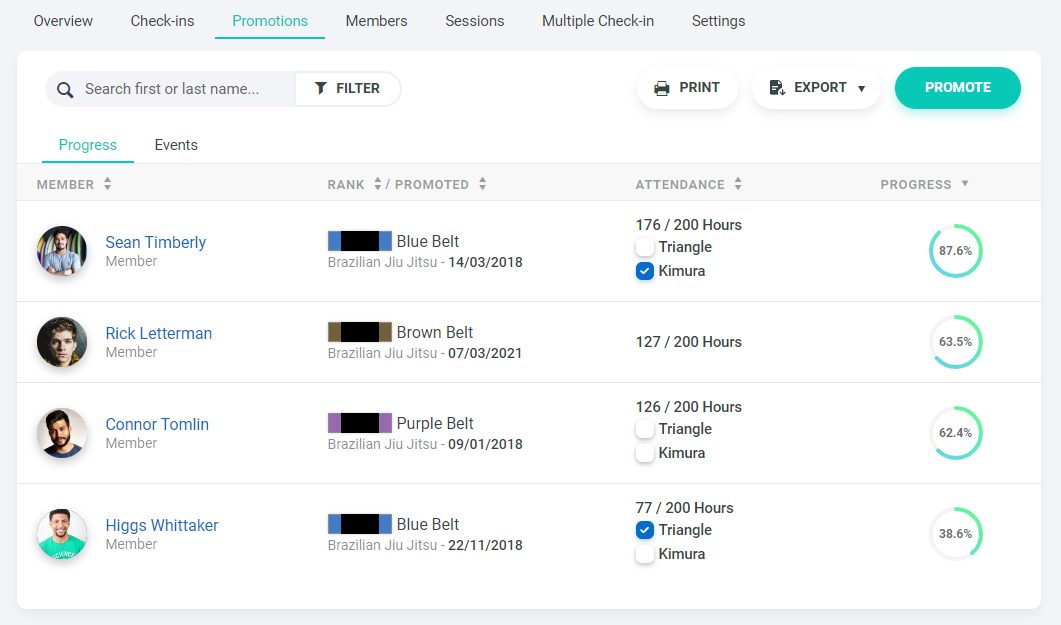
Joe Guarino's school, AE UNLTD, felt it right after the move:
Automations that branch and stop on their own
Kicksite's message flows work "for prospects or students."
The difference is in how the flows behave.
Gymdesk automations start from 19 triggers, including an absence, a frozen membership, and a promotion. From there, a flow can:
- Wait by days, or by classes attended
- Split on a condition, like whether the student booked a class
- Stop on its own when the student books, renews, or replies
- Create a task for someone on your staff
Example: an absence follow-up in Gymdesk
One automation, built from the steps above. Timing and messages are yours to set.
- Trigger: A student is absent.
- Wait: Three days.
- Check: Has the student booked a class?
- If not: Send a check-in message and create a call task for a coach.
- If they book: The flow stops on its own. No more absence messages.
So a student who rebooks after an absence stops getting absence messages automatically.
If that matters to you, ask to see it in Kicksite's demo.
What Kicksite and the Listicles Say About Gymdesk
Two claims about Gymdesk travel around the "Kicksite alternative" results. Neither holds up.
The claim
Gymdesk isn't built for martial arts
Not true
Kicksite's Kicksite vs Gymdesk page says some schools "could find features lacking" because Gymdesk serves "a variety of fitness businesses." Gymdesk started in martial arts, and its rank tools (six promotion requirements, auto-promotion, grading events) are built for belt systems.
The claim
Gymdesk's member app costs extra
Also not true
The software company 1club says its own member app is free, where Gymdesk's is "a $100 add-on." The native iOS and Android app comes with every plan at no extra cost. The $100 add-on is a branded version, listed in the app stores under your gym's own name.
Kicksite Pricing vs Gymdesk Pricing
Kicksite adds its payment processor, Basys, at $29 a month for US schools. Gymdesk's fixed monthly price drops when you process through Gymdesk Payments or an approved partner.
Students | Kicksite (plan + Basys) | Gymdesk with Gymdesk Payments (plan + account fee) | Gymdesk, processing elsewhere |
Up to 25 | $78 ($49 + $29) | $80 ($75 + $5) | $100 |
26–50 | $128 ($99 + $29) | $80 ($75 + $5) | $100 |
51–100 | $178 ($149 + $29) | $105 ($100 + $5) | $125 |
101–150 | $228 ($199 + $29) | $155 ($150 + $5) | $175 |
151–250 | $228 ($199 + $29) | $205 ($200 + $5) | $240 |
251+ | $228 ($199 + $29) | Contact us | Contact us |
Prices from Kicksite's pricing page, Basys via Kicksite, and Gymdesk's pricing page, October 29, 2026. Per-transaction fees aren't included.
The plan prices match each pricing page. The $29 is Basys's monthly fee, and the $5 is Gymdesk Payments' monthly account fee, so both sides include their processor's fixed cost.
The table has three exceptions worth reading:
- Under 26 students, Kicksite is cheaper: by $2 a month against Gymdesk Payments, and by $22 if you keep your own processor.
- Past 250 students, Kicksite's flat $228 is likely cheaper than Gymdesk's Enterprise pricing.
- From 151 to 250 students, Gymdesk with your own processor costs more than Kicksite ($240 against $228).
Then the extras.
On Kicksite, Basys card plus ACH costs $35 to set up and $49 a month in place of the $29. Annual plans come at a discount if you ask.
On Gymdesk, the branded app is $100 a month. Door access, in beta, is $100 a month for up to three doors.
Extra locations are $50 a month with Gymdesk Payments, $100 without. There's no setup fee and no exit fee.
Check Gymdesk pricing for the current tiers, or plug your numbers into the software cost calculator.
How to Leave Kicksite Without a Billing Gap
Leaving Kicksite means two cancellations and collecting every card again. The general 30-day plan and a member announcement are in the guide to switching martial arts software.
What Kicksite's own help center says about leaving
- "Card details can't be exported."
- "Cancelling either service doesn't cancel the other."
- Kicksite "requires 30 days' notice."
Source: Kicksite help center, "How Do I Cancel My Merchant Provider Account?" (updated October 13, 2026).
Know that leaving takes two cancellations
Your Kicksite subscription and your Basys merchant account are separate, and "Kicksite cannot cancel it on your behalf."
For your Kicksite notice, use the cancellation form under Account Billing that its terms point to, and email support@kicksite.net, as its help center says. Do both, and keep a copy.
On an annual plan? Kicksite's terms say it "automatically renews every 12 months," and leaving early "will not be prorated, discounted, or refunded."
Find your renewal date first.
For Basys, Kicksite's help center says to read your merchant agreement for the notice period and any early termination terms. It also warns that providers "commonly hold funds for a time after closure."
Export everything while you still have access
Kicksite's help center says, "Once your account closes you lose access."
Export these:
- The Student List
- The Attendance Log
- The Ranks Overview, from the Programs section
- Each Finances tab: invoices, recurring billings, payments, and payment methods
- The Payment Breakdown and Collected Tax reports
Download signed waivers and student photos yourself, since Gymdesk can't batch-import them.
Export once at the start, then again on cutover day.
Sort out your website before you give notice
If Kicksite's team built your website, its lead forms are "integrated directly into your site."
After you cancel, the terms say you "will no longer have access to Kicksite Services."
Plan on a redesign, too. Kicksite's terms of use list "website designs" among the content it owns, so you may not be able to keep the site it built for you.
Ask Kicksite who holds your domain and whether you can take the site files. Then rebuild the pages you need in Gymdesk's gym website builder.
Plan to collect every card again
From Kicksite's help center: "Card details can't be exported. They're stored at the processor, not in Kicksite. If you're moving to other software, you'll be collecting payment details again."
To collect them without a gap:
- Leave Kicksite billing running.
- Invite members to add a card in Gymdesk.
- Filter Gymdesk for members with no card on file, and email that list every week.
- Set each Gymdesk membership to start billing after its last Kicksite charge, so nobody pays twice.
- Cut over once nearly all of your roster has a card in.
The card-recollection emails are in the guide on how to switch gym software.
Re-entering cards takes time, and it shows.
When 10th Planet Long Beach changed processors moving from Zen Planner to Gymdesk, it dropped from about 35 students to 19 while families re-entered cards.
Bring attendance history so rank progress counts
Import the Attendance Log with the Student List, so classes since a student's last promotion count toward their next rank.
Current rank and last promotion date import one program per student, so multi-program students need a follow-up pass.
Choose self-import or full-service migration
Gymdesk's Migration Center (Settings → Gym → Migrate from a different provider) lists Kicksite as a source and tries to map its fields for you.

Most schools run the import themselves.
Self-guided onboarding is free, with weekly webinars and email and chat support. Larger schools can get a full-service data migration, where Gymdesk's team extracts, maps, and checks your data for you.
Either way, you rebuild class schedules by hand, and members first log in through Forgot Password.
Check open balances after the import
Imported Kicksite invoices can show up as overdue in Gymdesk when they aren't, so review open balances before your first billing run. For real declines after cutover, see how to recover failed payments.
Time the notice to your cutover
The sequence:
- Read your Basys merchant agreement for its notice period, and check whether your Kicksite plan is annual.
- Export everything from Kicksite.
- Start card recollection in Gymdesk while Kicksite keeps billing.
- Set your cutover date.
- Send Kicksite its 30-day notice and give Basys notice, timed so both end after Kicksite's last charge.
- On cutover day, inactivate recurring billings in Kicksite and run your final export.
FREE CHECKLIST
Download the Gym Software Switch Checklist.
Get the checklistWho Should Stay on Kicksite
Not every school needs a Kicksite alternative.
Stay on Kicksite if:
- You have more than 250 students, and Kicksite's flat top tier wins.
- You want someone else to build and run your website.
- You lean on Kicksite's free texting.
- You want 60 days of included one-on-one onboarding.
Who Should Pick Gymdesk as a Kicksite Alternative
Switching pays off for a different set of schools.
Pick Gymdesk if:
- You want a native app your students install from the store.
- Choosing your processor, or keeping the one you have, matters to you.
- Your promotion rules need to track skills and age, and promote students for you.
- You run 26 to 250 students and want a lower fixed monthly cost with Gymdesk Payments or an approved partner.
Gymdesk's page on switching from Kicksite lays out the product side.
Run Your Real School Through a Trial Before You Switch
Gymdesk's trial runs 30 days with no credit card. Kicksite's pricing page says your first 30 days are free.
Before you give notice anywhere, write down your non-negotiables. Then open a trial of Gymdesk's martial arts software, import a real class, promote a test student, and put one family through billing.
Joe Guarino's advice, from AE UNLTD's startup days, starts there:
Skip that step, he says, and you pay for it later:
If Kicksite passes the same test, stay. If it doesn't, you'll know before a single family re-enters a card.
FOR MARTIAL ARTS SCHOOLS