
Is PushPress Good for Gyms? An Honest 2026 Review

Last updated: June 2026
DISCLOSURE:
This review is published by Gymdesk, a PushPress competitor. We've worked hard to keep it honest, so you'll find the places where PushPress genuinely beats us alongside the places it doesn't. Use it to make a real decision, not to read a sales pitch.
You need help running your gym, you started shopping for software, and PushPress keeps coming up. It's polished, it's built by gym owners, and the demo looks great. But is PushPress good for your gym specifically?
That's the question that actually matters, and it doesn't have a one-word answer.
I've spent years around gym management software, I've watched owners switch onto PushPress and off it, and I've read more billing-horror reviews than I'd like. So this is the honest version: what PushPress is genuinely good at, where it frustrates owners, what it really costs in 2026, and the kinds of gyms it fits best.
Let's get into it.
What PushPress Was Built to Do
PushPress started with a CrossFit problem. Founder Dan Uyemura joined a CrossFit gym in 2008 and found the management software slow, clunky, and painful for members, so he built something simpler.
That origin still shapes the product today. PushPress is at its best with functional fitness: CrossFit boxes, strength and conditioning, personal training, performance-driven gyms. CrossFit's endorsement and athlete partnerships are real, and the platform's whole design philosophy is "keep it simple, do the core things well."
It covers what you'd expect: check-ins, scheduling, billing, point of sale, workout tracking, and a member app. It deliberately keeps the feature set tight so the software doesn't overwhelm a busy coach.
For a lot of gyms, that focus is exactly right. For others, it's the catch. Let's look at both sides honestly.
Where PushPress Is Genuinely Good
I'll start with the wins, because they're real and they matter.
- It's simple and easy to use. Owners consistently describe the platform as clean and approachable. If you've been fighting bloated software, the restraint feels like a relief, and onboarding your front desk is fast.
- Workout and performance tracking is strong. PushPress integrates workout-of-the-day programming and benchmark tracking, so members chasing PRs, times, and reps get a genuinely good experience. For a CrossFit box, this is core, not a nice-to-have.
- There's a real free tier. PushPress Free costs $0 a month in subscription. For a brand-new gym with tight cash, getting started without a software bill is a legitimate advantage, as long as you understand the trade-off in processing fees, which I'll cover below.
- Family billing is now native. This used to be a gap. It isn't anymore. PushPress supports family accounts, so I'm not going to pretend otherwise.
- The CRM and communication depth in Grow is excellent. This is one I'll concede flatly: PushPress's Grow product includes phone-number porting, caller-ID masking, WhatsApp messaging, lead capture, and a centralized inbox. If deep, all-in-one communication is your priority, Grow is a genuinely strong offering.
- The member-facing experience is polished. The app, the social feed, and the branded-app option give members a slick, modern experience. PushPress invests here, and it shows.
- Self-service support resources are solid. Their documentation and AI-assisted support resolve a lot of common questions quickly, which busy owners appreciate.
So PushPress is a capable, well-built platform. The question isn't whether it's good—it's whether it's good for the way your gym runs. That's where the cons come in.
Where PushPress Falls Short

Every platform has trade-offs. Here are the ones gym owners report most, with sources where I have them.
1. "All-in-one" really means several products stacked together. PushPress markets itself as all-in-one, but in practice it's modular: a Core plan, plus Grow for CRM, plus Train for workouts, plus a Branded App add-on. Each piece is priced separately, and the full stack adds up fast (real numbers below).
2. The free plan's processing fees are high. Free isn't really free. You trade the subscription for a 4.99% + $0.30 card-processing rate on the Free tier. On meaningful volume, that's expensive. A gym running $15,000 a month in card payments pays roughly $750 a month in processing on the Free plan, versus about 2.9% on a paid plan or another provider.
3. Billing and email reliability have real complaints. Owners have reported invoices and password-reset emails not reaching members, and a 2025 internal bug-fix push acknowledged billing emails not sending reliably. For software whose whole job is getting paid, that's a serious knock.
"Billing is also erratic and unpredictable with members being re-charged for past purchases without explanation."
— Verified PushPress review, Capterra
4. Integrations are limited on the free plan. Tools like Facebook, Google Analytics, and Mailchimp—the things you need for marketing from day one—are gated until you upgrade.
"The website integration failed to link my website to Google, which had a massive impact on our gym launch. Payments are unreliable and have often failed... Waivers were not added or duplicated causing member frustration."
— Jon K., PushPress customer (Capterra)
5. Reporting is tuned to functional fitness. WOD participation and benchmarks are well-covered. Program-level business metrics, like cost per acquired member, lifetime value by program, and granular attendance by class level, often require exports or manual work.
6. Migration and customization take effort. Importing historical records (member history, attendance, belt or skill progressions) can be slow, and heavier customization tends to need manual setup.
7. Support can lag. Alongside the praise for self-service docs, some owners report slow human responses, with reviews citing "customer support is lagging" and "the customer service response was poor."
None of this makes PushPress a bad platform. It makes it a platform with a clear shape: great at its core, strained when your gym needs more than the core.
PushPress Pricing: What It Really Costs in 2026
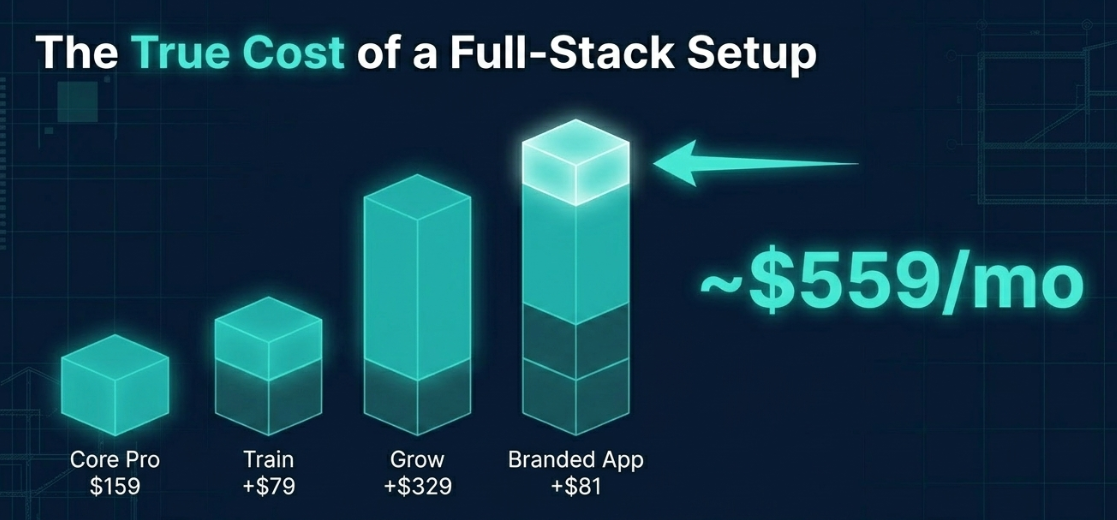
Here's the part owners get surprised by. PushPress's pricing has a clean front and a more complex back.
The Core platform tiers (the plans on their pricing page today):
Plan | Monthly price | Card processing | Built for |
Free | $0 | 4.99% + $0.30 | Small gyms laying a foundation |
Pro | $159/mo | 2.89% + $0.30 | Mid-size gyms growing fast |
Max | $229/mo | 2.75% + $0.30 | Established gyms |
The add-on products (priced on top of a Core plan):
Add-on | Price | What it adds |
Train | From $79/mo | Advanced workout tracking (up to 20 clients) |
Grow | $329/mo | Full CRM, automated email/SMS, websites, WhatsApp |
Branded App | $81–$97/mo | White-labeled member app |
Full Stack | ~$559/mo | Everything combined |
Read that bottom row again.
A true all-in-one PushPress setup (Core plus CRM plus workouts plus a branded app) lands around $559 a month. That's the number to plan around if you want the full marketing and communication toolkit, not the $0 or $159 sticker.
(It's also why it pays to map out what gym software really costs before you sign.)
A note on processing fees, in fairness: PushPress's paid tiers actually carry slightly lower card rates than many competitors: Pro at 2.89% and Max at 2.75%, versus roughly 2.9% elsewhere. The sting is specifically on the Free plan at 4.99%. So the honest framing is: PushPress Free trades a monthly bill for a high processing rate, and at real volume you often pay more, not less.
Interactive: use the PushPress vs Gymdesk cost calculator to plug in your member count and volume and see the real monthly total for each.
PushPress vs Gymdesk, at a Glance
Since I'm with Gymdesk, here's the honest head-to-head on the dimensions a general gym buyer actually weighs. I've marked the wins both ways.
| What you're comparing | PushPress | Gymdesk |
|---|---|---|
| Pricing model | Core plan + separate add-ons | Every feature on every plan, $75–$200/mo with Gymdesk Payments |
| What's included | CRM, marketing, branded app are paid add-ons | CRM, automations, member app included |
| Payment processing | PushPress's own stack | Bring your own — choice of 5 processors |
| CRM / communication depth | ✓Grow: porting, caller-ID masking, WhatsApp, inbox | Solid, but less deep on telephony |
| Member app experience | ✓Polished, social feed, deep branding | Included, clean, branded option |
| Specialty workflows (belts, recitals, skills) | Built around functional fitness | ✓Purpose-built for specialties |
| Support rating | Strong self-serve; mixed on human response | 4.8/5 on G2 and Capterra |
| Contracts / trial | Free tier; no long contracts | 30-day trial; no contracts |
If you want the full feature-by-feature breakdown, see the PushPress vs Gymdesk comparison. The short version: PushPress wins on CRM depth and member-app polish; Gymdesk wins on every-feature pricing, processor choice, and specialty workflows.
Who PushPress Is Best For (and Who It Isn't)
This is the part that answers the actual question.
PushPress is a great fit if you're:
- A CrossFit or functional-fitness gym—it's the home turf, and the workout tools shine.
- A straightforward mid-size gym that wants clean, simple software and will happily pay $159–$229/mo for it.
- Performance-focused, with members who care about PRs, benchmarks, and programming.
PushPress is a weaker fit if you're:
- A martial arts or BJJ academy with belts, rank tests, and family-heavy rosters—its MA features are newer and shallower, as our PushPress vs Gymdesk martial arts breakdown spells out.
- A dance or gymnastics studio needing recitals, costume fees, ticketing, or multi-level skill tracking.
- A boutique or multi-program studio juggling workshops, waitlists, and complex drop-in rules.
- A multi-location operator that needs program-level reporting across sites.
- A very cost-sensitive small gym—the Free plan's 4.99% processing can quietly cost more than a flat monthly fee once you're doing real volume.
If PushPress isn't the right shape, it's worth weighing the PushPress alternatives before you commit, and academies in particular should check the best martial arts management software.
Is Gymdesk a Better Fit for Your Gym?
Here's my disclosed pitch, kept honest.
Like PushPress, Gymdesk is built by people who've run gyms and trained on the mats. The difference is shape: every feature is included in one price set by member count. Gymdesk plans run $75 to $200 a month with Gymdesk Payments, and the CRM, automations, and member app (the pieces PushPress sells as Grow and add-ons) come standard.
Here's what that looks like for the gyms PushPress fits least well.
Every plan includes every feature, so you never pay extra for a feature. Optional extras like additional locations, door access, and a branded app are priced separately. There's a 30-day trial and no contracts. You can also bring your own payment processor, one of five options, for $25 a month more ($40 on Large), which keeps negotiating room on your rates instead of locking you to a single stack.
The specialty workflows are mature, not bolted on.
Belt and skill tracking, attendance-based promotions, family accounts with parent-managed kids' profiles, recital and event tools, and waitlist automation are all native, because Gymdesk grew up in martial arts (it started as Martial Arts on Rails).
Support is the other standout: a 4.8/5 rating on both G2 and Capterra, with reviews that mention fast, knowledgeable help. And your data is always yours, exportable to CSV anytime, before or after you cancel.
I'll concede the flip side plainly: if deep telephony and communication features (number porting, caller-ID masking, WhatsApp) are central to how you operate, PushPress's Grow product is genuinely stronger there. That's a real gap, not spin.
A Checklist to Help You Decide
Before you sign with anyone, get straight answers to these. The gaps are where hidden costs and manual work hide.
- Can I track multiple locations, and what does that cost?
- What program-level reporting is included—can I see retention and revenue by program?
- Are event tools (recitals, competitions, workshops, promotions) built in or bolted on?
- For the features I actually need, what's the real all-in monthly cost—base plan plus every add-on?
- Can I automate waitlists and cancellations per class type?
- How does family billing work for multiple kids on one account?
If a vendor can't answer cleanly, you'll pay for the gap later in time, manual work, and frustrated members.
So, Is PushPress Worth It for Your Gym?
PushPress is genuinely good for the right gym. It's clean, simple, and excellent for CrossFit and functional fitness, with a polished member app and a deep CRM in Grow if you choose to pay for it.
Just go in clear-eyed on cost. The free plan trades a monthly bill for a 4.99% processing rate, and a true all-in-one setup runs around $559 a month once you add Grow, Train, and a branded app.
Fit is the whole game here. If you run a CrossFit box or a straightforward mid-size gym, PushPress is a strong choice. If you run a specialty gym such as martial arts, dance, gymnastics, boutique, or multi-location, its functional-fitness shape will probably mean workarounds.
Want every tool on one plan, with specialty workflows built in from day one? Gymdesk includes the CRM, automations, and member app from the start, and you can try it free for 30 days. No contract, and no paying extra to unlock a feature.
Gym management software that frees up your time and helps you grow.
Simplified billing, enrollment, student management, and marketing features that help you grow your gym or martial arts school.


FAQ
PushPress FAQs
Common questions about PushPress pricing, its free plan, and who it fits.
.webp)
Andrew McDermott is a gym owner, Brazilian Jiu Jitsu brown belt, and digital marketer. He’s on a mission to build premier, high-stakes grappling tournaments, world-class academies, and a championship team of high-level athletes.