
Is Zen Planner Worth It? A Smart, No‑Nonsense Verdict for Gym Owners

Is Zen Planner worth it?
Imagine dealing with financial headaches manually—you see a growing number of missed payments, members panicking about double-charges, and staff harassing members to update their card on file.
These headaches are costly, but they’re also unnecessary.
If you’re in the market for gym management software, think about the moment that hurts: missed payments piling up, a double‑charge freakout, and “am I on the roster?” texts before class.
The right platform stops those fires—automated billing recovery, accurate rosters, and reliable reminders—so your day moves from fixing admin errors to adding members and reducing churn.
It's a key decision point.
If you choose the right platform, you'll find that your growth accelerates. You spend more time working on your business (e.g., improving marketing, adding member incentives, creating new promos, etc.) and less time working in it (i.e., processing payments manually).
Make the wrong decision, and you hamstring your company. You find yourself dealing with lost revenue, decreased member satisfaction, and the member churn that follows. If you’re in the market for a gym management tool, you’ll need to get it right.
Today, we'll take a close look at Zen Planner. Our goal? Helping you identify whether Zen Planner’s platform is a fit for your business. If you've already decided to evaluate it against Gymdesk specifically, the Gymdesk vs Zen Planner comparison covers the head-to-head.
What is Zen Planner?
Zen Planner bills itself as an all-in-one gym management software solution.
According to their website, they serve 7,000+ gyms and studios in 55 countries worldwide. Their customers serve 2.4 million members, and they rely on Zen Planner to manage their operations, including memberships, billing, scheduling, and attendance.
Since Daxko acquired them in 2017, they’ve worked to expand Zen Planner.
Gym owners on their platform have experienced “growing pains” as their service matured and evolved post-acquisition. Customers report software glitches, poor customer service, and post-cancellation billing issues. Gym owners often describe Zen Planner as expensive (compared to platforms like Gymdesk or Vagaro), clean, and intuitive.
Gym owners describe Zen Planner’s customer support as comprehensive and helpful, which is interesting given the previous complaints about support. This suggests their team is short-staffed or overwhelmed.
How Much Does Zen Planner Cost?
Zen Planner uses a tiered, member-count system. Their pricing scales with your business as you grow.
This gives gym owners access to premium tools at a lower (initial) cost. Here’s a breakdown of their tiers.
Studio Zen Planner tiers
| Member Count | Monthly Cost | Notes |
|---|---|---|
| 0–45 members | $99 per mo. | Month-to-month available |
| 46–60 members | $133 per mo. | Higher-tier features included |
| 61–75 members | $155 per mo. | Auto-billing required |
| 76–100 members | $189 per mo. | Additional setup required |
| 101–150 members | $229 per mo. | – |
| 151–200 members | $239 per mo. | – |
| 201–250 members | $269 per mo. | – |
| 251+ members | $289 per mo. | – |
| 401+ members | Custom pricing | Long-term contract often required |
Something to keep in mind. This pricing tier applies only to their Studio product.
This includes member management, scheduling and booking, reporting and insights, workout tracking, reporting and insights, and financial tools.
This product doesn’t include marketing or CRM.
You’ll need marketing and CRM tools from day one. If you plan on sticking with Zen Planner, you’ll need to upgrade to their Studio + Engage product. If you use a third-party platform, you’ll want to verify that Zen Planner integrates with your existing software stack.
These tiers require minimum auto-pay processing, and some users report annual contract requirements depending on promotions.
Gym owners also report that they’re required to use Zen Planner’s payment processor (which is expensive) to process payments via their app.
Expect to pay $39-$59/month for an EMV reader, or a $20/month surcharge if you don’t use their processor. Their processing fees range from 2.97% + $0.47 and will include an additional +1.71% for non-qualified transactions.
If you’re considering Zen Planner, you’ll want to ask some questions:
- Can I use my existing payment processor? Are there any additional fees to do this?
- Can you provide me with a fee schedule to break down my per-transaction costs?
- Are there any additional, ongoing costs to use your payment processor?
- If I have to use your payment processor, am I required to purchase a terminal? If so, what is the cost for this? Is this an equipment lease/rental or do I own the terminal?
- Are there any fees for early cancellation or chargebacks?
Add-on modules

They offer several paid add-ons beyond the base Zen Planner Studio subscription:
- Website Builder: $99/month—you get a basic template site (limited customization)
- Engage: $249+/ month—Zen Planner’s marketing suite offers email campaigns, marketing automation, and lead management
- Branded App: $39/ month—A custom-branded mobile app for member engagement
- EMV Devices: $39/month—Integrated payment processing hardware for seamless transactions (additional processing fees apply)
- SugarWOD: Workout software for coaches and athletes. SugarWOD pricing starts based on registered athletes, only for those currently registered, and adjusts monthly. You only pay for registered athletes.
Keep in mind that these add-ons don’t include setup fees, onboarding charges, and payment processing markups that aren’t immediately obvious.
Zen Planner Key Features and Add-Ons
Zen Planner has a mature feature set; the downside to that is that many of these tools require paid add-ons, upgrades, or technical setup. Here’s a snapshot of their core features and add-ons.
Core features
Here are the basic features you get with the Studio subscription:
- Membership management
- Class scheduling and booking
- Attendance tracking
- Rank and BJJ belt tracking for martial arts
- Recurring billing via Zen Payments
- Staff scheduling
Premium add-ons
And, as we saw above, here are the parts you need to pay additional costs to add on:
- Website builder
- Marketing automation
- Automated email sequences
- Lead management
- Advanced reporting and insights
- POS and retail
If you’re looking for a comprehensive tool, and you’re okay with the à la carte pricing that Zen Planner provides, their platform could be a great fit for your business.
Common Pros and Cons of Zen Planner
Your gym management software will be the backbone of your business.
It’s important that you know what you’re getting into ahead of time. With that in mind, let’s take a look at the pros and cons of their platform.
Zen Planner pros
- Comprehensive booking and scheduling tools. This is ideal for gyms serving different audiences (e.g., powerlifters, beginners, athletes) or martial arts systems.
- Integrated billing and financial tools. This helps you manage missed payments, payment retries, flex payments, and a variety of payment plans (e.g., hourly, memberships, subscriptions, flat-rate packages).
- Workout and rank tracking. This is perfect for specialty gyms (e.g., CrossFit and BJJ academies) that need detailed progress tracking.
Zen Planner cons
- Zen Planner has a steep learning curve. A comprehensive platform comes with a price—it takes a lot of time to learn. This means onboarding is essential.
- Dated and complex user interface. Take a look at their reviews, and you’ll see many users describing the platform in this way. Happy gym owners describe their platform as clean and intuitive so treat these descriptions as subjective assessments.
- À la carte pricing means lots of extra fees. Want more features? You’ve gotta pay. Need apps and additional services? Pay up. Zen Planner’s add-on modules and processing markups dramatically increase the cost of running your gym.
- Branded app can be glitchy. Gym owners and members report the occasional bugs, technical glitches, and crashes with their branded app.
- Slow to update their platform or add new features. They generally lag behind modern competitors like Gymdesk or Spark
- Slow and unhelpful customer support. Users often mention that their support teams are frequently slow and their responses are unhelpful.
- Not a fit for larger gyms. From a budget standpoint, their à la carte pricing means the cost escalates pretty quickly for gyms with high member counts.
Are these dealbreakers?
That’s a decision you’ll have to make before you move forward. If you’re someone who needs a lot of handholding, make sure you’re happy with the level of support Zen Planner offers.
Looking for an affordable solution for your business? Make sure Zen Planner’s à la carte pricing won’t break the bank.
What about performance?
Need reliable performance and a consistent update schedule? Search for favorable reviews and customer feedback. Look for status pages that verify the platform’s reliability and consistency.
User Feedback and Reliability Insights
Zen Planner has mixed customer reviews.
If we look at their review portfolio, we see polarization—if gym owners are happy, they’re really happy. If they’re angry, they’re furious. Let’s take a closer look at their feedback.
Common positive feedback
- The software is my right-hand man. Never going back
- Strong martial arts support (belt tracking, attendance)
- The ease of accessing any of tools. I can track attendance, workouts, change workouts, billing, etc., super easy and quick.
- User Interface is great, the app is great, the support is unbelievably comprehensive and helpful
- The onboarding process was very thorough, and the support team are always fast to respond and quick to resolve issues
- Much more personal than MindBody support
- Great staff, that has always been very receptive to feedback, and helpful with any questions
Common negative feedback
- The platform is buggy and complicated, disrupting our workflow
- The software started seriously glitching in 2022. Everything from scheduling classes to payments (over- and undercharging our members) stopped working correctly
- Their app stopped working, and then their payment processing stopped working. Support never got back to me. My account manager offered me 50% off, then another full month off. I have emails showing this, and yet the team still charged me for the month and claimed the 50% off and full month off were the same, even though they were submitted on different months
- Updates and integrations have caused more problems than they’ve solved, often adding extra fees without real value
- Reps are undertrained and frequently unable to resolve basic issues, leaving us to troubleshoot on our own
- Billing sync issues—I haven't received any payments for 4 months
- I have five emails to their membership services team trying to cancel my subscription, and they will not respond to me
- Removed my access to the database, but kept charging me for it
- They continued billing us for 3 months without our consent
- Will continue to bill you for months after cancellation
- Slow response times from customer service
- The platform is not as intuitive as advertised, and simple tasks like issuing refunds or managing memberships require excessive steps
If you’re thinking about working with Zen Planner, take their platform for a spin first. You’ll want to verify that they have each of these issues sorted out.
Play very close attention to application uptime, error management, and billing consistency. Verify that workflows for important tasks (e.g., processing payments, issuing refunds, managing memberships) are consistent and well-documented.
Give your team the time required to evaluate their platform properly. If you need more time to evaluate their platform, ask them to extend your trial.
Zen Planner aggregate ratings
What do gym owners say about Zen Planner’s platform? Here’s a quick snapshot of their aggregate reviews. As of December 2025, these are the ratings:
| Platform | Rating |
|---|---|
| G2 | 4.3/5 Stars |
| Capterra | 4.3/5 Stars |
| TrustPilot | 2.5/5 Stars |
What do these recent reviews and their aggregate ratings tell us about Zen Planner’s platform? They’ve hit a bit of a slump recently.
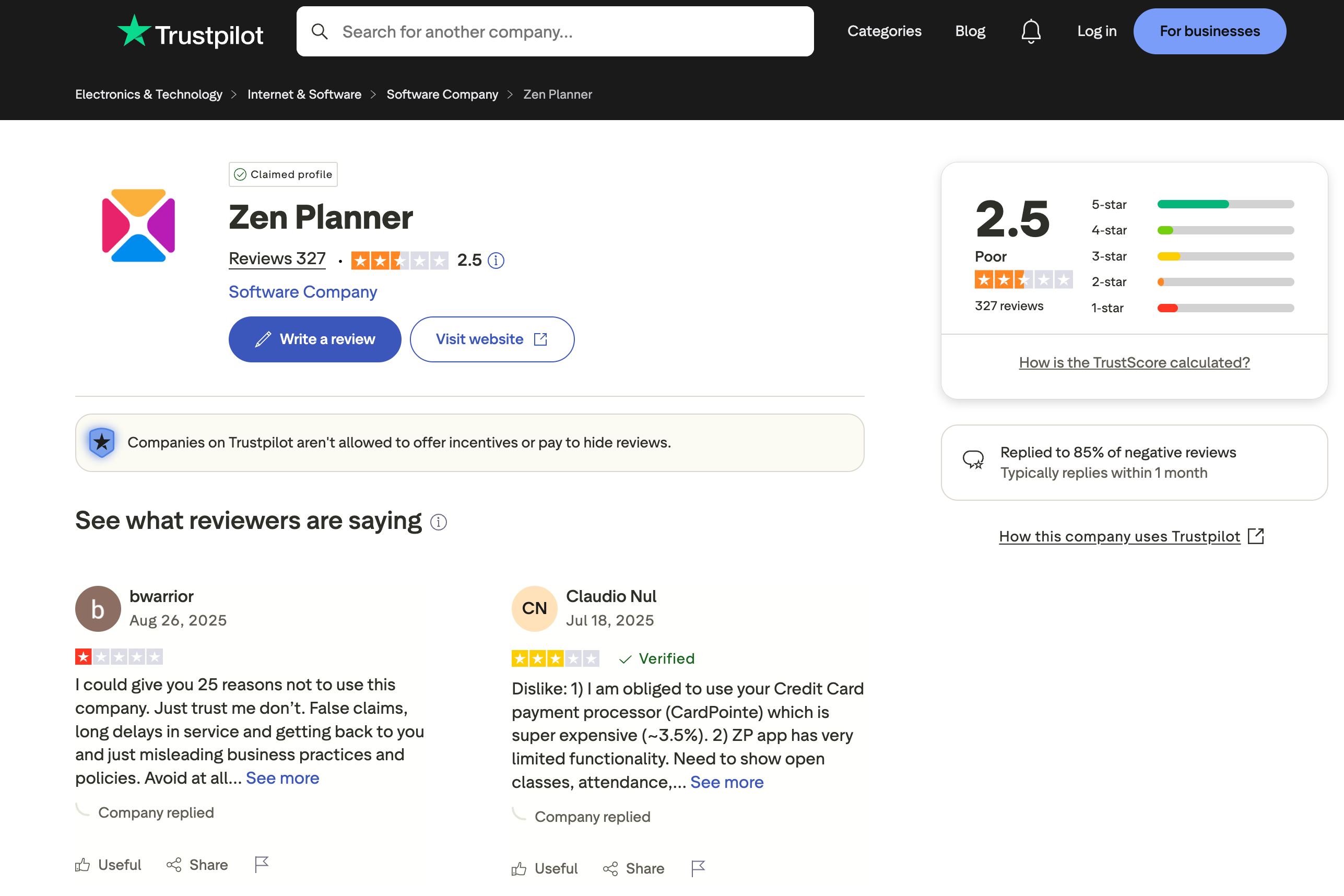
While mobile functionality and reliability are stable, customer satisfaction is declining.
Customers are frustrated by the limited functionality of Zen Planner’s app and the fact that they’re required to use their payment processor. There are still ongoing complaints about wait times for support. That’s not a good look.
What about the other parts of their platform? You know—tools, marketing, integrations, etc.?
Advanced Tools, Marketing, Reporting, and Integrations
Zen Planner’s platform comes with advanced tools (i.e., revenue recovery) and their reporting is comprehensive and customizable. Their platform integrates well with a variety of well known tools and resources.
Zen Planner Studio integrations
Here’s a list of the integrations listed on Zen Planner’s website:
- MailChimp
- Perkville
- Wellhub
- Welld Health
- HybridAF
- ClassPass
- SugarWOD
- Yext
- Google Analytics
- Slack
- Microsoft 365
- Google Drive
- TikTok
- Printful
- Shopify
- Zapier
Payment and billing features
Zen Planner offers a variety of billing and payment features, including:
- Revenue recovery (i.e., proactive card updates, expiring card notifications)
- Recurring/automatic billing
- Autopay
- Support for various payment methods (e.g., credit/debit cards, ACH, and eChecks)
In-app payments - Automated payment reminders
- Flex Fees
3. Zen Planner customer service
Zen Planner’s customer support is available via phone, email, help desk, and live chat:
- Call us at 303-927-0484 (Mon-Fri: 8 am—8 pm ET)
- Toll-free at 866-541-3570
- Email: support@zenplanner.com
- Chat/Helpdesk: Zen Planner Help Center (Mon-Fri: 24-hour availability)
Users report mixed experiences, with some praising the knowledgeable staff while others noting slow replies and inconsistent guidance.
Over time, reviews indicate a gradual improvement, but the company is still behind its top competitors.
How Zen Planner Compares to Other Gym Software Platforms

Here’s a quick, head-to-head comparison, showing you how Zen Planner stacks up against other gym software platforms.
| Software | Pricing | Ease of Use | Features | Support | Mobile App |
|---|---|---|---|---|---|
| Zen Planner | $$$$ | Moderate | Comprehensive | Mixed | ✔ |
| Gymdesk | $$ | Very Easy | Modern/Streamlined | Excellent | ✔✔ |
| Mindbody | $$$$$ | Difficult | Enterprise-level | Moderate | ✔✔✔ |
| Vagaro | $$$ | Easy | Broad | Good | ✔✔ |
So is Zen Planner a good fit for your business?
There’s definitely overlap among these four platforms. However, Zen Planner is best for:
- Functional fitness and boutique fitness studios looking for an all-in-one platform
- Those who prefer à la carte pricing and upgrades
- Gym owners who are interested in a legacy platform with an established history
What about performance?
If you’re looking for a gym management platform that’s built for performance, Gymdesk or Vagaro may be a better fit. Gymdesk outperforms Zen Planner across a variety of metrics, including ease of use, support, mobile experience, and price.
So is Zen Planner Worth It?
If you already have an established gym, a medium-to-large enterprise or franchise, and you’re looking for a comprehensive solution, Zen Planner may be a good fit.
If your gym has a dedicated admin team, and you’re looking for a platform that can support that, their platform is better aligned with your business. Managing a well-established, medium-sized fitness franchise? Zen Planner is a decent option.
So, is Zen Planner worth it?
That depends on you. From a cost and complexity standpoint, it’s less efficient than modern alternatives like Gymdesk or Vagaro.
“Now, what about Gymdesk?” you may be asking…
If you’re a gym owner, and you’re looking for a fast, simple setup you can use to grow your business, Gymdesk may be right for you.
Gymdesk offers simplicity, transparency, and automation. There are no hidden fees, no à la carte pricing, unnecessary add-ons, or forced upgrades.
It’s perfect for small-to-medium boutique studios (e.g., yoga, Pilates), martial arts schools, functional and sports performance gyms, and dance or gymnastics studios.
For example, if you’re running a Pilates studio and you’re looking to minimize your day-to-day admin work, Gymdesk is a great fit.
Interested in a second opinion? Who better to trust than yourself? Try Gymdesk’s free 30-day trial (no credit card required) and see for yourself.
Gym management software that frees up your time and helps you grow.
Simplified billing, enrollment, student management, and marketing features that help you grow your gym or martial arts school.


FAQ
FAQs About Zen Planner
.webp)
Andrew McDermott is a gym owner, Brazilian Jiu Jitsu brown belt, and digital marketer. He’s on a mission to build premier, high-stakes grappling tournaments, world-class academies, and a championship team of high-level athletes.