

Most guides to switching martial arts software are written by the software you're switching to. They promise a smooth move, then send you to book a demo.
What they skip are the parts that keep school owners up at night: rank history, family accounts, saved cards, and the contract you're still in.
Yes, Gymdesk makes martial arts software too. We see the irony. Bear with us.
This guide starts with those hard parts and gives you the questions to ask before you sign with anyone. Us included.
Still deciding whether to leave at all? Start with when to change software.
What Has to Move When You Switch Martial Arts Software
A martial arts school has more to move than a general gym.
A general gym can get through a switch with names, memberships, and cards. Your students' progress lives in your software, and so do the family accounts that pay for half your roster.
Student profiles and active memberships
Start with the basics: contact details, emergency contacts, signed waivers, membership type, price, and billing date.
Watch for grandfathered rates and one-off discounts. They often live as exceptions in your old system and don't map cleanly to a new one.
If a founding member's $99 rate turns into $149 after the move, you'll hear about it before the first class.
Belt and rank history
This is the one that matters most, and the one vendors get vaguest about.
Current rank is the easy part. You also need promotion dates, stripes, and attendance since each student's last promotion. That's the history your belt tracking software runs on.
If only the current rank comes over, a student who's two classes from a stripe test can reset to zero in your new system. Multiply that across a kids program and you have a front desk full of confused parents.
Family and household accounts
One parent paying for two kids and their own membership is a normal account at a martial arts school.
Ask whether households import already linked, or whether someone has to rebuild them by hand.
Each family member still needs their own profile, attendance, and rank.
Saved payment details
Your members' saved cards and bank details are stored as tokens with your payment processor, not inside your software. Whether those tokens can move depends on which processor you use, and some processors charge a fee to export them.
Tokens that can't move mean every family re-enters their payment details. Some will put it off. Some will quietly drop off your billing.
For the card-transfer details, see the full guide to switching gym software.
Attendance and testing history
Attendance history powers your retention reports and, in most schools, your rank eligibility.
Testing history is easy to forget: who tested, when, what they tested for, and what they paid. Ask about it as its own question, because it's often left out of a standard martial arts software migration.
Questions to Ask a Martial Arts Software Vendor Before You Sign
Get these answered in writing, ideally during the demo. A vague answer here often turns into a manual task for you later.
Will my rank history and promotion dates come over?
Ask for specifics: current rank per program, promotion dates, and whether attendance since the last promotion counts toward the next one.
Will families need to re-enter their cards?
Ask which processors they can import saved cards from. Their answer decides whether families re-enter anything.
What will I pay, including processing?
Get the monthly price at your active member count, plus processing rates. Ask what's an add-on: a branded app, a website, marketing tools, or extra locations.
What's the contract, and how do I leave?
Ask about contract length, cancellation notice, and how you'd get your data out if it doesn't work.
A vendor that makes leaving hard is telling you something.
Who does the migration, and how long does it take?
Find out whether you're uploading spreadsheets yourself or someone on their team is doing it with you.
Then ask how long the whole switch takes, from your first export to the old system's last bill.
What to Do Before You Cancel Your Current Software
Don't cancel anything until you know what you're walking away from.
Find your notice period
Thirty days' notice before you cancel is common, and you'll often owe fees through that date. Your agreement is the only place to confirm yours.
Check it for the notice period, any early termination fee, and whether you're on a monthly or annual plan.
Then work your timeline backward from your last billing date.
Export everything before you cancel
Export your members, memberships, billing history, attendance, and rank data as CSV files while you still have access.
Once your account closes, getting that data back can be slow or impossible.
Ask early about transferring saved cards
Card transfers take time, and some processors charge to export. Ask before you set a switch date, so both the wait and the fee are in your plan.
Pick the Right Week to Switch
The best switch date is a boring one.
Stay clear of belt testing and promotion weeks
Testing week is when your rank data gets the most use and your front desk gets the most questions.
Don't change systems in the middle of it. Finish your promotions in the old system, then move.
Line the cutover up with your billing cycle
Switch right after a billing run, so you have the most time before the next one.
That gives you a full cycle to confirm every recurring payment is set up before a single member is charged from the new system.
How to Tell Members and Staff About the Switch
Members want to know two things: will they get double-charged, and does the app still work? Which software you run is your problem.
What to say, and when to say it
Send a short note about two weeks before you switch. Say what's changing, what they need to do, and when.
Follow up on go-live day with the exact steps, then send one reminder a week later to anyone who hasn't finished.
Help members with new logins and the app
Most members will need to download a new app or set up a new login. Make it easy: one link, one set of steps, and a person to ask.
Families who need to re-enter a card should hear that plainly, with a deadline before their next billing date.
Brief instructors before the front desk gets questions
Your instructors will hear about the switch before you do. Give them a two-line answer to "What's going on with the app?" so they're not guessing on the mat.
Switching From Zen Planner, Kicksite, or Spark
The steps above apply to any switch. Each platform has its own sticking points, though.
Switching from Zen Planner
Stored cards aren't part of Zen Planner's standard data export.
Zen Planner schools have their cards with one of three processors: PaySimple, Fiserv (CardPointe), or Stripe.
Find out which one holds yours. If it's Stripe, check whether the Stripe account is in your school's name.
The Gymdesk vs Zen Planner comparison covers pricing and features side by side.
Switching from Kicksite
Kicksite runs payments through Basys. Don't count on moving saved cards out of Basys.
Plan from the start to have members re-enter their cards.
Check your agreement's notice period and build it into your timeline. The Gymdesk vs Kicksite comparison has the full breakdown.
Switching from Spark Membership
Spark processes payments itself. Most schools leaving Spark have members re-enter their cards, so plan for that from the start.
The Gymdesk vs Spark Membership comparison has more.
A 30-Day Switching Plan for Martial Arts Schools
Start any card transfer request before Week 1. It runs on your processor's schedule.
This plan assumes you run the import yourself. A full-service data migration takes longer.
Week 3 is your parallel week. Keep the old system running while you check in students and test billing in the new one.
Anything that didn't import cleanly shows up while you still have the original data to compare against.
What Switching to Gymdesk Looks Like
Students, ranks, family links, and cards from supported processors can all come over to Gymdesk.
A few details are worth checking during setup.

Importing students, ranks, and families
Your data comes over from CSV files through Gymdesk's Migration Center: members and memberships, attendance records, payments, products, and leads.
The data import guide covers the details. Coming from Spark, that includes your member data, payment history, leads, products, and attendance.

Each student's current rank and last promotion date come over in the member import, one program per student. Students who train in more than one program need a follow-up pass.
Family links come over with the member import when your old system exports parent names. After the membership import, review any shared family memberships.
Most schools run the import themselves. Self-guided onboarding is free and comes with weekly webinars plus support by email and live chat.
Once your data is in, you can go live right away.
Larger schools can get a full-service data migration instead, where Gymdesk's team extracts, maps, and checks your data for you.
Plan on 45 to 60 days for that, since it includes moving your saved cards.
Either way, a card transfer adds time. The switch waits on your old processor to release the cards.
Keeping belt progression on track
The vendor question that matters most here is attendance since the last promotion.
Gymdesk's martial arts software tracks progression by attendance, and the counter resets when a student is promoted. So bring your attendance history, not only ranks and promotion dates.
With it, classes since a student's last promotion count toward their next rank.
Say a student earned their blue belt on Sept 1 and you switch on Oct 15. Import their attendance history, and the classes from those six weeks still count. Import only the rank and the date, and the count has nothing to go on.
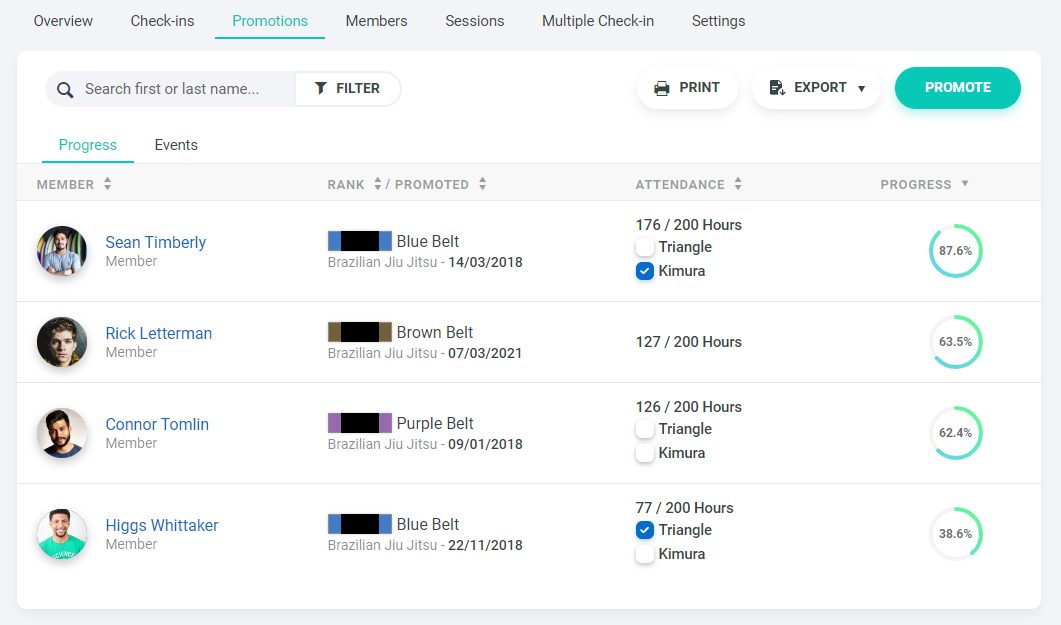
From there, you can set requirements with more than one criterion and promote a whole testing group at once.
Students can see their own progress toward their next rank.
Keeping your payment processor
Cards that already sit with a processor Gymdesk supports can stay where they are.
Gymdesk supports six payment processors: Stripe, Square, Authorize.net, GoCardless, Ezypay, and Gymdesk Payments. With Stripe, Square, Authorize.net, GoCardless, or Ezypay, you keep your own processor account.
Payment Method Sync pulls stored payment methods from those processors into Gymdesk and matches each one to a member by email, phone, name, and other fields.
Expired cards are skipped, and family dependents are left out because their cards belong to the family head.
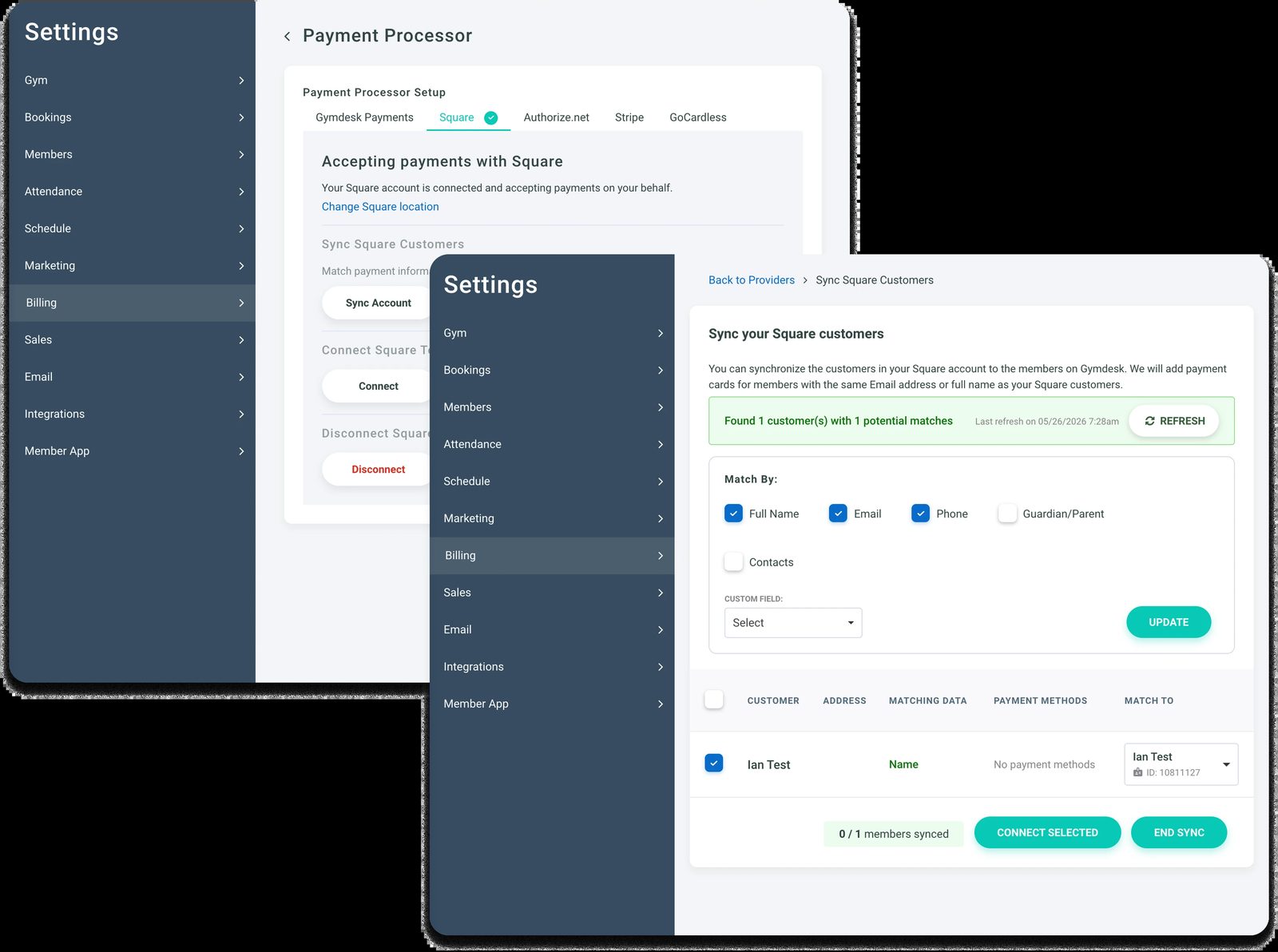
Cards held by a processor Gymdesk doesn't support have to be re-collected. Members can add a card themselves through the member portal.
See how Gymdesk billing handles recurring payments, failed cards, and family billing.
Pricing, contracts, and the free trial
Gymdesk pricing is based on your active member count. It starts at $100/month for up to 50 active members, or $75/month with Gymdesk Payments.
There's no contract, and you can cancel anytime. You can try it free for 30 days without entering a credit card.
Start the trial during your old system's notice period, and you have time to set up and run your parallel week before that account closes.
Protect Ranks, Families, and Cards, Then Switch
Get your answers in writing before you sign. After that, the goal is a switch so boring your students barely notice it happened.
Still comparing platforms? Start with the guide to the best martial arts management software and the breakdown of martial arts billing software.
Or read how owners moved from paper to software in their own words.
Gym management software that frees up your time and helps you grow.
Simplified billing, enrollment, student management, and marketing features that help you grow your gym or martial arts school.


FAQ
Switching Martial Arts Software FAQs
Quick answers to the questions school owners ask most before a switch.

Seanは過去10年にわたり、規模を問わずさまざまな企業が賢く成長できるよう、コンテンツを制作してきました。経営者が本当に好きなこと、つまり楽しい仕事にもっと時間を使えるようにするためです。
配送や国際物流からウェブ開発、マーケティングまで、言葉だけでなく実務を通じて、小売業やサービス業の効率的な事業拡大に携わってきました。
これまでの執筆先には、Sendle、Shogun、The 小売 Exec、Gymdeskなどがあります。