

A gym owner on Reddit posted a photo of his new lobby setup. Tablet mounted on the wall, members tapping their names to check in, a TV showing live tournament brackets next to it. Total cost: $110.
The thread blew up. Hundreds of comments. Other gym owners sharing their own setups, asking where to buy the hardware, debating which software to use. Seven separate mentions of budget check-in systems within 48 hours.
Here's what surprised me: most gym owners think a proper check-in system requires commercial kiosk hardware bolted to the floor and a four-figure budget. It doesn't. You need a tablet, a $20 wall mount, and gym management software you might already have. The whole thing takes an afternoon.
I researched the hardware, compared prices, and read every Reddit thread on gym check-in setups. This guide covers exactly what to buy, what it costs, and how to get your members actually using it by next week.
What a Check-In System Actually Gets You

Before you go shopping, let's talk about why this matters beyond looking professional at the front desk.
A clipboard sign-in sheet tells you that someone came to class. That's it. A digital check-in system tells you who's showing up three times a week, who dropped from three to once, and who hasn't walked through the door in 14 days.
That last one saves memberships.
You know this person. Everybody does. They quietly stop showing up. You don't notice until they email to cancel.
KEY TAKEAWAY:
A digital check-in system tied to your gym management software lets you set up automated messages that fire after 7, 14, or 30 days of no check-ins. That single text—"Hey, we haven't seen you in a while"—costs nothing and saves memberships. But it only works if attendance tracking is automatic.
"Hey, we haven't seen you in a while. Everything OK?"
That text costs you nothing and saves memberships. But it only works if your attendance tracking is automatic. Clipboards don't send texts. (I've asked.)
Your $150 also gets you:
- Class utilization data. Which classes are packed and which are running half-empty. Scheduling decisions made with real numbers instead of guesswork.
- Promotion eligibility tracking. For martial arts schools, attendance data ties directly to belt promotions. No more digging through notebooks to figure out if a student has enough classes for their next stripe.
- A professional first impression. A wall-mounted tablet in your lobby says "we run a real operation here." A spiral notebook on the front desk says something different.
The Equipment List

Here's everything you need. I'll give you a budget option and a premium option so you can pick what fits your gym.
The essentials
Tablet: $70–$150
You have two real options here.
The Amazon Fire HD 10 runs $140 at retail, but Amazon puts it on sale for $70 roughly every other month (Prime Day, Black Friday, random Tuesday sales). At 10.1 inches, the screen is big enough for members to tap their names without squinting. If you can wait for a sale, this is the budget pick.
A refurbished iPad (7th gen or newer) runs $100–$150 on Amazon Renewed or at your local electronics resale shop. iPads are slightly more responsive, but for a check-in kiosk running a browser all day, the Fire tablet does the same job.
Your members will not notice the difference between a $70 Fire tablet and a $400 iPad when they're tapping their name on a screen. I promise.
Wall mount or counter stand: $15–$30
A lockable tablet mount is worth the extra $5 over a basic stand. You want something that holds the tablet at eye level near the entrance and doesn't let someone accidentally—or intentionally—walk off with it. Kids will grab anything not bolted down. You know this.
For wall mounting, a Cuxwill anti-theft tablet mount ($20–$28) fits 9–14 inch tablets and comes with a key lock. For a counter or front desk setup, a Mount-It! tablet kiosk stand ($25–$35) with a cable lock works well.
Position matters more than the hardware. Put the kiosk where members physically pass it on their way to the mat or the floor. If it's behind the front desk or tucked in a corner, nobody will use it.
Software: $0 setup
Your gym management software likely already includes check-in. If you're using Gymdesk, check-in is included on every plan. You don't need a separate app, a separate subscription, or a separate vendor. More on setup below.
The full budget breakdown
Item | Budget Option | Premium Option |
Tablet | Amazon Fire HD 10 (on sale): $70 | Refurbished iPad 9th gen: $150 |
Mount | Adhesive wall mount with lock: $15 | Counter kiosk stand with cable lock: $30 |
Case (optional) | Rugged case: $12 | Rugged case: $15 |
Total | $85–$97 | $180–$195 |
The Reddit poster who started this whole conversation? $110. Right in the middle.
Optional upgrades
These aren't necessary for basic check-in, but they're worth knowing about if your gym has higher traffic or you want a more polished lobby:
- Barcode scanner ($25–$50). Useful if you have 200+ members and classes that change over quickly. Members scan a card instead of searching for their name. Moves the check-in line faster during class changeovers.
- Dedicated Wi-Fi access point ($30–$60). If your gym's Wi-Fi is flaky or the router is far from the lobby, a cheap access point prevents the "sorry, it's loading" moment that makes everyone give up.
- Wall-mounted TV ($80–$200). The Reddit poster paired his check-in tablet with a TV showing tournament brackets. Members loved it. Totally optional, totally worth it.
Setting It Up
This is the part where most "gym check-in system" articles stop and tell you to "explore your options." I'm going to assume you want actual steps.
Step 1: Get your tablet ready
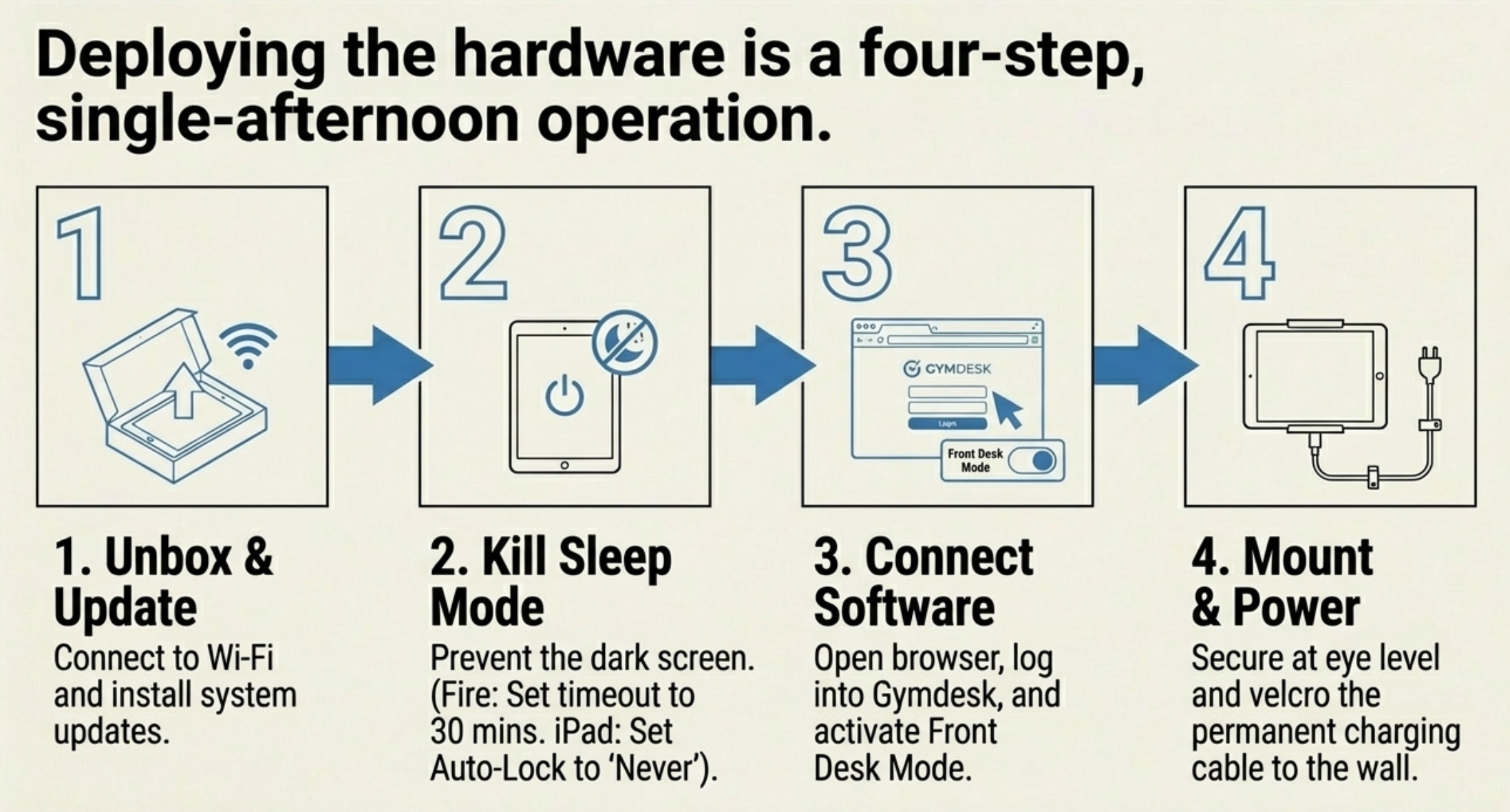
Unbox it, charge it, connect it to your gym's Wi-Fi, and update the software. That's about 30 minutes of waiting while it downloads updates. Good time to sweep the lobby.
One setting to change right away: disable the sleep timer or set it to the maximum. You want the screen on and ready when members walk in, not dark and waiting for someone to tap it awake.
If you're using an Amazon Fire tablet, go to Settings → Display → Screen Timeout and set it to 30 minutes. For iPad, Settings → Display & Brightness → Auto-Lock → Never (or plug it in permanently, which keeps the screen alive).
Step 2: Set up your check-in software
If you're using Gymdesk, open a browser on the tablet and log in. Switch to Front Desk Mode, which turns the screen into a clean check-in kiosk. Members see a simple interface where they can check in by:
- Tapping their name from a list (good for smaller gyms)
- Entering a four-digit attendance code (fastest for regulars)
- Scanning a barcode or QR code (if you added the scanner hardware)
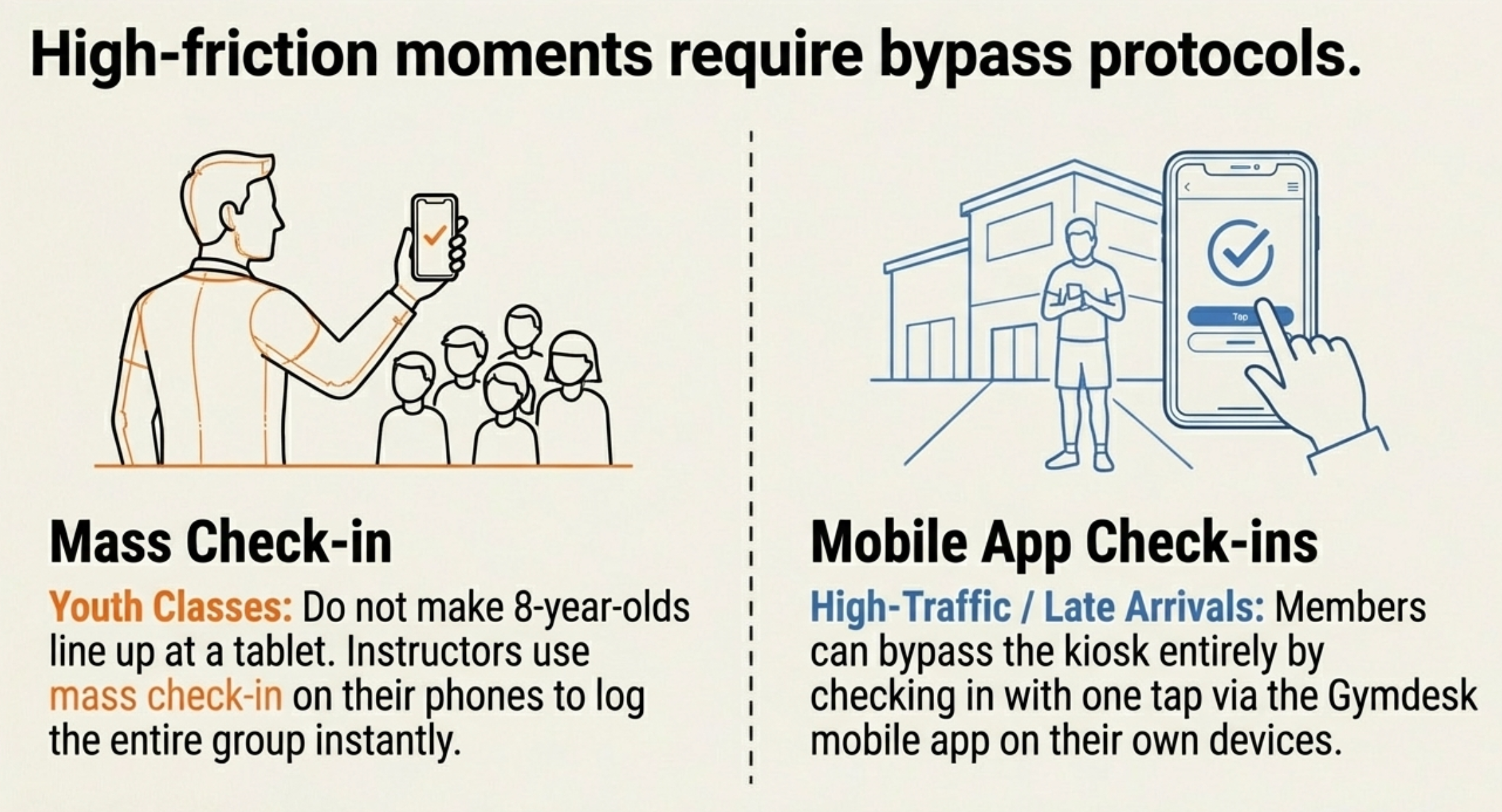
For kids' classes or large groups, instructors can use mass check-in to check in an entire class at once. No one needs to line up at the kiosk.
Don't have gym management software yet? Gymdesk offers a 30-day free trial with no credit card required. Set up the check-in system, test it with your members, and decide if it works before you spend a dollar on software.
Step 3: Mount the tablet
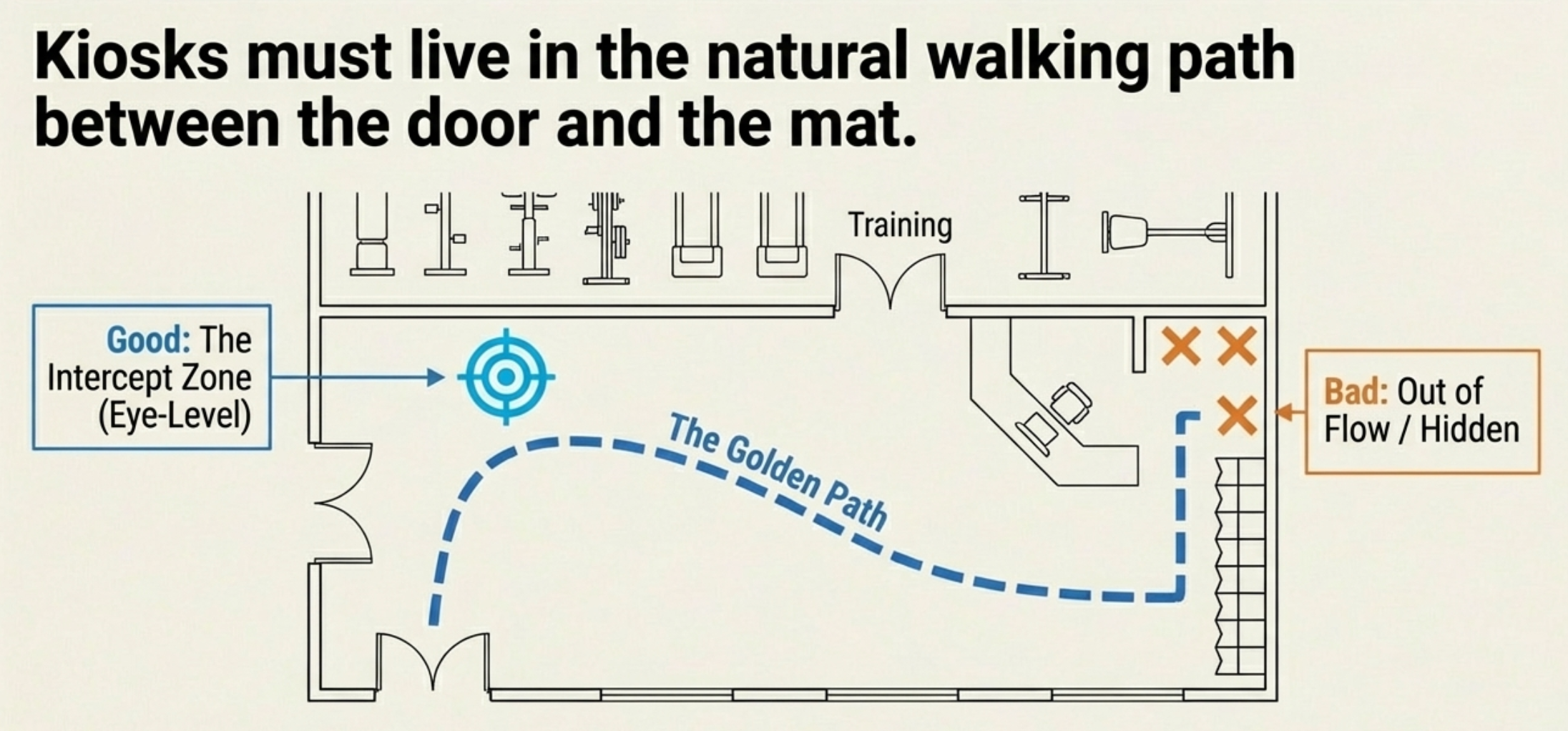
Install your wall mount or set up your counter stand. A few placement tips from gym owners who've already done this:
Put it between the front door and the training floor. Members should pass it naturally on their way in. If they have to go out of their way to check in, they won't.
Eye level. Not waist level, not above people's heads. Standing eye level. If your gym has a lot of kids, consider mounting a second kiosk lower (or just have instructors use mass check-in for youth classes).
Keep it plugged in. A tablet running a browser with the screen always on will die in four to six hours on battery. Run a charging cable to the mount. Velcro the cable to the wall if you want it clean.
PRO TIP:
Mount the tablet on the same wall as your entrance so members face it the second they walk in. If you put it on the opposite wall, they'll walk right past it every time. You want the kiosk between them and the mat.
Step 4: Test it before you announce it
Have your coaches and front desk staff run through each check-in method. Every one of them. If a staff member can't figure it out in 10 seconds, simplify.
Check your Wi-Fi signal at the kiosk location. If it's slow or drops, move the router closer or add that $30 access point from the upgrades list.
QUICK WIN:
Before your soft launch, assign every active member a four-digit attendance code in your gym management software. Print a sheet with their codes for the first two weeks so they don't have to ask. After that, they'll have it memorized.
Getting Members to Actually Use It
This is the section nobody else writes. And it's the one that matters most.
You will mount the tablet. You will set up the software. And then half your members will walk right past the kiosk, wave at the front desk person, and head to the mat.
This is normal. Reddit threads are full of gym owners venting about members who won't check in. The guy with the notebook who insists on signing his name with a pen. The woman who says "you know me, just mark me down." The kids who sprint past everything on their way to the floor.
I get it. You just spent money and an afternoon on this thing. But don't panic. Here's how to get adoption without turning your lobby into a TSA checkpoint.
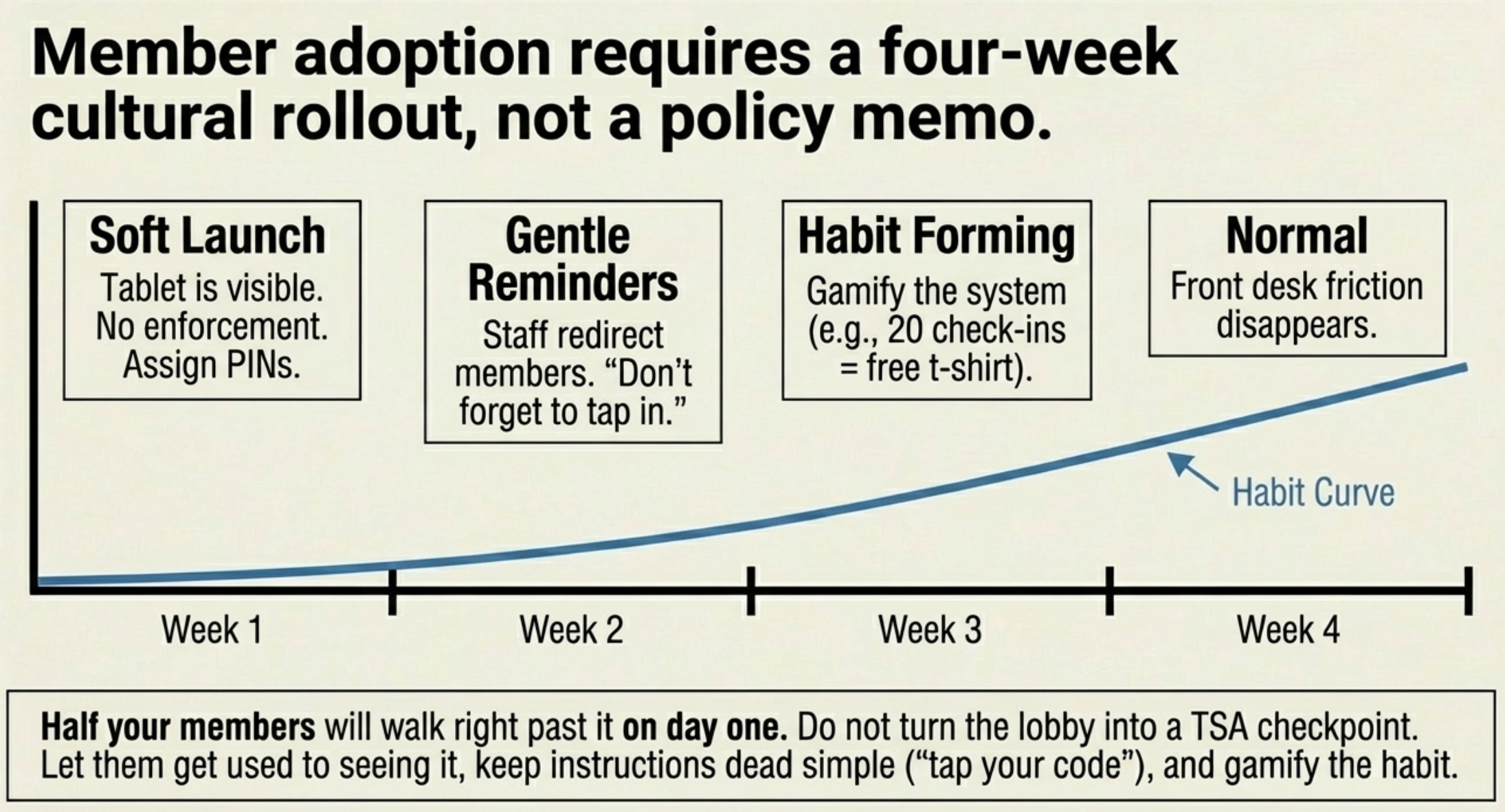
Make the first two weeks a soft launch. Tell members about the new check-in system. Don't enforce it yet. Let them get used to seeing it. Staff reminds, but doesn't nag. "Hey, don't forget to tap in on the new system" after they've already walked past works better than standing at the door like a bouncer.
Keep instructions dead simple. "Tap your name" or "enter your four-digit code." That's it. Don't explain the software. Don't explain why attendance data matters. They don't care. Just make the action obvious.
Make it part of the culture, not a rule. The gym owner whose Reddit post kicked off this whole article didn't enforce check-ins. He made the lobby setup look cool. Members wanted to use it because it felt professional and modern. That's a better motivator than any policy memo.
Use mass check-in for kids' classes. Don't make eight-year-olds line up at a tablet. Have the instructor check in the whole class at once from their phone. Parents will appreciate that their kids' attendance is tracked without adding another task to drop-off chaos.
Have a mobile backup. If you use a gym management platform with a member app, members can also check in from their phone. That covers the person who forgot their code, the member running late who doesn't want to double back to the kiosk, and the days when your Wi-Fi decides to take the morning off.
GYM OWNER TIP:
One gym owner on Reddit gamifies check-in adoption. Check in 20 times in a month, get a free t-shirt or open mat pass. Simple. Cheap. Gets the habit started. By month two, they're checking in without thinking about the shirt.
What Not to Do
A few things I've seen go sideways with gym check-in setups.
Don't over-engineer it. You don't need biometric scanners, RFID fobs, or a $3,000 commercial kiosk. A tablet on a wall mount does 95% of what those systems do at 5% of the cost. The other 5% is stuff your gym doesn't need.
Don't make check-in feel like airport security. If members dread the process, they'll skip it. The whole thing should take under five seconds. Tap, done, get to class.
Don't buy the cheapest tablet you can find. A $35 off-brand Android tablet will lag, freeze, and frustrate everyone who touches it. The Fire HD 10 at $70 is the floor. Below that, you're buying problems.
Don't hide the kiosk. I keep repeating this because it's the number one mistake. The kiosk goes where members walk. Not behind the desk. Not in a corner. Not on a shelf by the cubbies.
The Bottom Line
A gym check-in system is a tablet, a wall mount, and software you might already have. Total cost: under $150. Setup time: one afternoon. And the attendance data it generates will help you spot at-risk members before they cancel.
KEY TAKEAWAY:
Budget setup runs $85–$100 (Fire tablet on sale + wall mount)
Premium setup runs $180–$195 (refurbished iPad + counter kiosk stand)
The attendance data is the real value. One saved membership pays for the hardware.
Member adoption takes about two weeks of gentle reminders, not a policy memo.
The gym owner on Reddit spent $110 and got a lobby that looks like it belongs in a franchise. You can do the same thing this weekend.
If you don't have gym management software handling your check-ins yet, Gymdesk includes check-in on every plan with a 30-day free trial. Set up the software, order a tablet, and you're live by next week.
Gym management software that frees up your time and helps you grow.
Simplified billing, enrollment, student management, and marketing features that help you grow your gym or martial arts school.


FAQ
Gym Check-In System FAQs

Seanは過去10年にわたり、規模を問わずさまざまな企業が賢く成長できるよう、コンテンツを制作してきました。経営者が本当に好きなこと、つまり楽しい仕事にもっと時間を使えるようにするためです。
配送や国際物流からウェブ開発、マーケティングまで、言葉だけでなく実務を通じて、小売業やサービス業の効率的な事業拡大に携わってきました。
これまでの執筆先には、Sendle、Shogun、The 小売 Exec、Gymdeskなどがあります。