
Every Gymdesk Feature a BJJ School Actually Uses: The Complete Guide

Walk into a BJJ academy at 6pm on a Tuesday. There's a kid in a white gi tying his own belt for the first time, a blue belt taping his fingers, and a visitor from Texas signing a waiver on an iPad.
Your gym software needs to know who all three of those people are.
Most gym software doesn't. It was built for 24-Hour Fitness: one-to-one memberships, a key card at the door, maybe a group class sign-up.
That's not how a jiu-jitsu academy works, and if you've tried to force a BJJ school into that kind of platform, you already know what happens. You end up with spreadsheets on the side and a front-desk person who spends more time fighting the software than running the gym.
A BJJ school is a hundred small, specific things most gym management software was never designed to handle:
- Kids programs split into three or four age brackets, each on its own belt system
- Adult programs that track stripes on white, blue, purple, brown, and black belts—with promotion timing that matters
- Visitors and drop-ins from other schools at every open mat
- Family memberships where a parent trains three nights a week and the kids train twice
- Seminars and camps that bring in non-members for a weekend
- A head professor who can track every student's grappling progression in his head but needs help remembering whose credit card just bounced
This is a walkthrough of every Gymdesk feature a BJJ school actually uses, organized by what the software needs to do, with real stories from gym owners who switched after years of struggling with other platforms.
BJJ School Need | Generic Gym Software | Gymdesk |
Belt & stripe tracking with time-in-rank | Usually bolted onto a membership field | Native skills tracking, custom rank systems |
Kids age brackets with separate belt tracks | One "class" object, manual workarounds | Multiple age splits, kids-specific belt systems |
Visitor/drop-in waivers at open mat | Treated as an afterthought | Auto-capture into visitor database |
Family accounts & sibling discounts | One recurring membership per member | Household as the billing unit |
Embeddable schedule on your own website | Separate hosted page only | Widgets for WordPress, Squarespace, Wix, custom |
Unified payments (memberships, seminars, retail) | Billing split across 2–3 tools | Gymdesk Payments, one dashboard |
1. Belt and Stripe Tracking That Matches How BJJ Actually Works
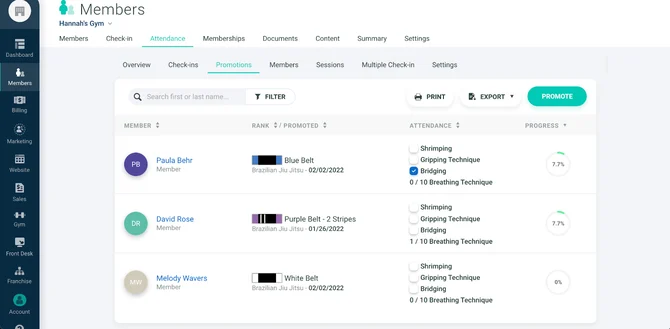
Belt promotions and stripe progression are the backbone of jiu-jitsu culture. They're also the one feature most general-purpose gym software gets catastrophically wrong.
A good BJJ tracking system has to handle:
- Belt levels: white → blue → purple → brown → black (plus coral and red for the long-timers)
- Stripes: 0–4 stripes per belt, earned at the instructor's discretion over months or years
- Kids belts: a separate track (usually white, grey, yellow, orange, green, sometimes with stripes)
- Time-in-rank tracking: how long has this student been a blue belt? When's their typical promotion window?
- Attendance tied to rank: IBJJF minimums for some promotions, or a gym's own internal standards
Gymdesk's skills tracking and curriculum management handles this directly.
You can define your own rank system—not just "blue belt" but the specific progression your academy uses. You assign students to ranks, track stripes, and tie promotions to attendance milestones.
At Alliance Jiu-Jitsu Charlotte—Lucas Lepri's academy—this was one of the core reasons they switched.
Lepri, a nine-time IBJJF world champion, runs a fundamentally traditional BJJ school with serious standards for promotion. When they moved to Gymdesk, his wife took over day-to-day system management alongside the front-desk team. Lepri himself put it this way:
"It's really important to have a system that can track the students with classes, with the attendance, with the levels of the students, payment systems. They can create their own accounts as well. They can make changes. They can communicate with everybody just between the apps."
— Lucas Lepri, Alliance Jiu-Jitsu Charlotte
A BJJ school needs tracking that actually maps to how BJJ schools operate, not a fitness platform bolted onto belt fields.
2. Attendance Tracking That Supports Promotions, Not Just Insurance
Every BJJ school tracks attendance. The question is why and how.
Most gyms run a clipboard at the door—sometimes filled out, sometimes forgotten, never aggregated into anything useful.
Gymdesk gives you an iPad at the door instead.
One tap to check in, automatic aggregation into attendance reports tied directly to each student's progression record. The front desk knows at a glance who's been showing up and who's been ghosting for three weeks.
KEY TAKEAWAY:
Attendance is the most objective promotion signal a BJJ school has. A blue belt training four nights a week for 18 months is visible in the data. So is a blue belt who only shows up when tournaments are coming. The professor still makes the call, but he makes it with real numbers instead of guesswork.
Learn more about Gymdesk's attendance tracking.
3. Class Scheduling That Handles the BJJ Reality
BJJ schools don't run "a 6 PM class." They run:
- Adults fundamentals (beginner)
- Adults all-levels (most of the gym)
- Adults advanced (blue belt and up)
- Competition team
- Kids ages 4–7, 8–12, teens 13–17
- Women's class
- No-gi
- Open mat
- And whatever else the head instructor adds next month
Each class has its own capacity, level restrictions, sign-up rules, and sometimes its own waitlist. You need a scheduler that lets you build arbitrary classes with custom rules. Gymdesk does that.
Individual classes have capacity limits, waitlist management, level gating ("this class is for blue belt and up"), and recurring schedules that match your academy's actual weekly rhythm.
Parents booking their kids into separate classes and coach-led bookings for the fight team work from the same system.
4. Family Accounts and Sibling Discounts Built In

A huge portion of BJJ revenue comes from families—kids training multiple days a week, a parent who watched for six months and finally signed up, and sibling discounts that make the whole family affordable.
Most general-purpose gym platforms charge per head and treat families as separate accounts glued together.
You end up maintaining three different profiles, three different billing addresses, and three different waivers for the same household. When a parent cancels their membership, you have to remember which two kid accounts are still active.
Gymdesk's billing and family account linking handles this differently.
You get one household account with linked profiles for every family member, automatic sibling discounts, and consolidated billing. When a family signs up, you enter the information once and the system handles the structure.
This is where a lot of BJJ schools got burned on their previous platforms.
General-purpose gym software often treats one recurring membership per member as the default, which breaks the moment you try to charge a parent and two siblings on the same account. Gymdesk treats the household as the unit, which is how a jiu-jitsu family actually works.
5. Visitor and Drop-In Tracking (The Open Mat Problem)
Here's a feature that matters specifically to jiu-jitsu and almost nothing else: Visitors.
BJJ culture is built around cross-training. Students from other schools show up at open mats, travelers drop in for a week while they're in town, and regional competitors come through before a tournament.
A BJJ school in a hub city might have 20–30 visitors a month, each of whom needs to sign a waiver, pay a drop-in fee, and get added to a list the gym can actually contact later.
Most gym software treats visitors as an afterthought.
Gymdesk actually builds for them: waiver capture on the iPad, lead tracking, and automatic entry into a visitor database you can segment and message.
Academia BJJ in Beamsville, Ontario runs exactly this play. As a regional hub between Niagara Falls and Hamilton, they see frequent visitors at open mats and events, and Gymdesk captures waiver information automatically, building a database of thousands of visitor contacts.
That database is what turns their annual Spring Smash event—a barbecue that grew into a 140-person gathering—into the gym's biggest lead-generation moment of the year. No spreadsheet, no clipboard, nothing slipping through.
For a BJJ school that runs open mats and seminars, this one feature alone can pay for the entire platform.
6. Communication Tools That Sound Like a BJJ Coach, Not a Corporate Marketer
Every gym platform has "email marketing."
Most of them are terrible for BJJ schools because they're built around the language of commercial fitness chains: "Transform your body." "Unlock your potential." The phrases make you cringe because you've never heard an actual coach talk that way.
A BJJ school doesn't talk like that. A BJJ school talks like Jeff at Academia BJJ: short, direct, casual, like a coach texting a student.
Academia's post-signup and post-first-class automated emails are written in that voice—"hope you worked hard, see you tomorrow" rather than "dear client." The system sends the sequence, but Jeff wrote the words.
That's the point worth stealing: systems don't have to kill your voice. You can automate the sequence and still sound like yourself.
Jeff's philosophy on automation is one every growing BJJ school should borrow.
"As the gym gets bigger, you can't maintain every one-to-one conversation manually. But your systems should emulate the one-to-one experience."
— Jeff, Co-owner, Academia BJJ
Google review prompts, follow-up messages, onboarding sequences—all written the way you'd actually talk to a student on the mat.
7. Website Integration: Embed Gymdesk Directly Into Your Gym's Site
Most BJJ schools don't want to rebuild their website every time they add a class or change their schedule. You want the site to stay current automatically.
Gymdesk supports this two ways:
- Embeddable widgets. Drop the Gymdesk schedule widget, signup form, or class booking into your existing WordPress, Wix, Squarespace, or custom site. When you update the schedule in Gymdesk, the widget updates on your website automatically.
- Built-in website builder. If you don't have a website at all, Gymdesk includes one—no extra cost, no extra tool to learn.
Nova Jiu-Jitsu in Rochester took the first approach.
Owner Jason is a software architect by day, and he embedded Gymdesk's calendar control directly into Nova's site. Class information stays automatically current without manual updates, and the look matches the rest of his site. For a technical founder, that mattered more than having a separate Gymdesk-hosted page.
Whether you code your own site, use Squarespace, or need Gymdesk to host one for you, there's a path that covers every BJJ school at every level of technical comfort.
8. Gymdesk Payments: One Platform Instead of Three
Most BJJ schools ran their billing on a stack before Gymdesk. Scheduling in one tool, payments in another, family discounts tracked in a spreadsheet somebody's spouse maintains.
Every reconciliation was a nightmare.
Gymdesk Payments—the native payment processing introduced this year—collapses that. Memberships, drop-in fees, seminar tickets, retail purchases, and family billing all run through one system tied directly to each member's account.
Picture a refund as a two-click operation instead of a login dance across three dashboards. A failed card shows up instantly in the member profile. That's the day-to-day difference.
Steve at Academia BJJ called this out directly when we asked what Gymdesk changed for him.
"I'm the most technologically inept person that has ever lived. Before Gymdesk I was handwriting invoices and asking students to remind me to collect payment."
— Steve, Co-owner, Academia BJJ
The consolidation was a life change for him, not a marginal workflow improvement.
9. Automations That Actually Retain BJJ Students
There are two moments a BJJ student is most likely to quit.
The first is in weeks one through four. They're overwhelmed, sore, and feeling like they don't belong. If nobody reaches out, they ghost. The second comes around month six to twelve, when the early learning curve flattens and motivation drops.
Both moments are solvable with automation, and Gymdesk's communication tools trigger on exactly those signals.
- New student onboarding sequence. Automated emails sent on signup, after first class, after first week, and at one month. Nova Jiu-Jitsu runs this pattern: the intro email explains how the gym works, how to connect to their GroupMe communication app, and how to set up their Gymdesk profile. Soreness is normal. Here's what to bring to your next class. Here's your first belt progression milestone.
- Milestone and retention messaging. Automated congratulations at 10 classes, 25 classes, 50 classes, 100 classes. Celebration emails for stripe promotions. Check-in messages when a student hasn't shown up in 10+ days. You template them once and they run forever, in your gym's voice.
This is the quiet, boring retention work that separates gyms that grow from gyms that lose students. You don't see it in a feature list, but you feel it in your member numbers six months later.
10. Kids Program Management Built for BJJ Age Brackets
Kids BJJ programs are where most gyms make their real money. They're also where software breaks down fastest.
A good kids system has to handle multiple age brackets (Alliance Charlotte runs Little Champions ages 3–5, Champions 1 ages 6–8, and Champions 2 ages 9–13; other schools use their own splits).
You need separate kids belt systems, parent check-in (kids don't check themselves in), parent communication about their kid's progress, sibling discounts tied back to family accounts, and pickup coordination for after-school programs. Waivers get signed by parents on behalf of minors.
Gymdesk handles all of this from the same account structure as adults. You define kids-specific belt systems that differ from the adult track, and parents use their own account to check in their kids.
Attendance rolls up by child. Progress notes go to the parent, not the kid. For most academies, this isn't a side feature—it's the load-bearing wall for the whole revenue model.
Comparing Platforms for BJJ Features
| BJJ Feature | Mindbody | Zen Planner | Gymdesk |
| Custom belt & stripe progression | |||
| Family accounts & sibling discounts | |||
| Visitor/drop-in waiver capture | |||
| Embeddable schedule widget | |||
| Native payment processing |
What's Missing From This List (Because It Shouldn't Be Software's Job)
Software can't teach jiu-jitsu—your head professor does that.
It can't build culture (that happens on the mat), and no automation fixes bad coaching. It can't replace the personal relationship between a coach and a white belt on day one, either.
What software can do is remove the friction that stops you from running the school you actually want to run. Less time on clipboards, more time on the mat. Less time chasing card declines, more time teaching class.
That's the whole bet. Gymdesk isn't trying to replace a professor. It's trying to give the professor their evenings back.
IMPORTANT:
Software can't teach jiu-jitsu, build culture, or retain a student who doesn't like the coaching. What it can do is remove the friction that stops you from running the school you actually want to run. Less time on clipboards, more time on the mat.
How BJJ Schools Typically Migrate From Other Platforms
If you're reading this on Mindbody, Zen Planner, Kicksite, Martial Arts on Rails (Gymdesk's earlier name), or a stack of spreadsheets, here's roughly how the migration works:
- Export your member list from whatever you're using now. Most platforms can export a CSV of members, contact info, and membership status.
- Import into Gymdesk. The Gymdesk onboarding team will walk you through this—it's not a DIY hassle.
- Set up your belt and rank system. Define the progression your academy uses (traditional BJJ, gym-specific variants, kids tracks).
- Import attendance history if possible. This gives you continuity for promotions.
- Set up billing. Transfer recurring memberships to Gymdesk Payments. The team will handle the credit card migration.
- Go live. Run parallel for a week or two if you want a safety net.
Most gyms in our Originals series report the switch takes 1–2 weeks of prep and one weekend to flip. Steve at Academia BJJ—the self-described "most technologically inept person that has ever lived"—successfully migrated his school from handwritten invoices to Gymdesk and hasn't looked back. If he can do it, you can do it.
Start Here
If you run a BJJ academy and you're tired of fighting your gym software:
- Book a demo—walk through the features specific to BJJ schools with someone who's seen hundreds of jiu-jitsu setups.
- Watch the Lucas Lepri Alliance Charlotte Gymdesk Originals episode to see how a nine-time world champion's academy uses the platform.
- Read the Nova Jiu-Jitsu story—a BJJ school that grew from a passion project to a full academy.
- Start a free trial and spend a week setting up your belt system the way you actually want it.
Jiu-jitsu is already the hardest thing most of your students will ever learn. Your software doesn't need to be on that list.
Want more BJJ school operations content? See our guides to BJJ pricing models, how much BJJ instructors make, and how Alliance Fort Mill built their academy.
Gym management software that frees up your time and helps you grow.
Simplified billing, enrollment, student management, and marketing features that help you grow your gym or martial arts school.


FAQ

Sean has spent the last decade creating content that helps businesses—small and not so small—grow smarter to allow operators to do more of what they love. You know, the fun stuff.
From shipping and international logistics to web development and marketing, he's done the work (not just the words) to scale retail and service businesses efficiently.
You can find his work at Sendle, Shogun, The Retail Exec, Gymdesk, and more.